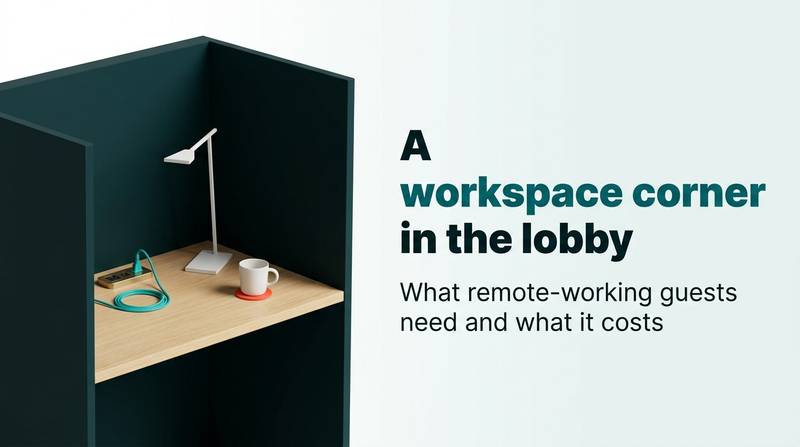
A workspace corner in the lobby: what remote-working guests need and what it costs
A hotel lobby workspace needs proper tables, sockets, and tested Wi-Fi, not just a sofa. Learn how to set rules, test the network, and count seat usage to decide if it works.
AI draft · awaiting editorial review
Contents
Key takeaways
- A lobby workspace corner is a defined place with a working-height table, a chair with a back, one socket per seat, task light and tested Wi-Fi, not a sofa with a side table.
- Test the network at the seat, on a laptop, at the busiest hour: a lobby that loads a page quickly can still drop a video call.
- Write the rules before you buy the furniture: opening hours, where calls happen, and whether non-guests may sit down.
- Count occupied seats for one week a month; that number, not the occupancy rate, tells you whether to add seats or move the corner.
- The Ministry's 2025 occupancy rate across certified İşletme and Basit facilities was 49.54%, a bed-based figure that cannot show whether a corner of six seats works (Source: Ministry of Culture and Tourism, certified accommodation statistics, 2025).
A hotel lobby workspace for guests is a small, defined corner with a proper table, a supportive chair, one socket per seat, task light and tested Wi-Fi, open set hours. It serves short tasks and calls, not a full working day, and it is justified by guest experience and by your own seat counts, not by occupancy.
At ten in the morning a guest is on a video call from an armchair in your lobby, laptop on their knees, phone propped against a coffee cup. Two hours later they are still there, and nobody in the building can say whether they are a guest, a visitor or a customer. This article turns that scene into a decision: what to buy, where to put it, how to test the network, which rules to write, and how to count use so the next step is a number, not a guess.
Who actually uses a lobby workspace corner?
Three kinds of guest use it: the guest with hours between check-out and a flight, the business guest who needs a desk away from the room, and the long-stay guest who wants to leave the room without leaving the hotel.
The gap guest is the most common. Check-out is at noon, the flight is at nine in the evening, and the room is gone. Those hours are spent somewhere, and today they are spent in an armchair with a laptop balanced on knees. The business guest comes down for two hours of email and a call, because the desk in the room is often a shelf, the chair is an armchair and the socket is behind the bed. The long-stay and remote-working guest books a week or a month and needs a place that is not the bed; the room and the price for that guest are a separate decision, covered in selling weekday and monthly stays to remote workers.
There is also the internal guest: someone waiting for a colleague, someone between two meetings, someone whose transfer is late. They are not demand you planned for, but they use the same seats.
Be clear about who the corner is not for. Families with children, leisure groups, anyone who needs a confidential call or a full working day: those need a day-use room, a meeting room or a monthly stay. Pretending otherwise leads to a guest taking a sales call next to a tour group.
You can see your own demand before you build. Walk the lobby at two fixed times, mid-morning and late afternoon, and count the laptops already open. Note where those guests sit and what they are plugged into. If laptops cluster near the one wall socket, you have your answer about placement. The corner also keeps a guest in the building: a guest who needs a desk and finds none leaves for a café, and may not come back for lunch.
What does the corner need: table, chair, socket, light?
It needs a table at working height, a chair with a back, one socket per seat at table level, and light that falls on the table rather than into the guest's eyes.
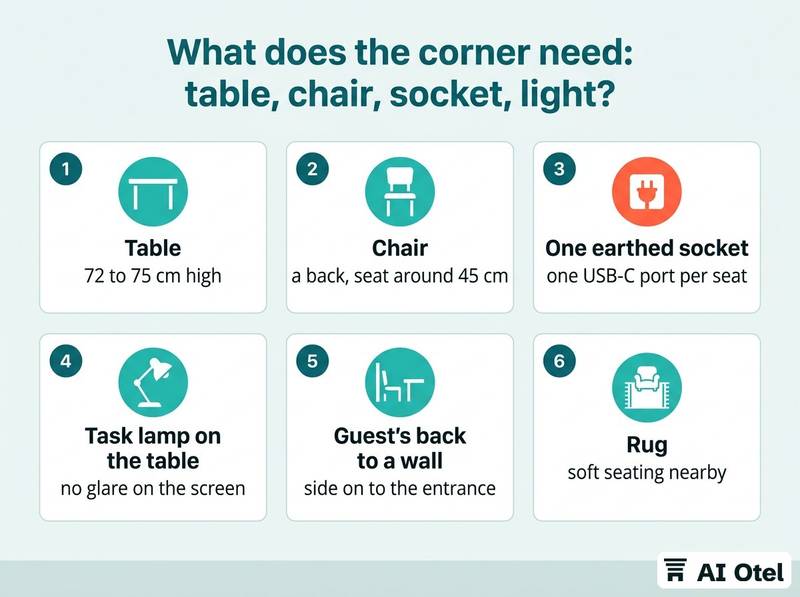
The table should be around 72 to 75 cm high, at least 60 cm deep, with 80 cm of width per seat. Two separate two-seat tables beat one long shared table, because a shared table turns every call into everyone's call. The chair needs a seat around 45 cm high, a back the guest can lean on, and no armrests that stop them pulling in to the table. A lounge chair or a bar stool is fine for fifteen minutes and wrong for ninety.
Sockets are where most corners fail. One earthed socket and one USB-C port per seat, at table level. Sockets under the table mean a guest on the floor, and an extension lead across a walkway is a trip hazard you own. Light comes from a task lamp on the table, warm-neutral, placed so the screen shows no reflection and the guest does not sit with a window behind them.
Position the corner with the guest's back to a wall, side on to the entrance. A guest on a video call does not want the front door and the check-in queue behind their head. For sound, remember that a hard marble lobby carries every word: a rug, soft seating nearby and two plants do more for call quality than a sign asking for quiet.
ChecklistThe build sheet, one line per item
- Table: 72 to 75 cm high, 60 cm deep, 80 cm of width per seat
- Chair: a back, seat around 45 cm, no fixed armrests
- One earthed socket plus one USB-C port per seat, at table level
- Task lamp on the table, no glare on the screen
- Seat placed with the guest's back to a wall
- Rug or soft furnishing within two meters
- Bin and water station within reach
- Cable tray or desk module, so no lead crosses a walkway
The small things matter too: a bin, water within reach, a cable tray, and a table surface that is not glass, which shows every fingerprint and every reflection.
How do you check that the Wi-Fi works at the seat?
Sit in the chair, open a real laptop, and test at the busiest hour of the day; a lobby that loads a web page quickly can still drop a video call.
Test at the seat, not at the front desk. Signal falls with distance and with walls, and the corner is usually further from the access point than the desk is. Test on a laptop: phones hold a connection at weaker signal and hide problems that a laptop will show immediately. Test three times, in an empty lobby, at breakfast peak and in the evening. The peak result is the one that decides.
Test upload and download separately, because a call sends as much as it receives, and a network built for browsing is often thin on upload. Then test a real call: five minutes of video with someone outside the building, watching for freeze and delay rather than for a speed figure. Check the sign-in screen too. If the guest network asks the guest to log in again every hour, a long call ends in the middle; set a session length that covers a working morning.
Check the handover by walking from the corner to the lift and back during a call. If the device jumps between access points and drops, the corner needs its own access point. Keep the guest network separate from the one the front desk and the property management system use, and never let a guest device reach hotel systems. Write the result down with a date and repeat it after any network change. If the deeper problem is mobile coverage rather than Wi-Fi, see checking weak mobile signal inside the hotel.
| What to test | How to test it | What a pass looks like |
|---|---|---|
| Signal at the seat | Measure on the laptop in the chair, compare with the front desk | The seat reads no worse than the desk |
| Upload | Send a file or run a call | A video call holds |
| Download | Load a page with images | It loads without a stall |
| Delay during a call | Five-minute video call | Voices stay in sync |
| Sign-in session | Log in, work for a morning | No re-login interrupts |
| Handover | Walk to the lift and back on a call | The call survives |
| Peak hour | Repeat the whole test at breakfast | The result matches the empty-lobby result |
What rules keep the corner usable?
Three written rules cover most of it: when the corner is open, where calls are allowed, and who may sit down.
Hours should match the quiet hours of the lobby, and the corner should close when the space is cleaned or reset for the evening. A corner open around the clock becomes a bedroom by two in the morning. For calls, name the seats where voice and video are allowed, usually the two ends, and expect headphones. A speakerphone in a lobby is a complaint waiting to be written.
At peak, a two-hour limit with a small card on the table is easier for staff to apply than a rule they have to judge case by case. For outside visitors, decide whether a non-guest may work there. Guests only is the simplest rule; guests plus a paid day pass is a product; open to all is a café, with different cleaning, security and insurance consequences.
Give the corner one named owner, usually the front office manager, so staff have someone to ask at eleven at night. Define cleaning and reset: who wipes the tables, how often, and who puts the chairs back and coils the cables. Signage is one small sign with the hours and the call rule, placed where the guest sits, not at the entrance where nobody reads it.
Watch outDecide the visitor rule before the furniture arrives
A corner with no written rule on outside visitors drifts. Within a month the same three people are there every day, using the sockets, the Wi-Fi and the toilets, and no one on the shift can say whether they are guests. Write the rule in one sentence and put it where staff can find it.
Where do coffee and the meeting room fit?
Put the corner next to the coffee service and keep it out of the breakfast room; the meeting room is a different product, sold by the hour.
A guest who works for ninety minutes orders one or two drinks. Decide whether that is charged, complimentary for in-house guests, or included in a day pass, and count the consumable into the decision. Do not place the corner inside the breakfast area: breakfast ends, the room is reset, and a guest on a call at half past ten is in the way of the reset. The tea and coffee station itself is a separate decision with its own trade-offs, covered in choosing between a kettle, a capsule machine and a lobby station.
The meeting room answers a different need. A guest who has to present to a client, or put three people in front of a screen, needs a room, not a corner. Sell it by the hour and state what is included. If your counts show that most use is calls, one sound-insulated single-person booth is worth more than four more seats, though it is also the most expensive single line. Printing and scanning: a guest who works often needs to print one page; either offer it at the front desk or say clearly that you do not.
Keep the walk from the seat to the coffee and to the toilets short. A guest who has to cross the whole lobby with a laptop leaves it unattended or does not go.
How do you count use and decide whether to extend?
Count occupied seats at fixed times for one week a month, and extend when the corner is full at peak for two months running.
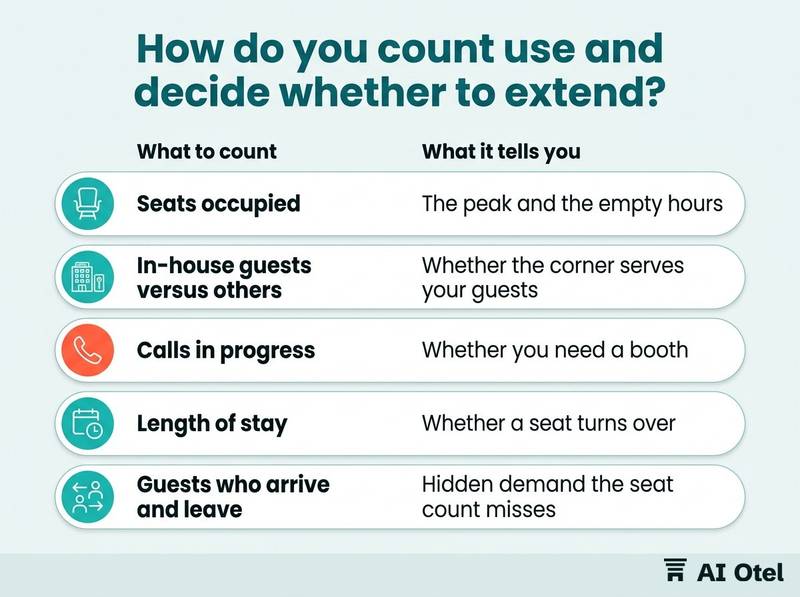
Count seats, not people in the lobby. A tally of occupied seats at four fixed times, for example 09:00, 11:00, 15:00 and 18:00, for one week a month is enough. Record four things: seats occupied, how many of those are in-house guests, how many are on a call, and roughly how long each person stays.
The peak hour is the number that decides. An average hides the two hours when the corner is full and the guest who arrives with a laptop walks away. The decision rule: full at peak for two consecutive months means add two seats; under a fifth of seats used across the whole count means the corner is in the wrong place, not the wrong size.
Do not use the occupancy rate as the measure. The Ministry's figure for 2025 was 49.54% across certified İşletme and Basit facilities, a bed-based rate that reflects the market, the season and the sales mix; six seats cannot move it, and a rise in it would not prove the corner worked (Source: Ministry of Culture and Tourism, certified accommodation statistics, 2025). Ask one question at check-out, or in the guest app, about whether the guest found a place to work, and read the answers next to the tally rather than instead of it. Review after three months, then twice a year, and always after a change to the network or the lobby layout.
| What to count | When | What it tells you |
|---|---|---|
| Seats occupied | Four fixed times a day, one week a month | The peak and the empty hours |
| In-house guests versus others | Same tally | Whether the corner serves your guests or the street |
| Calls in progress | Same tally | Whether you need a booth |
| Length of stay | Spot check three guests per count day | Whether a seat turns over |
| Guests who arrive and leave without sitting | Note at the desk | Hidden demand the seat count misses |
What does it cost, and what is it not for?
The furniture is the small line; the electrical work, the network point and the staff time are the ones that surprise, and the corner is not a co-working business.
One-off lines are tables and chairs, electrical points at table level, lighting, an access point and cabling, signage, and a call booth if the counts justify one. Recurring lines are cleaning and reset time, consumables, and the electricity of a corner that is lit and heated all day. The two lines that surprise are getting power to the table without an extension lead, and getting a network point to a corner that was never planned for one. Both are building work, not shopping.
Do not justify the corner with an occupancy lift. It cannot be separated from the market, the season and the sales mix, and a claim you cannot prove is a claim you will have to defend. What it can be justified by: a guest who stays in the building instead of leaving for a café, a better answer for the guest with hours to kill, and support for a day-use or monthly-stay product.
What it is not for: a full working day, confidential calls, team meetings, a substitute for a business center with printing, or a co-working operation with memberships. The meeting room is the right product for three people and a screen, and it has its own requirements, covered in the meeting room technology checklist for sound and screens.
Keep the change reversible. Buy movable furniture, put the sockets on the wall rather than into a built-in desk, and give yourself the option to move the corner after the first three months.
| Cost line | One-off or recurring | Where it surprises |
|---|---|---|
| Tables and chairs | One-off | The chair is easy to underestimate |
| Electrical points at table level | One-off | Building work, usually the largest line |
| Lighting | One-off | Needs a socket as well as a lamp |
| Access point and cabling | One-off | Depends on distance from the nearest point |
| Signage | One-off | Small |
| Cleaning and reset | Recurring | Staff minutes every day |
| Consumables | Recurring | Follows the coffee decision |
| Call booth | One-off | Most expensive single item, justified only by the counts |
What to do next
Before you buy anything, sit in the two chairs nearest a socket and a wall, test the network there at breakfast peak, and run a one-week tally of the laptops already open in your lobby. The corner itself is a small, cheap, reversible change; the count is what tells you whether it is the right one, and whether the next step is two more seats, a call booth, or a different place in the building.
If your property runs on a hotel operating system, the tally and the check-out question can live next to your other guest records, and a guest app can carry the same question to the guest's phone; you can read how a guest app handles this kind of in-stay communication, and how it fits the wider hotel platform. If you are a traveler reading this rather than a hotelier, you can find a hotel in Türkiye (opens in a new tab) that suits a working trip.
Frequently asked questions
How much space does a hotel lobby workspace need?
Two seats and about two meters of wall are enough to start. Position matters more than size: a wall behind the guest, a socket at table level and a network point within reach. If the counts show demand, add seats in pairs rather than building one long shared table.
Should the lobby workspace be free for guests?
For in-house guests, free is the simplest rule and the easiest for staff to apply. Charging only works if you define a product: what is included, what the hours are, and whether coffee is part of it. Non-guests need a written rule either way, because the answer decides cleaning, security and insurance.
Can the workspace share the breakfast room?
No. Breakfast ends, the room is reset, and a guest on a call at half past ten is in the way of the reset. Use a zone that is not needed for service during the hours you open, and keep the walk to coffee and to the toilets short.
Does the corner need its own Wi-Fi network?
Use the guest network, kept separate from the network the front desk and the property management system use. Test it in the chair, on a laptop, at the busiest hour, and check that the sign-in session lasts a working morning without asking the guest to log in again.
Is a call booth better than more seats?
If your counts show that most use is voice or video calls, one sound-insulated single-person booth solves a problem that more seats cannot. It is also the most expensive single line, so let the tally and the peak-hour picture decide, not the wish to look modern.