Duplicate or wrong Google Maps entries for your hotel: how to find them and what to report
A duplicate Google Maps hotel listing splits your reviews and confuses guests. This guide shows how to find every entry, claim the right one, and report errors with evidence.
AI draft · awaiting editorial review
Contents
Key takeaways
- A duplicate entry splits reviews, photos and calls between two pages, and Google, not the hotel, decides which one survives.
- Search by current name, former name, street address and phone number, on the map app and on desktop, before changing anything.
- Claim the entry that holds the reviews and matches the name on your sign; claiming a second entry makes the duplicate problem worse.
- Report a duplicate as a duplicate, never as permanently closed: closing the wrong entry can strand reviews and make an open hotel look shut.
- Keep a dated log with screenshots of every entry and every report, because a follow-up without evidence restarts the conversation.
A duplicate Google Maps hotel listing is a second Google Maps entry for the same property. Find every entry by searching your current name, former name, address and phone as a guest would, write each one down with a dated screenshot, claim the entry that carries your reviews, then use Google's edit and report tools on the rest.
A guest taps your hotel on the map and the pin sits two streets away, on a page with four reviews and a phone number nobody at the front desk recognizes. The page with three years of reviews is somewhere below it, and both claim to be you. After reading this you will know how to find every entry that exists for your property, which one to claim, and what to report, with a log that makes follow-up possible.
How do you find every Google Maps entry for your hotel?
Search the way a guest does, then repeat the search with every detail a guest might use: the current name, the name before the renovation, the street, the phone number. Each result is a separate entry until you prove otherwise.
Run every query twice, on the phone app and on desktop, signed in and signed out. Your own search history and personalization hide entries you have already visited, so the signed-out desktop search is the one that shows what a stranger sees.
Use the full query list below. For each hit, record the name shown, the address, where the pin sits relative to the guest entrance, the category, phone, website, hours, open or closed status, review count, and whether the page offers to let you claim it or shows an owner. Copy the entry's web address and take a full screenshot with the date visible. This is the evidence base for every later step, and without it a follow-up has nothing to stand on.
Zoom the map to street level around your pin and look for entries carrying your name at a different location: a beach club, a car park, a service road, the next street. Then ask the front desk and reservations whether guests have reported wrong pins or failed navigation; those reports are the cheapest way to find a bad entry.
ChecklistSearch list to run every time
- Current hotel name
- Former name or brand
- Name plus district
- Name plus city
- Street and number alone
- Front desk phone number
- Hotel website domain
- Street-level map browse around the building
- "Hotel near" plus the nearest landmark
- Each of these on the mobile app and on desktop, signed out
What kinds of wrong entry will you find?
Wrong entries fall into six kinds, and each has a different correct fix, so name the problem before you touch anything.
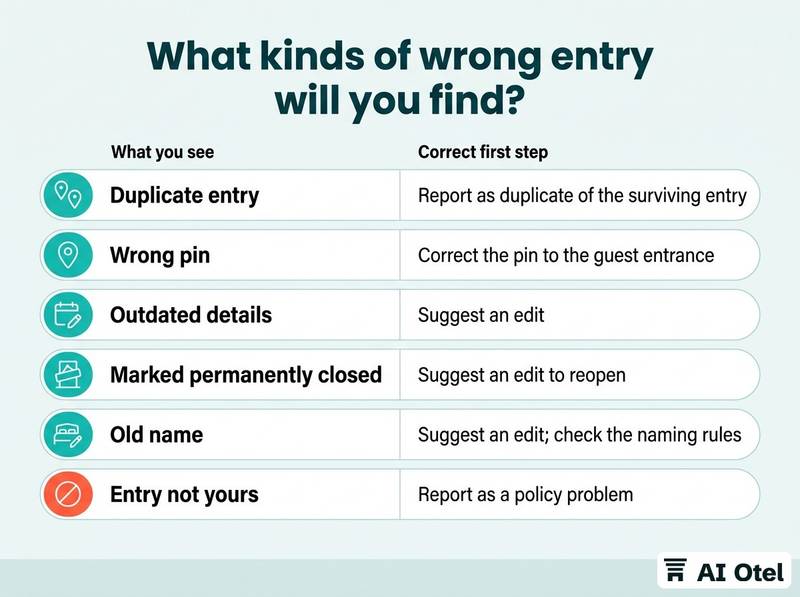
A duplicate is two entries for the same building, usually one created by a guest, an agency or a previous owner, with reviews split between them. A wrong pin means the entry is correct but the location is not, so navigation ends at a rear gate, a beach or the next street. Outdated details cover an old phone number, an old website, reception hours that make a 24-hour desk look shut, or a category that puts the property in the wrong filter, such as apartment instead of hotel.
The most damaging is marked permanently closed, common after a renovation or a seasonal closure, because it tells the guest not to come. An old name means the entry still carries the previous brand after a rebrand, so guests book the wrong property entirely. And an entry that is not yours at all, your name with someone else's call-center number or a third-party website, is impersonation rather than a data error, and it is reported differently. If a rebrand is what caused the split, the choice of name itself matters, and naming a hotel so the name survives a rebrand online is worth reading before the next one.
| What you see | Why it usually exists | Correct first step |
|---|---|---|
| Duplicate entry | Guest, agency or previous owner created it; reviews split | Report as duplicate of the surviving entry |
| Wrong pin | Address typed by hand or map dragged | Correct the pin to the guest entrance |
| Outdated details | Old owner or agency data | Suggest an edit |
| Marked permanently closed | Renovation or seasonal closure | Suggest an edit to reopen |
| Old name | Rebrand not carried through | Suggest an edit; check the naming rules |
| Entry not yours | Lead generation or impersonation | Report as a policy problem |
Which entry should you claim first?
Claim the entry that carries the reviews, the photos and the name on your sign, because that is the one Google already treats as the property.
Decide on evidence, not on which pin looks tidier: review count and age, photo count, which entry appears first for your name, and which one matches your street address and phone number. Claim it through Google Business Profile. Google chooses the verification method, which can be a postcard, a phone call, an email or a video, and it can require someone to be at the address.
Claim only what you are authorized to represent. A management company, a former operator or an agency may hold the profile; request the ownership transfer in writing and keep the reply. Do not claim the duplicate to keep an eye on it: a verified second profile is harder to remove and can split the listing further. If the correct entry is already verified by someone you do not recognize, use the ownership request route instead of creating a third entry.
Once verified, fix the details on that entry first: pin at the guest entrance rather than the loading dock, phone, website, hours, category, and the name exactly as it appears on the sign. For how the profile works day to day, see Google Business Profile for hotels: facts, photos and the booking link. If your hotel has just changed hands, moving Google and website accounts when a hotel changes operator covers the transfer in full.
Key pointOne entry to rule them all
One verified entry with correct details and the reviews on it. Everything else in this article is cleanup around that single page.
How do you report the entries you do not control?
Use the map's own edit and report paths, choose the reason that matches the problem you named, and record what you submitted.
For wrong details on an entry you do not own, suggest an edit with the correct value. Small corrections are often accepted without a claim. For a duplicate, report it as a duplicate of the other entry and say which entry should survive. Do not report it as permanently closed.
For permanently closed on a hotel that is open, suggest an edit to reopen, and use the report form linked from Google's business profile help pages if the edit is rejected. Impersonation is different: an entry with your name and someone else's phone or website is a policy report, not a data edit. State plainly that you represent the business and attach the screenshot.
Record for every report the date, the entry, the reason you chose, a screenshot before and after, and any reference number the form returns. Set your own follow-up date in advance, then follow up once through the help form with the log attached, rather than resubmitting daily.
Watch outNever close your own entry
Never mark your own hotel permanently closed, and never close a duplicate to hide it. Reviews and photos can be stranded on the closed page, and a guest searching your name can land on a hotel that looks shut.
What do you do while Google decides?
Keep your own channels correct and active. Update your website's contact page, answer reviews on the entry you own, and tell the front desk which phone number and address to give guests who call confused. If a wrong pin sends guests to the wrong street, put written directions in the booking confirmation until the pin is fixed. The report is with Google; the guest experience is still with you.
Which other sites and apps copy your map entry?
A correction on Google changes Google. Booking sites, map apps and directories keep their own copy of your address and pin, so each one needs its own edit.
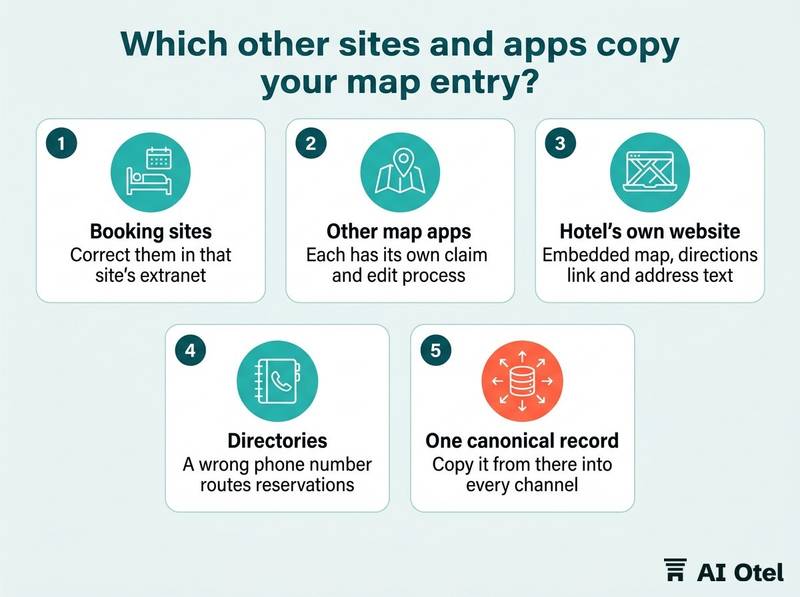
Check each booking site's property page for the pin, address and phone, and correct them in that site's extranet. The guest who books there never sees your Google fix. Check the other map apps your guests use, each of which has its own claim and edit process.
Check the hotel's own website: the embedded map, the directions link and the address text should match the corrected entry word for word, including the district and postcode. Check directories, tour operators and local listings that republish your address, because a wrong phone number there routes reservations to someone else. The hotel website SEO checklist for local search and the technical basics covers how the site and the map entry should agree.
Keep one canonical record of name, address, phone and coordinates, and copy it from there into every channel, the same discipline as keeping one room inventory for every sales channel, the approach behind a distribution setup built so that one room inventory feeds the hotel's own website, OTAs, travel agencies and AI assistants. Recheck the booking sites after a rebrand or a change of operator, the two moments when the old name survives longest.
What does a quarterly check look like?
Thirty minutes, the same search list, the same log, four times a year and immediately after any rebrand, renovation or change of operator.
Rerun the search list and compare it with the last log. New duplicates appear without anyone at the hotel creating them. Check the reviews and photos that landed on the wrong entry since the last check, and answer them there with a pointer to the correct page.
Confirm the verified entry still shows the right pin, hours, phone and category, because edits by others can be accepted quietly. Give the check one named owner and one shared file: a routine with no owner stops after the first quarter. Run it immediately after a name change, a seasonal closure or a handover, the three moments when entries multiply. Close the loop by noting what was fixed, what is still waiting, and the date of the next follow-up.
ChecklistQuarterly routine
- Rerun the full search list
- Screenshot every entry found
- Compare with last quarter's log
- Check reviews and photos on wrong entries
- Confirm pin, hours, phone and category on the verified entry
- Check the booking sites' pins
- Update the log with dates and the next follow-up
What to do next
Write down every entry you found today, claim the one that carries the reviews, and report the rest with a screenshot and a date. The map is a record other people edit, so the hotel's job is to keep one correct entry and to notice the day a second one appears. Book the thirty-minute check in the calendar now, with a named owner, before the log goes cold.
Frequently asked questions
Can I delete a duplicate Google Maps listing myself?
You can only delete a profile you manage. For an entry you do not control, report it as a duplicate of the correct entry and let Google decide. You cannot force removal, and creating a new entry as a workaround adds to the problem.
Someone marked my hotel permanently closed. What should I do first?
Suggest an edit to reopen that entry, and keep your own website and booking pages clearly showing that you are open. Use the report form linked from Google's business profile help pages if the edit is rejected. Do not create a second entry.
Will the reviews move to the surviving entry?
Not on your instruction. Google decides what happens to reviews on a duplicate, and you cannot request a transfer. Plan for the possibility that some reviews stay on the old page, and answer guest questions there in the meantime.
How long does a Google Maps correction take?
Google sets no date, and the outcome can differ by entry and by the type of report. Keep a dated log, set your own follow-up date, and do not promise a date to guests or to your general manager.
Does fixing Google fix the pin on the booking sites?
No. Each booking site and map app holds its own copy of your address and pin, edited in its own extranet or claim process. The correction has to be repeated where the guest actually books.