Ten reports to ask for in a PMS demo, and what each should answer
A PMS demo often skips reports, but they reveal the system's true capability. This checklist lists ten essential reports, the questions they answer, and a live export test to run with the vendor.
AI draft · awaiting editorial review
Contents
Key takeaways
- A demo shows the booking flow; reports show whether the system's data model can answer a manager's question.
- For every report, agree the question it answers before you look at the screen.
- Run one export live, with your own date range and a filter the vendor did not prepare.
- A report whose definition is not in writing cannot be reconciled at month end.
- Score each answer as shown live, shown from a prepared screen, promised, or not available, and keep the score with the offer.
A property management system (PMS) is the hotel's core record of rooms, guests and money, so its reports are the real test of a demo. Ask for ten: arrivals, in-house, departures, room status, daily revenue, night audit, city ledger, pickup and pace, channel production, availability by room type. Then run one export live.
The demo room is booked, the guest is checked in, the bill is settled. Then you ask to see yesterday's revenue by department, and the conversation moves quickly to the next feature. This is the moment that matters, because the screens will look good in every demo, while the reports will tell you whether the system can actually run your hotel. This article is a PMS demo reports checklist: ten reports, the question each one answers, what to check on screen, and one export test to run while the vendor is still in the room.
Why do PMS demos skip reports, and how should you ask for them?
Demos are built around the booking flow because it is visual and fast, while reports are slow, need realistic data and expose how the system stores money. Ask for a separate reports session, in advance, with the person who maintains the reports.
A sales demo runs search, rate, reservation, check-in and bill in a few minutes. It is designed to look complete, and it never touches a month of trading data. Reports are the opposite: they need volume, they take time to run, and they reveal the data model behind the screens. That is exactly why they are the best test you have.
Book the reports session separately from the sales demo, and ask for the person who builds and maintains reports, not only the sales contact. Ask for a database with at least one full month of trading, ideally a busy month: pickup, pace and ageing reports are empty or misleading on a week of demo data. Send your ten questions before the meeting and ask the vendor to mark each one as a standard report, a configured report, a custom report, or not available. Ask for the built-in report list in writing, with each report's name and a one-line description of what it contains. If you are also preparing a demo script of ten tasks to ask the vendor to perform live, the reports session slots in after it.
TipWhat to put in the meeting request
A reports session, a database with at least one month of trading, the built-in report list, and thirty minutes with the person who maintains the reports.
Which reports does the front desk read every day?
Three lists run the desk in the morning and one runs it at noon: who is arriving, who is in the house, who is leaving with an open balance, and which rooms can be sold right now.
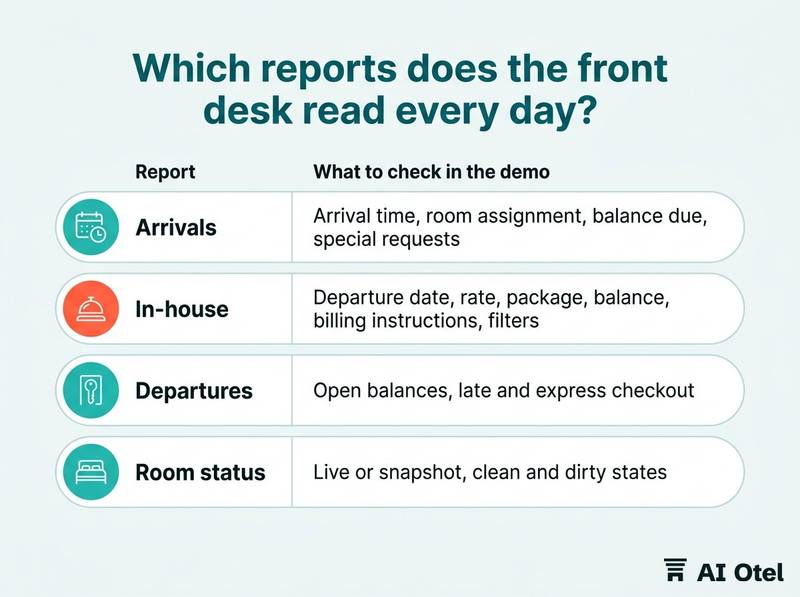
On the arrivals list, check that it shows estimated arrival time, room assignment, rate code, balance due, package elements and special requests, and that it updates when a booking changes. On the in-house list, check that it shows departure date, rate, package, balance and billing instructions, meaning who pays, and that it can be filtered by rate code, company or agency. On departures, check open balances, late checkout, express checkout, and whether the bill moves to a company or agency account instead of being settled at the desk.
Room status is its own test. Ask whether the list is live or a snapshot, whether it separates clean, dirty, inspected, blocked and out of order, and whether the front desk and housekeeping see the same version. Ask whether each list prints, exports and refreshes without leaving the screen, because a list you cannot hand to a colleague is a list you will retype. Finally, ask what happens to each list when a guest extends a stay, moves room mid-stay or splits the bill between two payers. These lists are covered in more depth in front office reports the desk reads daily.
| Report | The question it answers | What to check in the demo |
|---|---|---|
| Arrivals | What must be ready before the guest reaches the desk? | Arrival time, room assignment, balance due, special requests, live updates |
| In-house | Who is in the building tonight, and what does each guest owe or get? | Departure date, rate, package, balance, billing instructions, filters |
| Departures | Which departures will hold up the desk at noon? | Open balances, late and express checkout, transfer to a company account |
| Room status | What can I sell right now? | Live or snapshot, clean and dirty states, blocked and out-of-order rooms, one version for desk and housekeeping |
Which reports does the money side need?
Three numbers matter and they are not the same: what was sold today, what was collected today, and what is still owed. Ask for a report for each, and ask for the definition in writing.
Daily revenue should break down by department, rooms, food and beverage, spa, other, and by VAT rate. Ask whether it is shown gross or net of VAT, and whether package elements are split across departments or left in rooms. Night audit and day close deserve their own questions: what the sequence posts, how it treats no-shows and rate changes, what it refuses to close on, what it prints, and whether a person must be present while it runs.
City ledger and ageing show open balances by account, company, agency or direct bill, with age buckets. Ask who can post to an account, who can write it off, and whether the report links back to the original invoice. Watch the business date too: after a close run at 04:00, yesterday means the business date, not the calendar date, so ask how each report labels it and whether you can run on either. On corrections, ask whether a voided or reversed posting still appears in the report and how it is shown, so a month-end total can be explained line by line. If your accountant reconciles the system against the ledger, ask for the revenue journal or trial balance, and ask who signs off the daily figure.
Watch outOne day, three numbers
Revenue sold, cash collected, balance owed. If a vendor uses one word for all three, ask for the definition in writing before you compare offers.
Which reports tell you whether the next three months will fill?
Three reports answer the commercial question: what has been sold for future dates, through which channel, and what is left to sell. Ask for them on a future date range, not on last month.
Pickup and pace show bookings taken on a given day for each future arrival date, compared with the same point in a previous period or with budget. Ask what pickup means in this system, by booking date or arrival date, and before or after cancellations. Ask for the cancellation and no-show detail behind the pickup number, because a date that fills and empties looks identical in a net figure.
Channel and segment production should show rooms, room nights and revenue by channel, rate code and segment. Ask whether commission is recorded, and whether it is netted from revenue or shown as a separate line. The availability and occupancy forecast should work by room type and date, rooms sold against rooms available, with blocked rooms, out-of-order rooms and overbooking limits handled explicitly rather than left to the reader. Ask for at least ninety days forward: many systems report history well and the future badly, and the future is where the decisions are. Ask how group blocks appear, rooms held against rooms picked up, and which of the two numbers the forecast uses.
Checklist
- Is the report by arrival date or booking date?
- Does it net out cancellations and no-shows, and can you see them?
- Is revenue gross or net of commission?
- Does it exclude blocked and out-of-order rooms?
How do you test exports, filters and scheduled delivery in the demo?
Run one export live, on your own date range, and open the file while the vendor is still in the room. Export is where report quality usually shows.
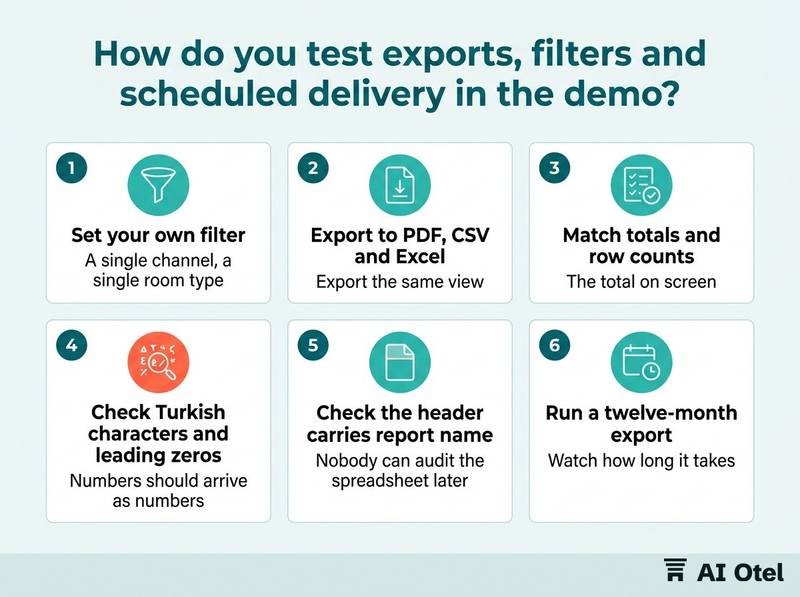
Filter first: choose a single channel, a single room type and a two-week range the vendor did not prepare, then export the same view to PDF, CSV and Excel. Compare three things: the total on screen, the total in the file and the row count. If they disagree, ask which one is right and why.
Then check the file itself. Turkish characters should survive, numbers should arrive as numbers and not as text, leading zeros in confirmation numbers should survive, and dates should not be silently converted. Check the header: the file should carry the report name, the filter used, the business date, the time and the user who ran it. Without that, nobody can audit the spreadsheet later. Test volume with a twelve-month export and watch how long it takes and whether it completes at all. Test permissions: ask who can run and export what, and whether a receptionist can export a year of revenue. Test scheduled delivery: can a report be emailed on a schedule to an address outside the system, before the morning meeting, and who is told when the job fails.
Checklist
- Set your own filter.
- Export to PDF, CSV and Excel.
- Match totals and row counts.
- Check Turkish characters, number formats and leading zeros.
- Check the header carries report name, filter, business date, time and user.
- Run a twelve-month export.
- Check who may export what.
- Ask for one scheduled delivery to an outside address.
How do you score the vendor's answers?
Score every answer at the moment it is given, in one of four levels, and keep the score with the offer so that two vendors can be compared on the same ten reports.
Level one is shown live, with your filter, on a database with real trading data. Only this counts as evidence. Level two is shown from a prepared screen or a saved demo: useful, but ask for it to be repeated with your own filter before you score it. Level three is promised for implementation, so ask for the promise in writing, with the definition and the name of who builds it. Level four is not available, so ask what the workaround is, who maintains it after a version upgrade, and whether it survives the next release.
Ask for the definition of each report in writing: what is included, what is excluded, which date field it uses, and whether revenue is gross or net. Ask what you can take with you if you leave: can you export all historical data and reports, in what format, and at what point in the contract. Record the answers as an annex to the offer, so the promise is written down before the contract is signed. The scorecard pairs well with how to choose a hotel PMS in Türkiye and with a requirements document that makes vendor offers comparable.
| Answer level | What it means | How to score it |
|---|---|---|
| Shown live with your filter | The report ran in front of you on real trading data | Full mark, and ask for the definition in writing |
| Shown from a prepared screen | The report exists but was not run on your terms | Half mark, and request a repeat with your filter |
| Promised for implementation | Not built yet, or built as a custom report | Score only with a written scope, owner and date |
| Not available | No report and no plan | Ask for the workaround and the export path |
We build a hotel operating system too: reservations, front desk, housekeeping, billing, restaurant sales, reports and compliance in one place, built and working, ahead of launch, with 150+ built-in reports (June 2026). Apply the same ten reports and the same four levels to the hotel operating system we build, which is built and working, ahead of launch, and read what we publish about our own status before you score us.
What to do next
Send the ten-report list to every vendor before the demo, ask for the reports session with a month of trading data, and score the answers in writing on the day. The ten reports are not a wish list: together they test whether the system can answer a manager's question about today, about the money and about the next three months, and the scorecard turns those answers into something you can compare and attach to the contract. If you want to put the same questions to us, request a briefing.
Frequently asked questions
How many reports should a hotel PMS have?
The count matters less than coverage: a long catalogue can still miss the ten questions a manager asks. Ask for the built-in list in writing and check it against the ten. If a vendor quotes a number, ask what it counts, since variants of one report are often counted separately.
Should I ask for reports in Excel, CSV or PDF?
All three, because they serve different jobs: PDF for reading and signing, CSV and Excel for analysis. Test each one live with your own filter, and check that totals and row counts match the screen, that Turkish characters and leading zeros survive, and that the file records which filter and which business date produced it.
What is a pickup report?
It shows bookings taken on a given day for each future arrival date, so you can compare the pace of a date against the same point in a previous period or against budget. Ask the vendor to define it: booking date or arrival date, before or after cancellations, and whether group blocks are counted as held or as picked up.
Do I need scheduled reports or can I run them on demand?
Both. Daily operational reports are best scheduled before the morning meeting, while ad hoc runs answer the question of the moment. Ask whether a schedule can deliver to an address outside the system, such as your accountant, and who is notified when a scheduled job fails.
What if the report I need does not exist?
Ask who builds a custom report, how long it takes, who maintains it after a version upgrade, and how the work is quoted and owned. Also ask what you can export if you later leave the system, because a custom report you cannot take with you is a cost you pay twice.