The guest has a confirmation but you cannot find the booking: a search routine across channels
A confirmation proves the channel has a contract, not that your system has the booking. Use this fixed search routine to find missing reservations and resolve them calmly.
AI draft · awaiting editorial review
Contents
Key takeaways
- A confirmation is the channel's record of a contract with the guest; it does not prove the booking reached your hotel system, so the search starts at the channel, not at the desk.
- Search on a fragment of the surname and on the booker's name, because the guest at the desk is often not the person who booked.
- The number on the guest's voucher belongs to the channel; your system keeps it in a separate reference field, and the channel manager log keeps the raw message behind it.
- The desk may hold a room while the search runs, but a rate, a free night or a relocation is a duty manager's decision, not a front office one.
- Every case ends with one written line naming the step that broke, because the same mapping fault usually repeats before anyone notices.
A guest's confirmation proves a booking exists on the channel that issued it, not in your system. When your hotel cannot find a guest booking, work in order: name variants and the booker's name, the channel's own reference and the booked-on date, the channel's extranet, the channel manager log, then the reservations inbox. Offer a provisional hold, not a promise.
A guest arrives with a confirmation on their phone, the dates are right, the name is right, and your arrivals list shows nothing. The queue behind them is growing and the first sentence out of your mouth decides how the next hour goes. After reading this you will have a fixed search order, the sentences for the first minute, and a clear line between what the desk may decide and what belongs to the duty manager.
What do you say to the guest in the first minute?
Take the confirmation itself, say what you are going to do and when you will come back, and promise nothing about the room yet. Calm at the desk comes from a routine, not from reassurance.
Ask for the document, not a description of it. The email or the screenshot carries the name, the arrival date, the channel's number and the channel itself, and all four matter. Give a time, not a hope: "I am checking this with the channel now and I will come back to you in fifteen minutes" is a promise you can keep, while "the system shows nothing" ends the conversation badly.
Do not name a cause in front of the guest. At this point the cause is unknown, and a guess about the channel, a colleague or the guest's own booking is a guess you may have to take back. Do not promise a room, a rate, an upgrade or a free night; whether a room can be given to a booking you cannot see is a duty manager's decision.
Offer the practical minimum while you work: a seat, the wifi password, somewhere for the luggage, and one person's name to come back to. Write the arrival time and the time you promised to answer in the shift log, so that if the case crosses a shift change, the next person starts from the same point.
TipThree sentences for the first minute
"May I see the confirmation email? I am checking it with the channel now. I will come back to you by 14:00 with an answer."
Why does the guest have a confirmation when the booking is not in your system?
Because a confirmation is issued by the channel, and the booking has to travel from the channel through a channel manager into your hotel system before you can see it. A break at any step leaves the guest holding a valid document and you holding nothing.
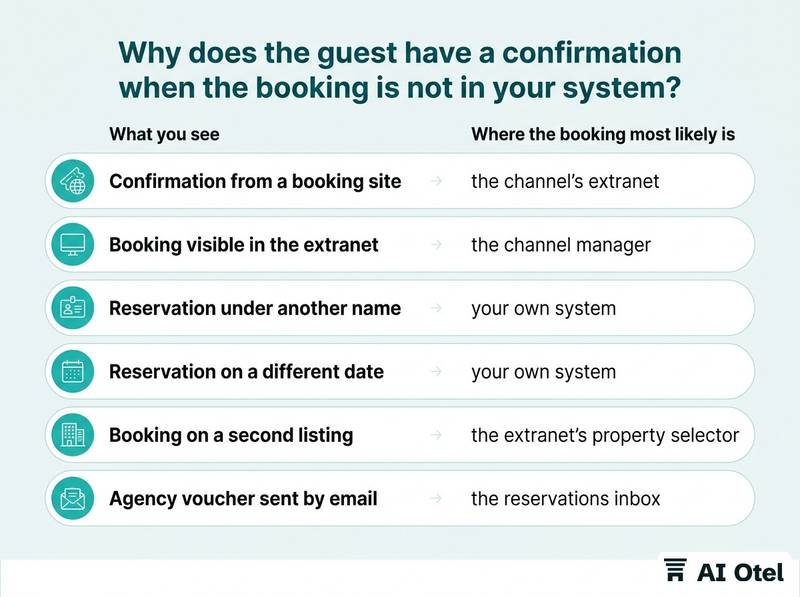
The chain has four links: the guest books on a channel; the channel sends the booking to your channel manager, the service that carries bookings in and availability out between your hotel system and the channels; the channel manager passes it to your hotel system; the hotel system creates the reservation. The channel may never have sent it, for example when the booking failed a card check or the channel's own process stopped short. The channel manager may have received it and rejected it, usually because the room type or rate plan code in the message does not exist in your mapping. The mapping may have sent it to a room type or rate plan that is closed or inactive for those dates, so the system has nowhere to put it.
The other family of causes is not a break at all: the booking is in your system under another name, another arrival date, another listing or inside a group block or agency allotment. Do not diagnose before you search. The order below is what saves time, and it also produces the evidence the channel's support desk will ask for.
| What you see | Where the booking most likely is | First check |
|---|---|---|
| Confirmation from a booking site, nothing in the hotel system | the channel's extranet | search the channel's reference there |
| Booking visible in the extranet, not in the hotel system | the channel manager | open the log for that reference |
| Reservation exists but under another name | your own system | fragment search on surname and booker |
| Reservation exists on a different date | your own system | search a date window around the arrival |
| Booking made on a second listing of the property | the extranet's property selector | check both listings |
| Agency voucher sent by email | the reservations inbox | search the alias and the spam folder |
If you also run a linked calendar alongside a channel manager, the failure modes multiply: why a linked calendar and a channel manager fail in different ways explains the difference.
How do you search by name when the name on the confirmation is wrong?
Search on a fragment of the surname, then on the booker's name, then on contact details. A full-name search assumes the guest typed the name the way your system stores it, and that assumption is what fails.
Use the first three or four letters of the surname rather than the whole string; a fragment catches the spelling variants that an exact search drops. The booker is often not the guest: a spouse, a secretary, a company, a parent booking for a student. Read the booker's name and email from the confirmation and search those too.
Turkish characters transliterate differently on a foreign keyboard: Ş becomes S, Ğ becomes G, İ becomes I, Ö becomes O, Ü becomes U, Ç becomes C. "Şahin" arrives as "Sahin". Field order varies by channel: some send "SMITH JOHN", some "John Smith", some put both names in one field, so search each name on its own. Strip titles and punctuation before you search: Mr, Mrs, Dr, dots, hyphens, and double surnames split across two fields.
If your system stores contact details, search the email address or the mobile number from the confirmation. They are unique in a way a name is not. Widen the arrival date by a few days in both directions while you search by name; a name search inside a short date window is far faster than a name search across the year.
How do you search by confirmation number and date?
Search the channel's number in the reference field your system keeps for it, and search the booked-on date as well as the arrival date. The number on the guest's voucher is the channel's, not yours.
Your system has its own reservation number and normally stores the channel's number in a separate reference field. Search that field first, not the reservation number field. Then search the channel manager log by the same reference: it keeps the raw message the channel sent, including the channel's own identifier.
Search by booked-on date, not only by arrival date. Confirmations usually show the day the guest booked, and guests read that date as their arrival. Check today's and tomorrow's arrivals lists, then the no-show and cancelled lists; a booking cancelled by the channel after a failed card check still leaves a record behind, and how no-show and cancelled records are handled covers what to do with one. Search the guest's name inside the date window printed on the confirmation, not the date the guest says at the desk. If the confirmation names a different property, the guest may have booked a sister property or a second listing of the same hotel; check that before you conclude anything.
What do the extranet, the channel manager log and the inbox tell you?
The extranet proves the booking exists, the log shows what your systems did with it, and the inbox catches the bookings that never travelled through either. Check all three before you tell the guest anything final.
Open the reservation in the channel's extranet and read its status, its room type and its rate plan code. That screen is the channel's own record and the fastest proof for the guest. The channel manager log shows what arrived, when, and what happened next: accepted, rejected, unmapped, duplicated or modified. A mapping fault becomes visible here and nowhere else.
Check the reservations inbox, including the spam folder and the shared alias the channels send to. Some agencies and corporate bookers still send a voucher by email and expect the hotel to enter it by hand. Check the channel's message thread with the guest; guests often write there when the hotel does not answer the phone. Check whether the property is listed twice on the same channel, because a booking made on the second listing lands in the extranet but not in your mapping. Write the time of each check into the shift log: when the case goes to the channel's support desk, the timestamps are the case.
Key pointThree places, three jobs
The extranet is the evidence. The log is the diagnosis. The inbox is the exception.
Most of these cases never reach the desk if someone checks the extranets every morning; the daily extranet routine that catches most of these cases early gives the checklist.
What can you offer the guest while the search is still running?
Hold a room if one is available, give the guest a time and a contact, and leave every commitment about money or relocation to the duty manager. A hold is reversible; a promise is not.
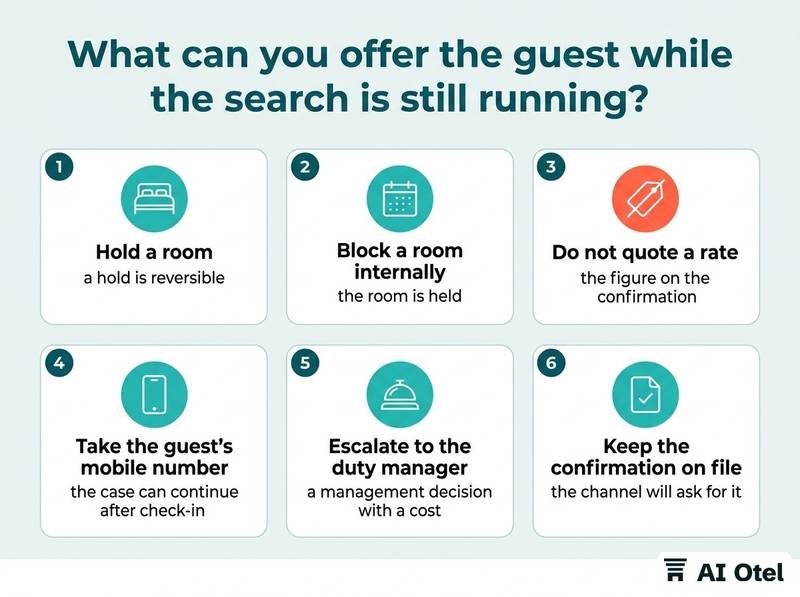
Block a room of the booked type internally so it is not sold while you search, and say exactly that: the room is held, the booking is not yet found. Do not quote a rate for the missing booking at the desk; the figure on the confirmation may be a net rate, a package rate or a currency you cannot match to your own. Take the guest's mobile number and email so the case can continue after check-in, and give them one person's name in return.
Escalate to the duty manager before anything is promised: a free night, an upgrade, a waiver or a relocation is a management decision with a cost attached. If the hotel is full and the guest must be accommodated elsewhere, that decision belongs to the manager, and the record of what was offered belongs in the log. Keep the confirmation on file even after the case closes; it is the document the channel will ask for if a refund or a charge is disputed later.
ChecklistDesk checklist for a missing booking
- copy of the confirmation saved
- guest mobile and email recorded
- room held internally (yes/no)
- time promised to the guest written in the log
- duty manager informed
- channel reference noted
- channel's support ticket opened if the extranet shows the booking
How do you close the loop so the next guest is not affected?
Write one line naming the step that broke, fix that step, and test it with a live booking before you trust it again. A case that ends at the desk will happen again next week.
Record the cause in one line: which step failed (channel, channel manager, mapping, hotel system) or which search field found it (name, date, listing, group block). Where the mapping was wrong, correct it and test it with a live test booking before relying on it; an untested mapping change is the next fault, already scheduled. Mapping room types and rate plans, and testing them explains the method.
Review the channel manager's rejected and unmapped list every week; the same room type usually fails more than once before anyone notices. Put the routine on one page at the desk: the order of the search, who escalates, and what may not be promised. Tell the guest what happened if the case cost them time, in plain words and without blaming the channel. Keep a monthly count of these cases; a rising count points at one channel or one mapping, not at the front desk.
What to do next
Write the one-page routine today and put it where the desk can reach it: the order of the search, the sentences for the first minute, and the list of things only a manager may promise. The whole routine rests on one idea: the confirmation belongs to the channel, the evidence sits in the extranet and the log, and the desk's job is to search in order and hold, not to guess and promise. If your current software makes the reference field or the channel log hard to reach, that is worth knowing too: software that keeps the channel reference on the reservation and the log one click away shortens this routine to minutes, and a record that shows its working, where the reference, the channel and the time sit together, saves the desk from reconstructing the story later.
Frequently asked questions
Can we check a guest in when the booking is not in the system?
It is an operational decision for the duty manager, not a rule the desk applies alone. If it is taken, enter a manual reservation marked as such so the room is counted and the channel's copy can be reconciled later, and record the agreed rate and payment method. Tell the channel afterwards so the same stay is not charged twice.
What is a channel manager log?
It is the record the channel manager keeps of every message it received from a channel and what it did with it: accepted, rejected, unmapped or duplicated. It is usually the only place where a booking that never reached the hotel system is visible, and it is the evidence the channel's support desk asks for.
The guest booked through a travel agency, not a booking site. Where do we look?
Agency bookings often arrive by email or through the agency's own portal rather than through the channel manager. Check the reservations inbox and its spam folder, check group blocks and allotments for the arrival date, then call the agency's reservations line and ask for their reference and the name on their file.
How long should the search take before we escalate when the hotel cannot find the guest booking?
A first pass through name, number, date and extranet belongs in the first fifteen minutes, and the guest should be told when to expect an answer. Escalate to the duty manager as soon as the guest is at the desk and no room is held, and keep searching after check-in rather than stopping at the first miss.
Should we offer the guest something when the booking cannot be found?
Whether to offer a drink, a late checkout, an upgrade or a rate adjustment is a management decision with a cost attached. The desk's part is to record what was offered, when, and by whom, so the decision is consistent and can be reviewed later.