The weekly review of AI changes: what a manager reads in the decision record
A decision record protects a hotel only when a named person reads it. This guide gives you a 20-minute weekly routine to review AI changes, undo errors, and update rules.
AI draft · awaiting editorial review

Contents
Key takeaways
- A change log that nobody reads is a file, not a control: the weekly review is the control.
- Open every entry that waits for a person and every entry that touches a guest or money; sample the automatic ones by exception, not at random.
- Undo is a reversal entry, not a deletion, and a message already sent to a guest is the one thing a hotel cannot take back.
- The third time you correct the same thing, change the limit, the approval tier or the instruction instead of correcting it again.
- Sign each review with a name and a date, because an unsigned review cannot be told apart from no review.
A decision record is the log of every change an AI assistant made or proposed, who approved it and whether it can be undone. Read it once a week for 20 minutes: open every pending approval and every guest-facing action, sample the automatic ones by exception, undo what is wrong and write down the rule you changed.
For example, an assistant that has been running for three weeks. Somewhere in its record is a rate it changed at 02:00, a room it moved and a message it sent to a guest. Nobody has opened the file. This article gives you a weekly review routine for your hotel's AI decision log that fits in 20 minutes: what to open, what to sample, what to undo, what to turn into a rule and how to sign the review so it counts.
Why does an AI change log need an owner and a time slot?
Because a record only protects a hotel when a named person reads it on a fixed day. Without an owner and a slot, the log becomes evidence of what went wrong instead of the control that caught it.
Name one owner, usually the general manager or the revenue manager, and one deputy. A shared inbox is not an owner; when everyone is responsible, the record goes unread. Give the deputy the same authority to undo a change and to raise an approval tier, so the routine does not pause when the owner travels.
Fix the slot: same day, same hour, 20 minutes, placed before the week's revenue meeting so findings feed decisions rather than trailing them. Split the reading by department: front office, housekeeping and restaurant heads read their own slice and bring exceptions to the owner. Define what reading means: the entry was opened, the reason was seen, and a decision was taken to keep, undo or escalate. Scrolling is not reading.
Keep the review short by fixing the approval tiers, not by reading less. A review that takes two hours means the thresholds are set wrong, and the fix belongs in the tiering, not in the calendar. Write the outcome in the same slot, so the review leaves a trace of its own.
Key pointFour questions for every entry you open
What changed, why it changed, who allowed it, and can it be reversed? If an entry cannot answer all four, that is itself a finding about how the assistant is configured.
What are the three kinds of entry in the record?
A record can sort entries by how much freedom the assistant had: changes it applied on its own, changes that waited for a person, and changes sensitive enough to need two people.
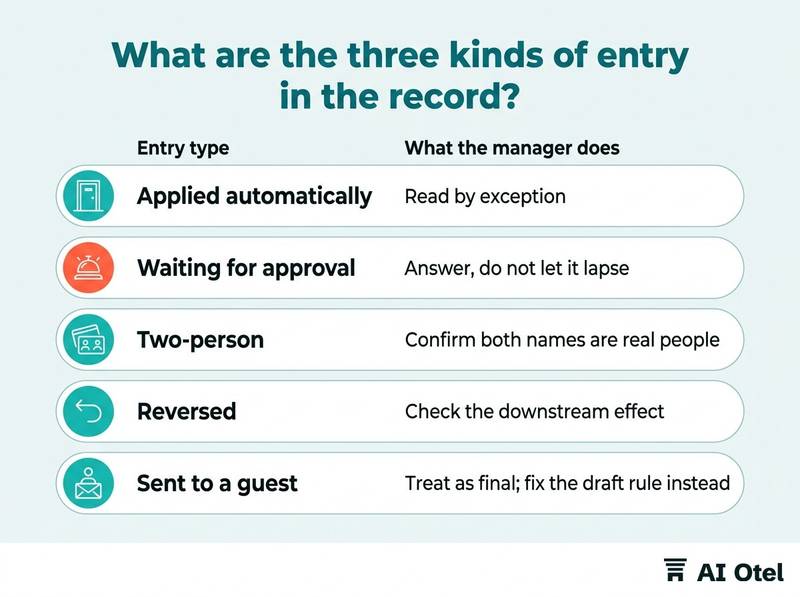
Applied automatically means small, reversible and logged after the fact; the manager reads these by exception. Waiting for approval means the assistant proposed and stopped; these entries expire if nobody answers, so an unread queue is itself a finding. Two-person entries cover money, guest data and fiscal documents, and both names appear in the entry. A reversed entry keeps both the original and the reversal, so nothing is deleted and the history stays readable. A message already sent to a guest is different: the record shows that it went, not that it can come back. Every entry should carry its reason, not only its action: which rule fired and which limit applied.
| Entry type | What it looks like | What the manager does |
|---|---|---|
| Applied automatically | Small, reversible, reason shown | Read by exception |
| Waiting for approval | Proposal plus expiry | Answer, do not let it lapse |
| Two-person | Two names, money or guest data | Confirm both names are real people |
| Reversed | Original plus reversal entry | Check the downstream effect |
| Sent to a guest | Message text and time | Treat as final; fix the draft rule instead |
How many entries should you sample, and which ones?
Open every entry that waits for a person and every entry that touches a guest or money. Sample the automatic ones by exception rather than at random, because random sampling spends the slot on the entries least likely to matter.
Set exception filters first: values outside the normal range, close to a floor or ceiling the hotel set, guest-facing, or involving money. Rotate the sample by department so no area goes unread for weeks. Read the full entry, not the summary line; the reason field is where a mistake shows itself.
Time-box the sample. If it overruns the slot, the tiering is wrong, not the sample size. Write down which entries you opened: a sample you cannot name is not a sample. Look for silence as well as noise. An action you expected and did not see is worth a question to the person who owns that area.
ChecklistWeekly sampling checklist
- Every pending approval answered
- Every guest-facing entry opened
- Every entry touching money opened
- Exception filters checked against the hotel's own limits
- One rotating department sampled
- Entries opened recorded by reference
- One expected-but-missing action raised with its owner
What can you undo, and what is already gone?
Most changes can be reversed by a second entry that puts the value back. A message already sent to a guest, and a document already issued, cannot be pulled back the same way.
Undo is a reversal, not a deletion: both the original entry and the reversal stay in the record. Reversing a rate or a room assignment restores the system, not the consequences; an agency may already have seen the price. For guest messages, draft and hold before sending, and treat sending as a two-person action. For fiscal documents, the correction route belongs to your accountant, not to the assistant and not to the review meeting; confirm your own case with them before you need it.
Test the undo before you need it: pick one small change in a quiet week and reverse it end to end. Check the downstream as well. A reversed bill line may still need a note on the guest's account so the desk can explain it. For a fuller treatment of the one-way door, see irreversible actions in hotel AI: messages, refunds and invoices.
Watch outReversal restores the record, not the world
A guest who has already read the message has read it. The fix after a bad message is the rule that drafted it, not the undo button.
How do repeated corrections become a rule?
When you correct the same thing for the third time, stop correcting and change the rule, the limit or the approval tier behind it.
There are three kinds of fix, in this order: tighten the limit (a rate floor, a maximum discount), raise the tier so a person confirms, then rewrite the instruction the assistant works from. Write the rule in one sentence with a date and an owner, and keep it in the same register as the hotel's other AI uses, the sheet described in an AI register for hotels: every use, its owner and its risk tier on one sheet.
Separate a rule problem from a data problem. If the input was wrong, no rule will fix it and the fix belongs upstream, in whatever fed the assistant a bad number. Re-check the rule at the next review: did the corrections stop, and did anything new break? Tell the staff who will feel the change before it takes effect, not after the first complaint. Keep the rule where the assistant actually reads it, not in a folder nobody opens.
How do you record and sign the review?
One line per review: the date, the name of the person who read it, what was opened, what was undone and which rule changed. Five columns are enough, and a shared sheet is enough at the start.
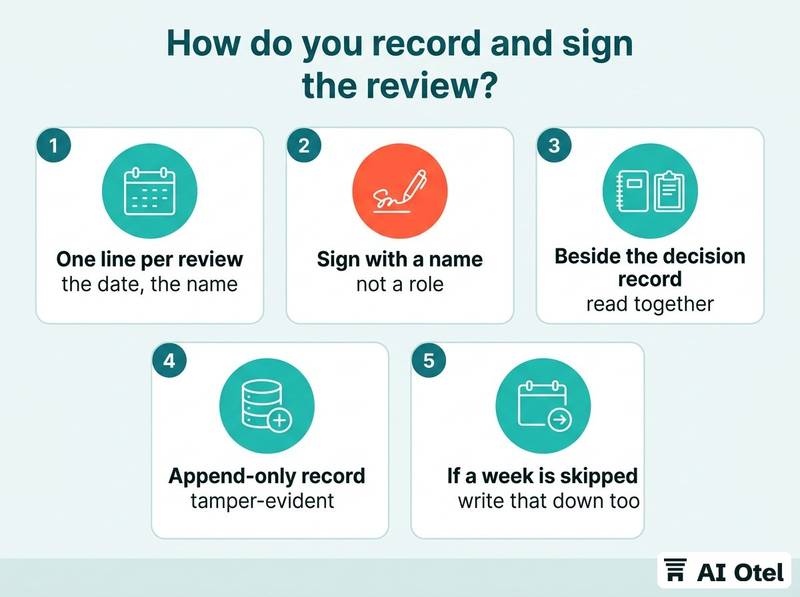
Sign with a name, not a role. The front office cannot be asked what it saw last Tuesday; a person can. Keep the review record beside the decision record so the two can be read together: one is what the assistant did, the other is what a person did about it. The weekly review is about action; the monthly read is about pattern, access and who holds which permission, covered in how to read the PMS audit log each month and in decision record and audit record: two records with two jobs.
Prefer an append-only record. That makes it tamper-evident: a change shows, and the record does not claim to be tamper-proof. If a week is skipped, write that down too. A gap that is recorded is a gap; a gap that is hidden is a control failure.
AI Otel's decision record is built and runs in a public demo environment: small changes apply automatically and are logged, larger ones wait for a person, and every change can be undone except a message already sent to a guest. The review record you keep sits beside it. The mechanism is described on the platform page and in the hotel operating system overview.
NoteThe five columns of a review line
Date · who read it · entries opened (by reference) · what was undone · which rule, limit or tier changed.
What do you tell the team on Monday?
Tell them what changed, what was undone and which rule is new, in plain words, before they meet the change at the desk.
One short note is enough: what the assistant now does on its own, what it must ask before doing, and what to do when something looks wrong. Name the person to tell when an entry looks wrong; staff usually see the effect before the log shows the cause. Explain tier changes as changes to their day: this now needs your confirmation is a different working morning.
Ask for the counter-signal: which proposals they rejected and why. That is the raw material for next week's rule. Frame the record as a record of the assistant's actions and the approvals around them, not as supervision of people; the moment staff read it as surveillance, the counter-signal stops arriving.
What to do next
Put a 20-minute slot in next week's calendar, name an owner and a deputy, and open the record with the four questions: what changed, why, who allowed it, and can it be reversed. The record is the assistant's memory; the review is the hotel's judgment, and only the second one turns a log into a control. If you want to see how such a record is structured, you can request a briefing.
Frequently asked questions
How long should the weekly review of an AI decision log take?
About 20 minutes when the approval tiers are set sensibly. Pending approvals and guest-facing entries take most of the time, and automatic entries are read by exception. If it regularly runs long, the fix is a tighter tier or a clearer limit, not a longer meeting.
Who should own the review when the general manager is away?
A named deputy with the same authority to undo and to raise a tier, written into the routine rather than decided each week. The deputy signs the review line, so the record always shows a person.
Does the weekly review replace the monthly audit read?
No. The weekly review is about action on individual entries; the monthly read is about pattern, access and permissions. They use the same underlying record and answer different questions.
What if the assistant keeps proposing the same change?
That is a rule problem, not a nuisance. Either the limit is too tight, the instruction is unclear, or the action belongs in a different approval tier. Change one of the three, write it down with a date, and check at the next review whether the proposals stopped.
Can a hotel run this routine without special software?
Yes. A shared sheet with five columns (date, who read it, entries opened, what was undone, which rule changed) is enough to start, provided the underlying record is append-only and the entries carry their reasons.