A shared reservations mailbox: rules for who answers, forwarding and what leaves the hotel
A shared reservations mailbox prevents lost bookings and data leaks. Learn how to set up access rules, status labels, and forwarding policies for your hotel team.
AI draft · awaiting editorial review
Contents
Key takeaways
- A reservation that lives in one person's inbox is a reservation the hotel cannot see, hand over or measure.
- Forwarding guest mail to a personal address moves data onto an account the hotel cannot audit, retrieve or delete.
- Four status labels (new, waiting for the guest, confirmed, closed) answer the daily question of who is handling what.
- Confirmed means a booking number in the hotel's system, not a friendly sentence in an email.
- Access is granted by name and removed by checklist; the forwarding rule a leaver left behind is the usual leak.
A hotel shared reservations mailbox is one hotel-owned address that several trained staff open with their own logins, so no reservation sits in a personal inbox. It needs a named owner, a daily rota, four status labels, written forwarding rules and an access list checked whenever someone joins or leaves.
A confirmation request arrives at 09:40 and lands in the reservations manager's personal inbox. She is on leave until Thursday, and nobody else can see the message. The guest is choosing between three hotels, and one of them has already gone quiet. This failure needs no new software to fix, only a decision and a routine. After reading this you will be able to set up a shared mailbox, label it, write the forwarding rules and remove access cleanly when someone leaves.
What goes wrong when reservations mail sits in one person's inbox?
Three things: the queue stops when that person stops, the hotel cannot see what was promised, and guest data spreads to places the hotel does not control.
The address is a person, not a function. When the holder is on leave, ill or travelling, requests wait in a queue nobody else can see and nobody can reassign. The hotel has not lost the bookings it knows about; it has lost the ones it never saw.
Copies go to personal addresses "just to be safe". Each copy is a second record of guest data on an account the hotel cannot audit, retrieve or delete. When that person leaves, the copies stay behind in an inbox the hotel has no right to open.
Promises live in one head. A rate, a late check-out or an airport transfer agreed in a private thread is invisible to whoever answers the next message. The guest quotes the promise; the person on duty cannot find it.
Search breaks too. A returning guest's history is split between an inbox, a phone and a printed sheet, so the answer depends on who remembers. And nothing can be measured: without a shared queue the hotel cannot see how long a request waited before a reply, so it cannot tell whether it has a problem. For the wider picture, see how a hotel reservations department works from request to arrival.
The first fix is a decision, not a purchase: the address belongs to the hotel, and the people who answer it are named.
How do you set up a shared reservations mailbox?
Create one address on the hotel's own domain, give every person their own login, name one owner, and publish the rota before the first message moves.
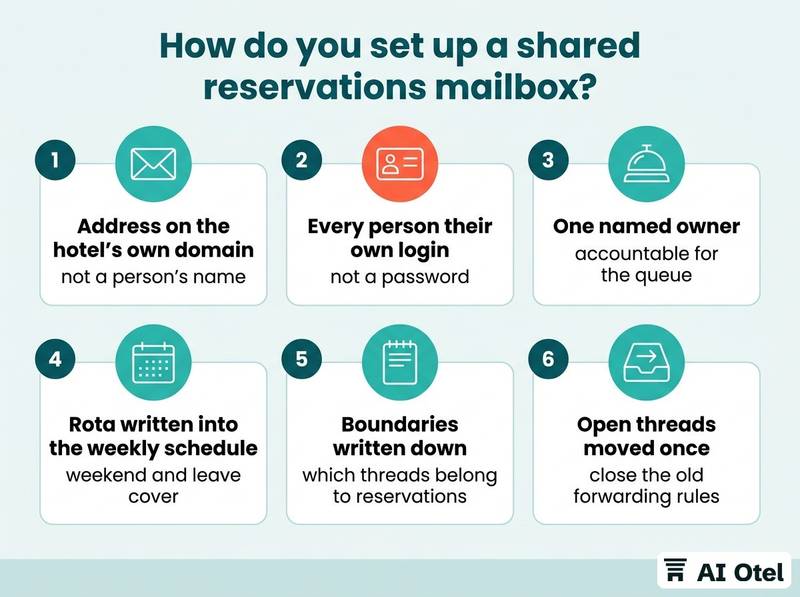
The address is reservations@ on the hotel's own domain, not a free consumer address and not a person's name. It has to survive staff changes. A mailbox named after a person fails on the person's last day.
Logins, not a password. Each person signs in with their own account. A password the whole team knows destroys the only record of who read and who answered, and it cannot be revoked for one leaver without locking out everyone.
One named owner. Several people answer, but one person is accountable for the queue, the rota, the labels and the weekly check. The rota itself, primary, backup, weekend and leave cover, is written into the weekly schedule. A rota that exists only in conversation is not a rota.
Boundaries matter as much as access. Decide in writing which threads belong to reservations and which to sales or the front desk, so a group request is not answered twice or by nobody. Then migrate: move open threads out of personal inboxes once, and close the old forwarding rules. A half-migrated mailbox is worse than either state. One related failure sits outside the mailbox itself: if confirmations never arrive, the problem may be email authentication, covered in whether confirmation emails actually arrive.
ChecklistSet-up checklist
- Address created on the hotel's own domain, not a person's name
- Every team member has their own login
- One named owner for the queue
- Rota written for weekdays, weekends and leave
- Boundary with sales and front desk written down
- Open threads moved from personal inboxes and old forwarding rules closed
- Test message from an outside address seen and answered by two people
Which labels should a reservations mailbox use?
Four status labels and a short list of topic labels: status says where a thread stands, topic says what it is about.
The status set is new, waiting for the guest, confirmed, closed. Four is enough; every extra status is a place for a thread to hide. Define each in one line and pin the definitions where the team can see them.
| Status label | What it means | Who sets it | When it changes |
|---|---|---|---|
| New | Nobody has replied | Whoever opens the thread | When the first reply is sent |
| Waiting for the guest | Hotel has replied, next move is the guest's | The person who replied | When the guest answers or the hold expires |
| Confirmed | A reservation exists in the hotel's system with a number | The person who created or verified the booking | If the booking is cancelled |
| Closed | No further action, reason in the last line | Whoever finishes the thread | Final |
Topic labels run alongside: group, corporate, agency-relayed, complaint, and one per language the desk answers in.
One status at a time. A thread carries exactly one status label, and changing it is part of sending the reply, not an evening chore. Confirmed is a system fact, not a tone of voice. A warm email saying "you are all set" is not a reservation until it exists in the hotel's system with a number.
Whoever closes the desk runs an end-of-day sweep: filter the two open statuses, reassign anything older than the hotel's own target and note why. Archive on close, not on read, so the working view shows only live work. Threads arrive from more channels than email, and the same labels work across them, as described in turning phone, email and WhatsApp inquiries into reservations.
What a reservations reply must contain
Acknowledge, answer, state the next step, give a deadline: in the guest's language, from the hotel's address, with a signature that says who is speaking.
Four lines are enough for most requests: what the hotel can do, what it costs, what it needs from the guest, and by when. Never promise what the system has not confirmed. "I can hold this room until Thursday" is only true if a hold exists and expires on Thursday.
The signature carries name, role, hotel, the shared address, the desk phone and the languages the desk answers in. No personal mobile unless the hotel has decided it is a duty phone. Answer in the language the guest wrote in, or say plainly which languages the desk covers and hand the thread over.
Tone is short sentences, no exclamation marks, no marketing paragraphs inside a booking thread. The guest is trying to decide, not to be sold to. On time: the hotel sets its own first-reply target and writes it down, for example the same business day, then measures against it. A target nobody wrote down can be neither missed nor met. Keep a small approved set of templates for the common cases, with the variable fields marked, so speed does not turn into invention. Drafting them well, including with help from an assistant, is covered in drafting reservation emails faster without wrong promises.
TipThe four-line reply skeleton
Acknowledge: one sentence naming the request. Answer: what the hotel can do and the price. Next step: what the hotel needs from the guest. Deadline: by when, and what happens after. If a line cannot be filled truthfully, the thread is not ready to send.
What must never be sent or forwarded from a reservations mailbox?
Identity documents, card details and anything the guest sent in confidence. The reply should point to the hotel's own channel instead of asking for them by email.
A passport or ID card sent as an attachment is a copy of personal data that then sits in every inbox, backup and phone it passed through. Ask for it at check-in through the hotel's own system, not by email. Card details are the same: never request a card number, expiry date and security code by email, and never forward a message that contains them. If a guest sends them unasked, do not forward it; follow the hotel's own written procedure for that message.
Forwarding to personal addresses is banned, including to an owner's or manager's private account and to a phone-number address. Forwarding outside the hotel needs trimming too: a transfer or tour partner needs the guest's name, the date and the flight number, not the whole thread with the rate and the guest's notes.
Attachments get one rule: open only the file types the hotel expects. A "confirmation" that arrives as an executable or an archive is not a booking. And tell the guest, in one line in the reply, how their document or payment will be handled, so they do not send it twice.
The general duty is clear: guest data in the mailbox falls under the hotel's responsibilities as the party that decides why and how it is used, under KVKK (kişisel verilerin korunması kanunu). The specifics for your property, including retention and any notification duty, are a question for your legal adviser.
Watch outNever by email
Passport or ID copies. Card number with expiry and security code. Any thread forwarded to a personal address. If a guest sends one of these unasked, do not forward it, and follow the hotel's written procedure.
Who gets access, and what happens when someone leaves?
Access is granted by name on the first day and removed on the last, and the removal is a written checklist rather than a memory.
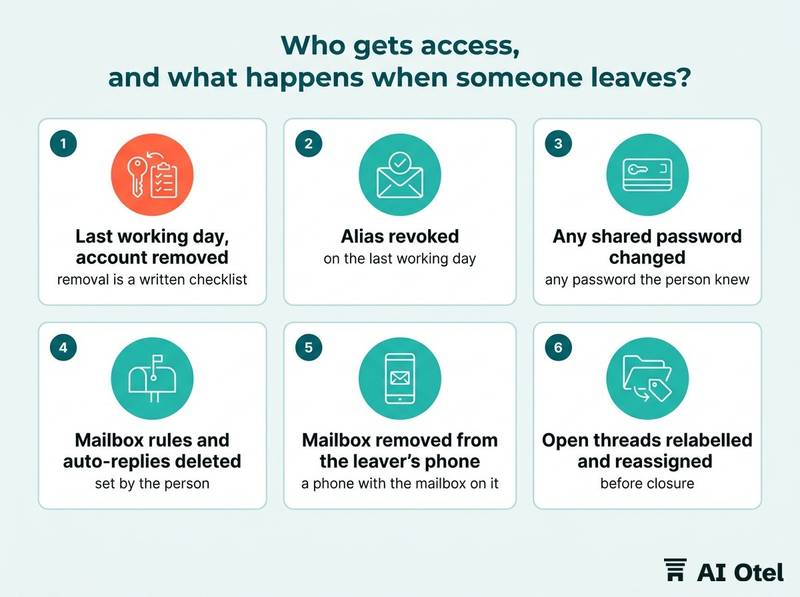
Joiners get their own login on day one, the four labels explained, the forwarding rules read and signed, and a named buddy for the first week. Leavers are the harder half. On the last working day, remove the account, revoke the alias and change any password the person knew.
The hidden access is the real risk. Forwarding rules, auto-replies and connected devices set by the person are the usual way mail keeps arriving after someone has gone. Check the mailbox's own rules list, not only the user list. A phone with the mailbox on it is hotel access; the split between company devices and personal phones belongs in writing before the first person asks, as set out in company devices, personal phones and the rules for both.
Handover comes before closure: relabel and reassign the leaver's open threads first, so no guest is waiting for a reply from a closed account. Quarterly, print the access list, have the owner justify every name, and remove anyone who has not answered a thread in the period. Keep a one-page access log with dates. It takes ten minutes to maintain and it is the first thing anyone asks for later.
ChecklistLeaver checklist
- Last working day, account removed
- Alias revoked
- Any shared password changed
- Mailbox rules and auto-replies created by the leaver deleted
- Mailbox removed from the leaver's phone
- Open threads relabelled and reassigned
- Access log updated with the date
The weekly check: five threads, read end to end
Once a week the owner reads five closed threads in full and writes one line on each; two recurring faults become next week's fix.
Pick five at random, and make sure one is a complaint, one a group request and one written in another language. Read for time to first reply, whether the promise matched the system, whether the label matched reality, whether anything personal went out by email, and whether the signature and address were right.
Write one line per thread, not a report. The point is to find the repeating fault, not to grade people. Count what the hotel can count honestly: how many threads this week waited longer than the hotel's own target.
Monthly, put the access list and the mailbox rules list next to the staff list and reconcile them. After a quarter the test is simple: no reservation thread lives only in a personal inbox, and every confirmed thread has a booking number in the hotel's system.
What to do next
Start this week with the two cheapest controls: the access list and the four status labels. They fix the failures that hurt most, the invisible queue and the mail that follows a person home. Then set the hotel's own reply target and begin the five-thread check, so the mailbox belongs to the hotel rather than to whoever happens to be answering.
Frequently asked questions
Can the whole reservations team share one password for the mailbox?
No. A shared password removes the only record of who read and who answered a thread, and it cannot be revoked for one person when they leave without locking out everyone else. The hotel shared reservations mailbox is shared; the credentials are not. Each person signs in with their own account.
Is it acceptable to forward reservations email to a personal address so I can answer at night?
No. It moves guest data onto an account the hotel does not control, cannot audit and cannot delete, and it outlives the employment. If out-of-hours cover is needed, the answer is a hotel account on a hotel device, with the device rules written down first.
How fast should a hotel answer a reservation email?
This article gives no benchmark, because none is published here. Set your own first-reply target, write it down and measure against it. What matters is that the target is visible to the team and that the "new" label is emptied every working day.
What should we do when a guest sends a photo of their passport by email?
Do not forward it. Handle the message under the hotel's own written procedure, tell the guest in one line how the document will be handled, and steer the next guest to the check-in flow instead of email. The specifics of your own case are for your legal adviser.
Who should own a group request that arrives in the reservations mailbox?
Decide in writing whether sales or reservations owns group and corporate threads, label the thread so the answer is visible, and only mark it confirmed once a booking exists in the hotel's system with a number. The point is that one named person owns it, not that a particular department does.