Account security terms for hotel managers: two-step sign-in, password manager, phishing and more
This guide defines essential account security terms for hotel managers, from two-step sign-in to least privilege. It explains how to verify vendor claims and protect guest data.
AI draft · awaiting editorial review
Contents
Key takeaways
- Two-step sign-in protects an account even when the password is already known, while single sign-on reduces the number of passwords and turns the main identity account into the most valuable credential in the hotel.
- Least privilege means a role starts with nothing and is given only what the job needs, so a compromised housekeeping account cannot reach the night audit.
- Credential reuse turns one small breach on a personal site into a door into the hotel's systems.
- A backup is a copy; a restore test is proof that the copy opens, and only the second one counts when the front desk is down.
- Any vendor phrase that describes a feeling rather than a mechanism needs a follow-up question, and the answer belongs in the contract, not in the meeting notes.
Account security terms describe how a hotel proves who is signing in, what each person may reach, and how it recovers when something goes wrong. Two-step sign-in adds a second proof, a password manager stores long unique passwords, single sign-on uses one identity for many systems, and least privilege gives each role only the access the job needs.
In a vendor meeting the words arrive quickly: role-based access, single sign-on, encrypted, bank-grade. Everyone nods, and the contract is signed with the vocabulary still undefined. This article defines the account security terms hotel managers actually meet, in front desk language, and ends with a one-page rule and five questions to ask every vendor. After reading it you will know which words ask for a decision and which are decoration.
What do the sign-in terms mean: password, passphrase, two-step sign-in and single sign-on?
A password is a secret shared between one person and one system; a passphrase is the same idea made long enough to resist guessing; two-step sign-in adds a second proof; single sign-on replaces many sign-ins with one.
Length beats decoration. A short password with a capital letter, a number and a symbol is still short, and it follows a pattern people guess first. Four unrelated words are long, easy to type and hard to guess.
A system should store a one-way scramble of the password, not the password itself, so a copy of the database does not hand over the keys. Ask a vendor whether this is how it works, and treat a vague answer as a question for the next meeting.
Two-step sign-in, also called two-factor or multi-factor, combines something you know with something you have: an authenticator app on a phone or a small hardware key. A code sent by text message can be relayed or intercepted, which is why the app or the key is the better default.
Repeated approval prompts on a phone are not a glitch. They mean someone already has the password and is trying to get the second step approved. The rule is to deny the prompt and report it, never to approve it to stop the noise.
Single sign-on means one identity for many systems: the person signs in once and reaches email, the property management system and the back office. The benefit is one place to disable a leaver. The risk is that this one account now opens everything, so it needs the strongest second step in the building.
A password manager is software that generates a long unique password for each system and remembers it behind one strong passphrase. It removes reuse, the habit that turns a small breach elsewhere into a breach here. For the accounts that resist every tool, see shared passwords in hotels: a routine for extranets, Wi-Fi and social accounts.
Some systems will never join single sign-on: property Wi-Fi administration, an extranet run by a partner, a legacy tool. Those are the accounts the hotel must list and review by hand.
| Term | What it means | What it looks like at the front desk |
|---|---|---|
| Password | One secret, one person, one system | A receptionist typing the same word into the property management system and a personal shopping site |
| Passphrase | A long password made of words | The phrase a manager types once a shift |
| Two-step sign-in | A second proof after the password | A phone prompt when the night auditor signs in from a new device |
| Single sign-on | One identity for many systems | One sign-in in the morning that opens email and the property management system |
| Password manager | Software that generates and stores unique passwords | The tool that stops a shared spreadsheet of logins |
What do the access terms mean: named user, role, least privilege and session timeout?
Access terms describe who may reach what: a named user is one person with their own account, a role is a bundle of permissions, least privilege gives that role only what the job needs, and a session timeout closes a screen nobody is watching.
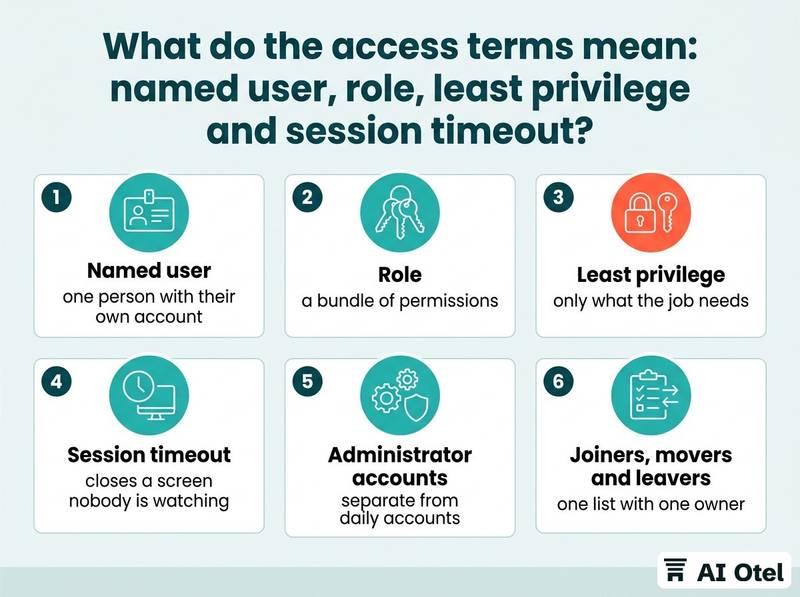
A named user means no shared logins for the property management system. A shared account destroys the record, because the system shows the account and not the person, and no one can answer who changed a rate or voided a charge.
A role should be defined by the task, not by seniority. The night auditor needs to close the business day; that does not mean the role needs to change rates or delete a reservation. Least privilege is a starting position: begin with nothing, add what the job requires, then review. The practical test is one sentence: if a stranger used this account today, what is the worst they could do?
A session timeout locks an idle screen. An unattended terminal at a busy front desk is an open door, so shared terminals need a short timeout and a lock-on-idle habit, while a manager's own device can be more forgiving. Sensitive actions deserve a second sign-in even inside an open session: a refund, a rate change across a date range, an export of guest data. The person is already known; the point is to make the action deliberate.
Administrator accounts should be separate from daily accounts. The account someone reads email in should not be the account that can change permissions, and the most sensitive changes are better with two people involved.
Joiners, movers and leavers are one list with one owner. New staff get access on day one, transferred staff lose the old role, and leavers are disabled the same day. The leaver step is the one hotels most often miss.
ChecklistMonthly access review
- List every account on every system that holds guest or financial data.
- Mark each account with a named person and a role.
- Delete or disable accounts with no owner.
- Check that leavers from the past month are disabled everywhere, including extranets and the Wi-Fi administration page.
- Confirm that administrator accounts are separate from daily accounts.
- Write the date and the reviewer's name at the bottom.
What is phishing, and why does the front desk see it first?
Phishing is a message that pretends to come from someone the hotel trusts, in order to make a person click, pay or sign in. Front desk staff see it first because they handle guest requests, supplier invoices and payment questions all day.
There are three common shapes: a link that leads to a fake sign-in page, an attachment that runs something when opened, and a written request to pay an urgent invoice or change a supplier's bank account.
Hotel context makes the message convincing. It may carry a real reservation name, an arrival date or an invoice number. Knowing a detail is not proof of identity, because those details travel through many hands.
The rule is a second channel you already had: a phone number from the contract or the address book, not the number written in the message. Never confirm by replying to the message itself. A supplier changing bank details is always a phone call, and the person who approves the change is not the person who received the email. One short call is cheaper than one wrong transfer.
Reporting must be easy and blameless. One address or one button, and no punishment for reporting a click, because a report that arrives late is still useful and a hidden mistake is not. Ten minutes of training covers the whole habit: pause before clicking, check on a second channel, report it. Repeating it once a quarter matters more than a long document nobody reads.
Watch outThree checks before acting on any payment or sign-in request
1) Was this request expected, from a supplier or a person already in the file? 2) Does the account number match the one in the signed contract? 3) Has a second person confirmed it by phone on a number we already had?
For the payment side of the same risk, see card data at a hotel in plain words: PAN, authorization, tokens and why a note field is the wrong place.
What is the difference between a backup, a restore test and an incident?
A backup is a copy kept somewhere else; a restore test is a real restore into a clean place, checked by a person; an incident is any event that may have affected the confidentiality, integrity or availability of hotel data, and it is declared rather than debated.
A backup needs four answers written down: what is covered, how often it runs, where the copy lives, and who can delete it. A copy that the same administrator account can delete is not a defense against ransomware.
A restore test has a date, a separate environment and a named person. Restore, open the system, check one reservation and one bill, and write down how long it took. Without that, the backup is a belief. Two plain numbers decide the design: how much work the hotel can afford to lose, and how long the front desk can stand still. The hotel sets these, not the vendor, because the hotel carries the consequence.
An incident is broader than an attack: a lost laptop with a saved password, a mailbox opened from an unfamiliar country, a payment sent to the wrong account. Waiting for certainty before acting is the common mistake. Name the person who declares an incident and the small group who handles it. A written log starts at the first minute, because memory rewrites itself within a day.
In Türkiye every stay involves personal data (KVKK, the personal data protection law), and a personal data breach carries duties for the hotel. Confirm your own position and any notification duty with a legal adviser before the day you need it. If the worst happens, the sequence is written down in ransomware at a hotel: the first 24 hours, step by step.
Which vendor phrases need a follow-up question?
Any phrase that describes a feeling rather than a mechanism needs a follow-up question, and the answer belongs in the contract, not in the meeting notes.
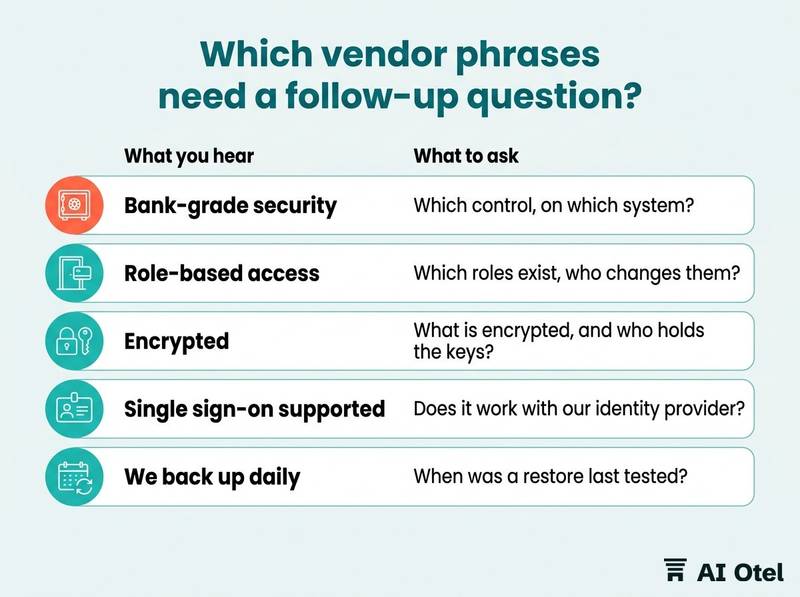
"Bank-grade security" and "we take security seriously" contain no mechanism. Ask which control, on which system, and where it is written. "Role-based access" is a start, not an answer: ask which roles exist, who can create or change them, and whether a role change is recorded.
"Encrypted" needs two halves: what is encrypted, and who holds the keys. Data encrypted in transit protects the line; data encrypted at rest protects the disk; the two are different promises. "Single sign-on supported" means little until you ask whether it works with the identity provider the hotel already uses, and what happens to existing accounts on the day it is switched on.
"We back up daily" is a schedule, not a result. Ask when a restore was last tested, whether the hotel can obtain a copy of its own data on request, and in what format. "KVKK compliant", and any certification word, needs a document: the data processing agreement, where the data is processed, and which paper supports the claim. A claim without a document is a sentence.
Ask for the status word on every feature: built and working, in testing, or planned. A roadmap item is not a control, and a hotel should sign knowing which of the three it is buying.
| What you hear | What to ask | What a good answer sounds like |
|---|---|---|
| Bank-grade security | Which control, on which system, and where is it written? | A named control, the system it covers, and a clause the hotel can read |
| Role-based access | Which roles exist, who changes them, and is the change recorded? | A short role list, one owner, and a record of changes |
| Encrypted | What is encrypted, in transit or at rest, and who holds the keys? | A specific answer for each half, with the key holder named |
| Single sign-on supported | Does it work with our identity provider, and what happens to existing accounts? | A tested answer, plus a plan for the switch-on day |
| We back up daily | When was a restore last tested, and can we get our own data on request? | A date, a result, and an export format |
How do you use these words in a meeting?
Take one page, ask for mechanisms, and write the answers into the contract; the vocabulary is only useful if it changes what the hotel signs.
Open with the hotel's own rule rather than the vendor's slide: which systems require a second step, who approves access, who declares an incident, and when the last restore test happened. Ask every vendor the same five questions and compare the answers side by side. The comparison is the tool; a single impressive answer proves nothing.
Ask for the status word on each claim and write it down: built, in testing, planned. The hotel can accept a planned feature; it cannot accept not knowing. File the answer next to the contract clause it belongs to. If the promise is not in the contract, it is a hope, and the person who signed it will not be in the room when it matters.
Bring one department head. The front desk manager hears the friction that a general manager does not, and friction is where staff invent workarounds such as a shared login.
The same test applies to AI features. An assistant that can act on the hotel's systems inherits every access question above: whose account it uses, what it may change, and who confirms a sensitive action. The same questions, in more vocabulary, are collected in AI security terms for hotel managers: shadow AI, jailbreak, data leakage and more. For how one hotel operating system is put together, see the platform page, and for how a vendor should state what it does and does not do, see the trust page.
ChecklistThe one-page card
- Which systems require two-step sign-in.
- Who holds administrator accounts.
- Who approves a new role.
- The date of the last access review.
- The date of the last restore test and how long it took.
- Who declares an incident.
- The phone number used to verify a payment change.
- Where staff report a suspicious message.
- The five questions asked of every vendor.
- Where the answers are filed.
What to do next
Write the hotel's one-page rule this week: which systems require two-step sign-in, who approves access, who declares an incident, and when the last restore test happened. Then ask every vendor the same five questions, file the answers with the contract, and review the page once a quarter. The terms only earn their keep when they change a signature, a setting or a habit at the front desk.
Frequently asked questions
Is two-step sign-in worth the friction at a busy front desk?
Start where the damage is largest: administrator accounts, remote access, email and any system holding guest or payment data. Use an authenticator app or a hardware key rather than a text message where the system allows it. Measure the friction honestly: a few seconds per shift against a shared account anyone can use. Then extend to the rest of the team once the habit exists.
Should every hotel employee use a password manager?
It depends on whether the hotel has approved one tool and written a rule for it. A password manager removes reuse, which is the main way a breach elsewhere becomes a breach here. It does not fix shared accounts: those need an owner, a rotation routine and a plan to replace them with named users. Decide the tool centrally; do not let each department choose.
What should happen when an employee with administrator access leaves?
Disable the account the same day, on every system, including extranets and Wi-Fi administration. Change any secret the person could see, and check the record for changes made in the final weeks. Confirm that the remaining administrator accounts are separate from daily accounts. The leaver step belongs on the monthly access review, not in someone's memory.
What is the difference between two-step sign-in and single sign-on?
They solve different problems. Two-step sign-in proves that the person signing in is who they claim to be, even if the password is known. Single sign-on reduces the number of separate sign-ins by using one identity for many systems. They work best together: one identity, protected by the strongest second step the hotel can operate.
Who is responsible if a guest's data is exposed through a staff account?
In Türkiye every stay involves personal data, and the personal data protection law (KVKK) places duties on the hotel that processes it. The exact position, including any notification duty and its timing, depends on the case. Confirm it with a legal adviser before an incident, and keep the written incident log ready for that conversation.