Currency settings on booking sites: which currency your rates are loaded in and what the guest sees
Every booking passes through three currencies: loading, display, and payout. Learn where each setting lives, how to test what guests see, and how to reconcile documents.
AI draft · awaiting editorial review

Contents
Key takeaways
- Three currencies are in play on every booking, loading, display and payout, and only the first is fully under the hotel's control.
- The currency a guest sees depends on the guest's own settings as much as on the hotel's, so one search from the office browser proves nothing.
- Compare the amount on the reservation, the invoice and the payout for the same stay: any difference is a conversion, and someone made it.
- A rate change reaches each channel, cache and guest session at its own moment, so old and new prices coexist for a while.
- Write the currency chain on one page for the front desk and the accountant, and the same question stops arriving twice.
Every booking passes through three currencies: the one you load rates in, the one the guest sees, and the one you are paid in. Each can be set in a different place, and each side may convert. Test all three with real guest searches before you trust the number on a reservation.
A guest books a room at a price in euro, arrives, and the folio opens in lira. The reservation, the invoice and the bank statement each show a different number, and nobody at the desk can say which one was the agreed price. This article gives you the working method: what each currency is called, where each setting lives, how to test what a guest actually sees, and how to compare one stay across all three documents so the answer is written down before the next guest asks.
What are the three currencies in a booking?
Every reservation carries three currency values: the currency you load rates in, the currency the guest sees, and the currency you are paid in. They are set in different places and can differ from each other.
The loading currency is the currency a rate plan is stored in, in the channel manager or the hotel's own system. Every other price is derived from it, so this is the one to get right first. The display currency is what the guest sees on the results page and at checkout; it is often chosen by the guest's own setting, such as country, language or a currency selector, not only by the hotel. The payout currency is what reaches the hotel's bank account or virtual card, set by the commercial agreement and the payment model rather than by a screen in the extranet.
A conversion can happen at either boundary: loading to display, and display to payout. Each conversion has an author, the site, the payment provider or the bank, and a moment. The hotel's own system holds one rate as the source of truth; everything else on a booking site is a copy of it, sometimes a converted copy.
| Currency | Where it is set | Who can change it | What it affects |
|---|---|---|---|
| Loading currency | Channel manager or hotel system | Revenue management | Every derived price and the margin |
| Display currency | Booking site plus guest settings | Guest or the site | What the guest believes they agreed to |
| Payout currency | Commercial agreement, payment model | Contract only | The bank statement and the accountant's work |
There is a real trade-off. Loading in the currency your costs are in protects your margin, while loading in the guest's currency is easier to compare on a results page. Pick one deliberately and write down why; the reasoning behind the choice of loading currency is covered in more depth in Euro or lira? Pricing hotel rooms in Türkiye when costs are in lira.
Where does the currency setting live on a booking site?
In three places at once: the booking site's extranet, your channel manager, and the property record in your own system. They must agree, and nothing in the chain enforces that they do.
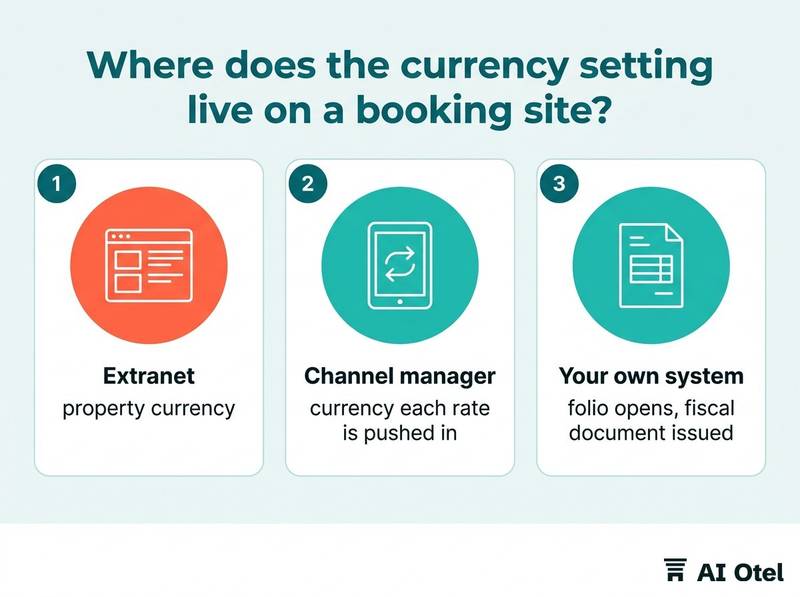
The extranet holds the property currency, and sometimes a separate currency carried on individual rate plans. Check the rate plan, not only the property. The channel manager holds the currency each rate is pushed in, mapped per channel; a mapping set once and never reviewed is the usual source of a quiet mismatch. Your own system holds two further decisions: the currency the guest folio opens in, and the currency the fiscal document is issued in. These are two decisions, not one.
The commercial agreement sits behind all of it: payout currency and payment model are agreed with the site or the payment provider and are not visible in any settings screen. Currency is also a field in the rate plan itself, so a new rate plan copied from an old one can carry a currency nobody intended.
Assign one owner, usually revenue management, who can see all three places. A setting changed in one place only is a future dispute.
ChecklistSix-item currency audit before the season
- Property currency in each extranet
- Currency on every active rate plan
- Channel-by-channel currency mapping in the channel manager
- Folio currency in the hotel system
- Currency on the fiscal document
- Payout currency in each commercial agreement
Each item gets a name and a date checked. Fold the extranet items into your daily review routine, described in Extranet routine: what to check on booking sites every morning.
How do you test what a guest actually sees?
Search the way a guest would, from more than one setting, and keep the evidence. One search from your own office browser shows one version of your hotel, not the version your guest gets.
Use a private browser window, and do not sign in. A logged-in account can carry a stored country and currency that overrides everything else. Run three searches: your own country and currency; a main source market with its own currency; and a third with a different language but the same currency as the second. Repeat at least one search on a phone, because the mobile flow can summarize the price differently from the desktop flow.
Screenshot the results page, the room page and the checkout, with the date and time visible in the image. Record whether the price shown includes taxes and fees, and in which currency the final total is stated. Repeat the whole test after any rate change or currency change, and keep the screenshots in one dated folder.
TipSame hour, same day
Run the three searches at the same hour on the same day, so that a rate change cannot explain a difference you see. If the three results differ, the difference is a setting, not a price.
Why do the reservation, the invoice and the payout show different amounts?
Because each document is produced by a different party at a different moment, and any of them may have converted. A difference is not an error by default; it is a conversion you have to name.
The reservation amount is what the guest agreed to pay, in the currency displayed at checkout, and the confirmation email is the evidence of that agreement. The invoice is a fiscal document in the currency your system issues, and the rate applied to convert it is a decision someone made, not an accident. The payout is what the site or the payment provider sends, after its own conversion and its own deductions; it is the last number in the chain, not the reference number.
Build a three-line comparison for one stay: booked amount, invoiced amount, received amount, each with its currency and its date. Ask who converted at each step. If nobody in the hotel or on the site can answer, that unanswered question is the finding. Do not treat a difference as a loss automatically; it can move either way, and it changes with the day it was applied.
Watch outDo not adjust documents to match the payout
Never adjust a folio or an invoice to make it match a payout figure. Correct the record with a documented entry that names the conversion, and keep the original document unchanged.
The payout side of the chain is covered in detail in Reconciling booking site payouts: commission, virtual cards and the bank, and the tax treatment of displayed prices in VAT and accommodation tax on booking sites: getting the displayed price right.
When you change rates, how long does the mismatch last?
Longer than the reload. A new rate reaches each channel, each cache and each guest session at its own moment, so old and new prices coexist for a while.
Push the change, then confirm it arrived at each channel. A channel manager saying it sent a rate is not the same as the channel showing it. Cached pages and search results can hold an old price after the extranet already shows the new one. A guest who searched before the change may complete a booking at the old price; decide in advance whether the hotel honors it, and tell the front desk the answer.
Changing the currency of a rate plan is a bigger event than changing an amount: it can leave two rate plans side by side rather than replace one. Keep a written note of the time of every currency or rate change, so a later difference can be explained without guesswork. Avoid running a currency change and a price change on the same day; if something goes wrong, you will not know which change caused it.
What should the front desk and the accountant be told?
Give both the same short written rule: which currency the guest agreed to, which currency the folio and the invoice use, and who to ask when the numbers differ.
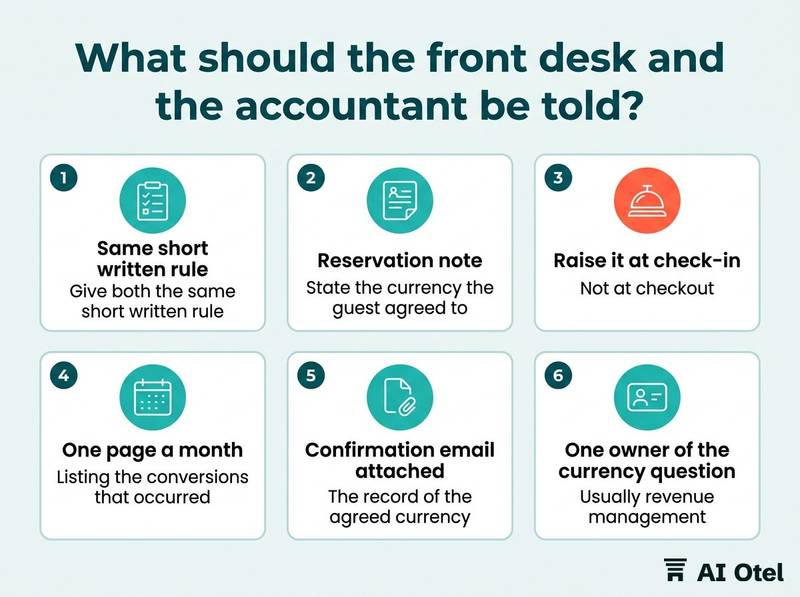
The reservation note should state the currency the guest agreed to and the amount in that currency, not only a converted figure. If the guest's confirmation shows a different currency from the folio, raise it at check-in, not at checkout. For the accountant, keep one page a month listing the conversions that occurred, with the document, the date and the party that converted.
Keep the guest's confirmation email attached to the reservation; it is the record of the agreed currency and the agreed amount. Name one owner of the currency question, usually revenue management, with the front office applying the rule and the accountant receiving the log. Do not invent a house exchange rate for the desk unless the accountant has approved how it is recorded and reversed.
How do you check five bookings a month?
Pick five reservations from different channels and different currencies, and trace each one from booking to bank. Five is enough to catch a systematic error; a hundred will not tell you much more.
Choose by channel and currency rather than at random: one direct booking, one or two from booking sites, one from an agency or corporate account. For each booking, record four numbers: booked amount and currency, invoiced amount and currency, payout amount and currency, and the date of each. Note the guest's country setting and the currency printed on the confirmation email.
Log the result in one sheet with a column for who converted at each step. Read the five together and look for a pattern, not a single outlier. Repeat monthly and compare with the previous month, so a change in behavior shows up as a change in the sheet.
ChecklistMonthly five-booking check
- Pick five bookings across channels and currencies
- Pull the confirmation, the invoice and the payout record for each
- Write the three amounts with currencies and dates
- Name who converted at each step
- Flag any booking where nobody can be named
- File the sheet with the month's screenshots from the guest-search test
What to do next
Run the three-search guest test this week, write the currency chain on one page, and start the five-booking monthly check. The three currencies only stay under control when one person owns the chain, the front desk applies it and the accountant sees the evidence. The test, the comparison and the log are the whole method.
Frequently asked questions
Does the guest pay in the currency shown on the booking site?
The confirmation states the currency the guest agreed to, and that is the number to compare against. Whether the site charges the card in that currency or the hotel collects it at the desk depends on the payment model in the agreement, so read the reservation record rather than assuming. The article on hotel collect, site collect and virtual cards covers the models.
Why is my euro rate showing a different number on the site?
The site may be displaying the price in the guest's own currency, which is a conversion, not a price change. Reproduce it with a fixed setting in a private window and screenshot the result. If the number still differs at the same setting, the loading currency or the rate plan currency, the booking site currency setting the hotel controls, is the place to look.
Should we load rates in lira or in euro?
There is no single right answer; it depends on where your costs sit and which markets you sell to. The loading currency is the one your margin is measured in, so choose it deliberately and write down the reason. Changing it later is a bigger operation than changing a price.
Does changing the currency in the extranet change existing reservations?
Do not assume either way. Open a few existing reservations before and after the change and check the currency recorded on each one. Existing bookings were agreed in a currency, and the confirmation email is the record of that agreement.
What do we do when the guest's confirmation and our folio disagree at check-in?
Show the confirmation, agree the amount and the currency with the guest before the stay begins, and record the decision on the reservation. Raising it at checkout turns a settings question into a dispute. Keep the confirmation attached to the booking as evidence.