Digital checklists for floor staff: replacing paper rounds with a task app
A digital checklist records who, when and with what evidence, turning a ticked box into a proof. Learn which hotel rounds to digitize first and how to run a two-week pilot.
AI draft · awaiting editorial review
Contents
Key takeaways
- A paper round sheet records a mark; a task app records who, when and with what evidence, which is the difference between a claim and a record.
- Digitize the lists that must be proven first: fire door and security rounds, pool and food temperature checks, night rounds and shift handovers.
- Test offline behavior, the time source, photo retention and template editing rights before you discuss price; these four decide whether the record survives an inspection.
- Run one checklist for two weeks against a written success test, then decide; a property-wide switch hides which list failed.
- Keep a printed fallback with a rule for entering it later, and keep paper where the writing itself is the point.
A digital checklist is a task list that floor staff complete on a phone or tablet, with a time stamp, a name and an optional photo for each item. It beats paper when a round must be proven, repeats across shifts, or feeds another process. It does not fix a list nobody owns.
The night round sheet comes back with every box ticked and no time on it. Nobody can say whether the fire doors were checked at 02:00 or at 06:40 just before the shift changed, and the paper cannot tell you. This article explains how to choose a hotel digital checklist task app list by list, what to test before you sign anything, and how to run a two-week pilot that produces a decision instead of an opinion.
Which hotel checklists gain most from a screen?
Lists gain from a screen when the record has to prove something: that a round happened, when, by whom and with what evidence. Lists that only remind one person of a routine gain very little.
Start with one test: does anyone ask for this record later? An insurer, an inspector, a guest complaint, the next shift or the maintenance queue. If nobody ever asks, the screen adds cost without adding proof.
The best first candidates are rounds that must be proven: fire doors and emergency lighting, security patrols, pool water chemistry, fridge and hot-holding temperatures, the night round. Repeat tasks across shifts gain next: handover lists, arrival and departure preparation, turndown, pool opening and closing.
Lists that produce evidence gain a lot. A photo of a stain, a cracked tile or a broken socket turns a ticked box into a work order someone can act on. Lists that feed another process gain silently: a minibar item to the guest bill, a linen count to the store, a defect to maintenance.
| Checklist type | What a screen adds | What to watch |
|---|---|---|
| Fire door and security round | Server time, the person's name, a tag scan at each door | Staff fear of tracking; agree the purpose in writing before the pilot |
| Pool water and food temperature checks | A number entered, and an out-of-range value that raises an alert | Who receives the alert at 06:00 and what they are expected to do |
| Housekeeping room check | A photo of the defect and a link to a work order | Photos must never capture a guest or their belongings |
| Shift handover | Open items carry to the next shift with a named owner | Lists grow quietly; review quarterly |
| One-off deep clean or event setup | A reusable template and visible progress | For a single run, paper is often faster |
Lists that gain least are short lists done in one place once a shift, lists that need a sketch or a long written note, and teams of two where the manager already sees the work. Also watch list growth: adding an item to a screen is free, so lists grow. Set a maximum length per list and review it quarterly, or the app becomes a longer paper form with a battery.
What should you ask a vendor before you buy a task app?
Ask about the record, not the interface. Offline behavior, the time source, photo handling, editing rights and export decide whether the app is usable in an inspection or a dispute.
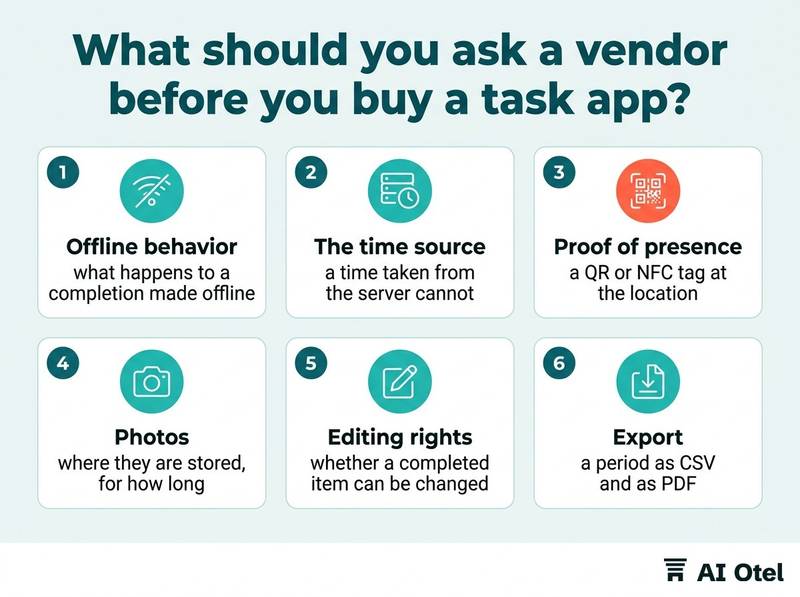
Offline is the first question, because stairwells, basements and plant rooms have no signal. Ask what happens to a completion made with no connection, when it syncs, and what the record shows if two people complete the same task.
The time source matters more than it looks. A time taken from the device can be changed by changing the device clock; a time taken from the server cannot. Ask which one the export shows.
Proof of presence is a choice, not a default. A QR or NFC tag at the location, or a location check, proves the person stood there. Decide whether you want it, and tell staff why, before you switch it on. Photos need a policy before they need a feature: where they are stored, for how long, who can see them, and whether a photo can be deleted after the fact.
Editing rights decide whether the record is worth anything. Ask whether a completed item can be changed or deleted, by whom, and whether the template carries a version and a date. Export must work without the vendor: a period as CSV and as PDF, including the person, the time, the template version and any late or back-filled entries.
ChecklistTen questions to send in writing before the demo
- Does the app work with no signal, and what happens to a completion made offline?
- Is the time stamp taken from the server or from the device?
- Can a completed item be edited or deleted, and by whom?
- Is the template versioned with a date, and can an old version be produced?
- Where are photos stored, for how long and who can see them?
- Can we export a period as CSV and PDF without asking you?
- Who owns the data, and what do we get back when the contract ends?
- How is the price counted: per user, per device or per site?
- Which languages does the interface run in?
- What are the support hours and the response time, and who do we call at 03:00?
For the last question, keep the vendor support sheet for who to call and when next to these answers, and read how we describe what is built and what is not if you want a model for plain answers to hard questions.
Who owns the checklist, and who may change it?
The department accountable for the outcome owns the list; IT runs the tool and the vendor supplies it. Give every list one named owner and a written rule for who may add, change or retire an item.
The owner is the manager who has to answer when the round is missed: the housekeeping manager, the chief engineer, the security manager. Not IT, and never the vendor.
Change control is simple to write and easy to skip: additions approved by the owner, deletions logged with a reason, and a template version with a date so you can show which version was in force on the night of an incident.
Completed records are never edited. A correction is a new entry that names the original and gives the reason, the way accounting treats a mistake as a reversing entry rather than an erasure. Involve the people who do the round: items that no longer matter should be struck out by the shift that carries them, or the list gets ticked without being read.
Review each list quarterly and after every incident. An incident review that changes nothing on the list is a missed lesson. Name lists so they can be found: one list, one name, one owner, one place. Two lists with the same purpose is how a property ends up with two versions of the truth.
Key pointOne list, one owner, one version
If two people can change a checklist and nobody records the change, the record proves nothing about the night it was used.
Phone, tablet or wall screen: what should staff carry?
Match the device to where the list is completed: a shared phone for rounds that move, a tablet for a fixed station, a wall screen for status nobody types into.
A shared phone suits rounds. It needs a fast user switch, a PIN or a badge, so the record shows the right person, plus a charging routine at shift change and a lockable cupboard.
A tablet suits a fixed station: the housekeeping office, the pool, the kitchen pass. It stays charged, is harder to lose and is easier to read for a list with photos. A wall screen suits live status, not data entry: which rooms are ready, which rounds are open. Nobody stands at a wall to type a note.
Personal phones are the cheapest option on paper and the most complicated in practice: reimbursement, breakage, data use and the right to disconnect all need a written rule before you rely on them. For a fuller treatment, read company devices, personal phones and the rules for both.
Set guest-facing rules: where a device may be used, whether it goes into a guest bathroom, how it is wiped, and that a guest or their belongings are never photographed.
TipWalk the round with the device before you buy
The stairwell, the basement plant room and the pool plant room decide both the device and how much offline behavior you actually need.
How do you run a one-checklist pilot?
Pick one list that must be proven, agree a written success test before you start, and run it for two weeks against the paper records from the month before.
Choose by evidence need, not by length. The fire door round or the pool check teaches you more in two weeks than a long housekeeping list that nobody disputes.
Write the success test first and share it with the team: every round has a name and a time, every failure has a photo or a note, every defect reaches the maintenance queue on the same shift, every missed round is recorded as missed with a reason.
Copy the paper list, then cut it. The first screen version should be shorter than the paper one, with one tap for a pass and words only for a failure, or staff will tick without reading. Do not run paper and app in parallel for long: double work is the fastest way to lose a shift, and a short overlap at the start is enough.
Baseline from last month's paper sheets: how many came back incomplete, how many defects were found, how long the round took. Those three numbers are your comparison. Talk to the night shift separately; they are the people the record protects and the people most likely to be blamed when something is missed.
Checklist
- Pick one list that must be proven.
- Write the success test and share it with the team.
- Copy the paper list, then cut it so the first version is shorter.
- Run it for two weeks across every shift, night shift included.
- Compare with last month's paper sheets on incomplete rounds, defects found and time taken.
- Decide, record the decision, and tell staff what changed.
A pilot that ends in silence teaches the team that the next one is optional. When defects found in the round become work orders, turning a checklist defect into a maintenance work order is the next link in that chain.
What should the export and the audit record contain?
The export must let someone outside the hotel answer who did what, when and on which version of the list, without the vendor's help.
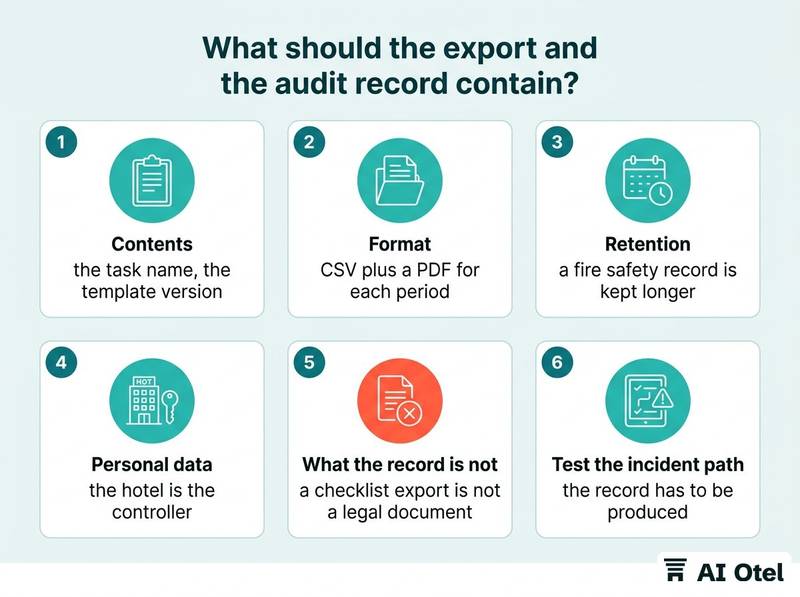
Contents: the task name, the template version and its date, the person, the server time, pass or fail, the note, a photo reference, and a mark for anything completed late or entered after the fact. Format: CSV plus a PDF for each period. Test the export before you sign, and keep one copy outside the tool so a contract ending does not take the history with it.
Retention should follow the list: a fire safety record is kept longer than a minibar check. Write the period down per list type and delete on schedule rather than by accident.
The record contains staff performance data, so access and retention are personal data questions under the privacy law that applies where your hotel operates. Photos can capture guests and their belongings, which is also personal data, and the hotel is the controller: set what may be photographed and for how long, and confirm your own case with a legal adviser.
Know what the record is not. Guest identity reporting requirements vary by country and are separate from operational checklists: a task app does not replace them, and a checklist export is not a legal document. Confirm which reporting duties apply to your property with a legal adviser.
Test the incident path: after a fire door failure or a guest complaint, the record has to be produced in an hour, not a week. Ask a colleague who has never used the tool to find one night's round. If the defect becomes a work order, the record should land where the asset list already lives rather than in a second silo; check whether the hotel operating system that holds the guest record, built and ahead of launch, can take it before you add another tool.
NoteA checklist record is a management record
It supports an insurance claim, an internal inquiry or a guest complaint; it does not replace the hotel's legal records.
When is paper still the right tool?
Paper stays right for one-off lists, lists that need drawing or long free text, areas with no signal and no device, and any list where the act of writing is the point.
One-off work, such as a seasonal deep clean or a single event setup, does not justify a template; building it costs more than the list will ever return. Lists that need a sketch, a floor plan or a paragraph also stay on paper: a handover note to the next manager is written to be read, not ticked.
Small teams where the manager sees the work keep paper too: in a small property, the round and the conversation are the same thing. And a basement plant room with no coverage and no budget for hardware is a paper room; pretending otherwise produces back-filled records.
Always keep a fallback. When the system is down, the printed list is completed and entered later, marked as entered later, never as done at that time. The final test is the same as the first: if nobody asks for the record and the list feeds nothing, paper is cheaper and honest.
What to do next
Pick one list this week, the one you would most hate to be asked to prove, write the success test on a single page, and run it for two weeks before you buy anything. The sections above fit together as one chain: choose by evidence, ask about the record, give the list an owner, match the device to the round, test small, and make sure the export survives the vendor. Paper keeps its place at the end of that chain, not at the start.
Frequently asked questions
Is a shared spreadsheet a digital checklist?
It is a shared record, not a task app. It has no offline use in a stairwell, no per-item time stamp, no photo evidence, and anyone with the link can rewrite history. It is fine for planning a small team's week; it is weak as proof of a round.
Can staff complete a round after the fact if they forgot?
Record it as missed with a reason, not as done. A system that lets a round be completed later with no mark destroys the value of every other entry. Decide the rule before the pilot and say it out loud, so nobody is punished for telling the truth.
Do we need one tablet per housekeeper?
No. Count devices per shift, not per person: shared phones with a fast user switch for rounds that move, tablets at fixed stations such as the housekeeping office, the pool and the kitchen pass. A wall screen shows status and takes no input.
What about photos taken inside guest rooms?
A photo can capture a guest or their belongings, which is personal data under KVKK (Law No. 6698), and the hotel is the controller. Photograph the defect, not the room; restrict who can see photos, set a retention period, and confirm your own case with a legal adviser.
How long should a digital checklist be?
Shorter than the paper version it replaces. One tap for a pass, words only for a failure, and a maximum number of items agreed with the owner. If the round takes longer on the screen than on paper, staff will tick without reading.