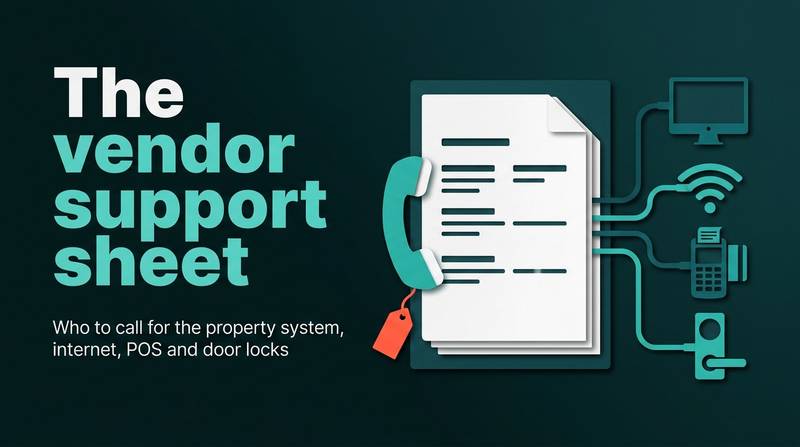
The vendor support sheet: who to call for the property system, internet, POS and door locks
A hotel vendor support contact sheet lists vendors, support hours and contract numbers for critical systems. This guide explains how to build, test and maintain one so night staff can act fast when systems fail.
AI draft · awaiting editorial review
Contents
Key takeaways
- A system belongs on page one only if its failure stops a guest checking in, paying or entering a room; everything else goes on page two.
- Each line needs the contract or customer number, because that is what a vendor's call center uses to find the account and the service level.
- The sheet must exist on paper in at least two places, because the copy stored inside the system that failed is the copy nobody can open.
- Name at least two people per system who may call, and give the night shift authority to report a fault, not to approve spending.
- Test one number a week in daylight and write down who answered, so the sheet is a tested document rather than a hopeful one.
A hotel vendor support contact sheet is one page that lists, for each system in the hotel, the vendor, its support hours, the contract or customer number, what the contract covers, a named escalation contact and the date of the last test call. It is printed and kept offline, so the night manager can use it when the network is down.
It is 02:00, the key card encoder has stopped issuing cards, and the night manager is holding a phone with a switchboard number that closes at 18:00. The number was correct two years ago, when someone wrote it on a sticky note and stuck it inside a drawer. After reading this guide you will know exactly which systems belong on the sheet, what each line must contain, where to keep the paper copies, who is allowed to call, how to test the numbers and how to log every call so the next contract negotiation has facts behind it.
Which systems belong on the vendor support sheet?
Put a system on page one only if its failure stops a guest checking in, paying or entering a room. Everything else goes on page two, where a fault can wait until morning.
Page one holds the systems that stop the hotel: the property management system (PMS, the software that holds reservations, the front desk and the guest bill), the internet line and the firewall that sits behind it, the payment terminal and the bank or provider behind it, the door locks and the key card encoder that writes the cards, and the point of sale (POS) terminals in the restaurant and bar. Page two holds the systems that inconvenience: televisions, telephony, the camera system, the Wi-Fi controller, spa and activity booking tools, energy management, and the lift, which belongs to its maintenance firm rather than to the hotel's IT supplier.
One system often needs two lines. The lock hardware and the software that issues keys may come from different companies, and so may the PMS and the server or hosting it runs on. Write both, and say in the line which one to call for which symptom. Give every line an internal owner: a person's name and mobile, not a department, because the first call is often not to the vendor at all but to the colleague who knows the account.
Leave off any vendor you cannot tie to a contract or an account. A number without an account behind it is a number that will not answer at night. Keep the sheet to one printed page per group. A list that runs to four pages gets filed, and a filed list is not a support sheet. If you are not sure what systems the hotel actually runs, start from the hotel IT inventory and network map that lists every system.
Checklist
- Page one, stops the hotel: PMS and its hosting
- Internet line and firewall
- Payment terminal and its provider
- Door locks
- Key card encoder
- Restaurant and bar POS
- Page two, can wait: televisions; telephony; cameras; Wi-Fi controller; spa and activity booking; energy management; lift (maintenance firm)
- For each line, the internal owner's name and mobile
What fields does each line need?
Each line needs nine fields: the system and its version, the vendor's legal name, the support hours, a primary and a backup number, the contract or customer number, what the contract covers, a named escalation contact, the hotel's internal owner and the date of the last test call.
The contract or customer number is the field people skip and the one that matters most. A vendor's call center routes on it: without it, the agent opens a new, unlinked record and the service level in your agreement does not follow the call. Support hours decide what happens at 02:00. Write the hours and the time zone exactly as the contract states them, and add a plain note on whether calls outside those hours are included, charged separately or simply not answered.
The escalation contact must be a person with a name and a direct number, agreed with the vendor in advance, not a second hotline. Ask the account manager to confirm in writing who that person is and when they can be reached. Write what is not covered as carefully as what is: cabling, guest devices, staff training and spare parts are common exclusions, and knowing them at 02:00 stops an argument at 09:00.
Note whether the vendor may connect remotely and who at the hotel authorizes it. That single line prevents both a blocked repair and an unannounced login, and it connects directly to the wider question of who may reach your hotel systems through vendor remote access. Record the language the support line answers in, if it is not the hotel's first language, and the reference the vendor uses for the account, which is sometimes different from the invoice number.
| Field | What to write | Why it matters |
|---|---|---|
| System and version | Name and version string as shown on screen | The agent knows what you are running |
| Vendor legal name | The contracting entity, not the brand on the box | Contracts bind the legal entity |
| Support hours | As in the contract, with time zone, plus out-of-hours terms | Decides what happens at 02:00 |
| Primary and backup number | Two numbers, tested | One may be closed or busy |
| Contract or customer number | The reference the call center routes on | Ties the call to your service level |
| Covered and not covered | Remote support, on-site visit, parts, exclusions | Stops arguments in daylight |
| Escalation contact | A named person with a direct number | A hotline is not an escalation |
| Internal owner | A person's name and mobile | The first call is often internal |
| Last test call | Date and who answered | Proves the line still works |
Where should the sheet be kept so it works when the network is down?
On paper, in at least two places, plus an offline copy on a phone. The copy stored inside the system that has failed is the copy nobody can open.
Print the sheet and keep one copy at the reception desk and one in the night manager's folder. Add a third in the network cabinet, so whoever is standing in front of the equipment has the numbers in hand. If you have not yet made the cabinet itself a place someone can work in, see the network cabinet and small server room: labels, power and access.
Keep a copy as an offline note on the duty phone, and one in the manager's cloud drive for editing. The phone copy is for reading; the drive copy is for updating. Put the version date and the name of the person who last updated it at the top of every page. Two undated versions in circulation is worse than one old one, because nobody knows which is true.
Name one owner for the sheet and one deputy. Updates arrive from many directions, and a document with many editors quietly stops being accurate. Reprint after every change, and destroy the old printouts: a stale page in a drawer is the most common reason a correct number is never called. Keep the sheet next to the emergency contact list and the downtime procedure, not in a general admin folder, so it is found by the person who needs it rather than by the person who filed it.
TipLaminate one copy and hang it inside the network cabinet door
When the internet is down, the cabinet is exactly where someone will be standing. Print the sheet in large type, laminate it, and it survives the coffee and the torch.
Who is allowed to call the vendor, and what should they have ready?
Name at least two people per system, tell the vendor who they are, and give the night shift authority to report a fault but not to approve spending. Then make sure they call with facts, not with a description of the mood.
Vendors commonly accept a request only from people named on the account. If the night manager is not on that list, the first call of the outage is spent proving who they are, so add the night manager and one deputy to the account before you need to. Separate reporting from spending: the night shift should be able to open a ticket at any hour, but approving an on-site visit, a part or an extra charge should need the duty manager or the IT lead.
Have the facts ready before dialing: the contract or customer number, the system name and version, the exact error text or a photo of the screen, the time the fault started, how many guests are affected, and what has already been tried. Give a callback number and the name of the person on shift, and write down the vendor's ticket number before the call ends. Without that number the next call starts from zero.
Set one rule for the night team: report, do not repair. Improvised fixes on a locked system, a payment terminal or a lock controller create a second problem that is harder to explain in the morning. Record the time of the first call. It is the only evidence of how long the hotel waited, and it is what a service-level discussion later turns on.
Checklist
- Contract or customer number
- System name and version
- Exact error text or photo of the screen
- Time the fault started
- How many guests are affected
- What has already been tried
- Callback number and the name on shift
- The hotel's own downtime step already started
- During the call: the agent's name and the ticket number
- After the call: the promised response time
How often should you test the numbers?
Quarterly, one system per week, in daylight, with the result written on the sheet. A number that has never been called is a guess.
Spread the work: one system a week means the whole sheet is checked in a quarter without anyone losing an afternoon to it. Call in daylight and ask a simple question: whether the contract and customer number are still on the account, and what the current support hours are. You are testing the route, not the friendship.
Write the date and the name of whoever answered. A line with a recent date is trusted at 02:00; a line with no date is tried second. Re-test immediately after any contract renewal, any change of account manager, any merger or rename of a vendor, and any change of the hotel's own IT lead.
Delete lines for vendors the hotel no longer uses. Old numbers cost time at exactly the moment time is short, because someone will try them first. Keep the test calls short and polite, and never run them during a live incident. A test that becomes a complaint teaches the vendor to route your calls slowly.
NoteThe quarterly test is also the moment to confirm the escalation contact by name
Account managers change without notice, and the person named on last year's sheet may now be at another company.
How do you log every call and its result?
One log, one line per call, with the vendor's ticket number, the promised response time and what actually fixed it. The log turns a pile of incidents into a case for the next contract.
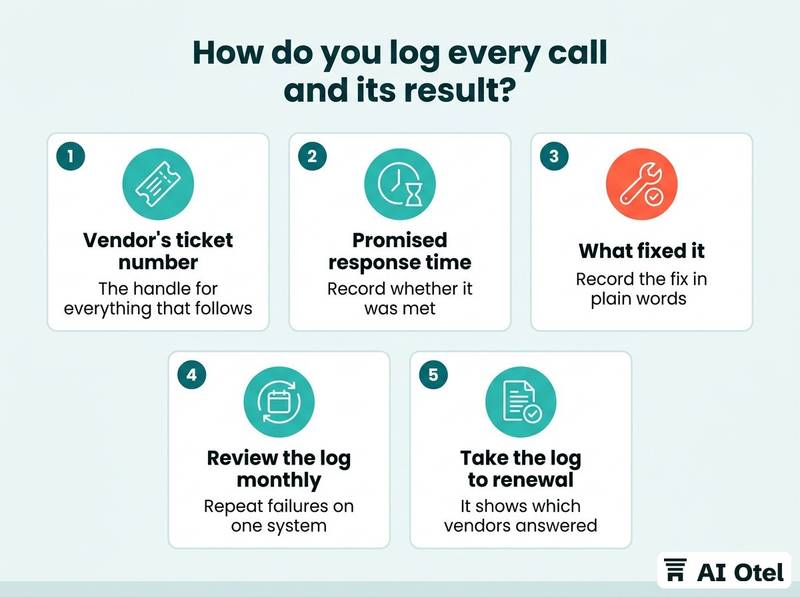
Log the basics: date and time, system, who called, the vendor's ticket number, the promised response time, the time the fault was cleared and what fixed it. The ticket number is the handle for everything that follows: escalation, credit for a missed service level and any later dispute all begin with that reference.
Record whether the promised response time was met. A pattern of misses is a fact you can put in front of an account manager; a memory of misses is an opinion. Record the fix in plain words, because the same fault usually returns, and next time the night manager can try the known step before calling.
Review the log monthly for repeat failures on one system. Three visits for the same symptom is a signal to look at the contract, the hardware or the process, not at the shift. Take the log to renewal. It shows which vendors answered, which ones sent someone, and which ones only sent an invoice, and it pairs naturally with a scoring checklist for evaluating hotel suppliers.
What does a starter sheet look like?
Five rows, filled in by hand this week, then tested one at a time. The example below is illustrative only; your own contract terms and numbers replace every cell.
Start with page one only: PMS, internet and firewall, payment terminal, locks and key card encoder, restaurant POS. Page two can wait a month. Fill each row from the contract, not from memory or from the sticker on the device. Where the contract is silent on hours or escalation, ask the vendor to confirm in writing and add the reply to the file.
Mark every cell you could not fill. An empty cell is a question for the account manager, and it is better asked in daylight than discovered at 02:00. For example, a row might read: door locks, the lock vendor, support Monday to Friday 09:00 to 18:00, contract number on the invoice, escalation to the named account manager, last tested on a date you wrote down. Your terms will differ, and the sheet should say so.
Print the filled page, put the date on it, and give a copy to the night manager before the next weekend shift.
| System | Vendor | Support hours | Contract no. | Escalation | Last test |
|---|---|---|---|---|---|
| PMS and hosting | To be confirmed | To be confirmed from the contract | To be confirmed | To be confirmed | To be confirmed |
| Internet line and firewall | To be confirmed | To be confirmed from the contract | To be confirmed | To be confirmed | To be confirmed |
| Payment terminal | To be confirmed | To be confirmed from the contract | To be confirmed | To be confirmed | To be confirmed |
| Door locks and key card encoder | To be confirmed | To be confirmed from the contract | To be confirmed | To be confirmed | To be confirmed |
| Restaurant and bar POS | To be confirmed | To be confirmed from the contract | To be confirmed | To be confirmed | To be confirmed |
What to do next
Build page one this week with the five systems that stop a guest checking in, paying or entering a room. Fill each row from the contract rather than from memory, and test one number before the next weekend. The sheet, the test date and the call log are one habit: the sheet says who to call, the test proves the number still works, and the log proves whether the call was answered.
Frequently asked questions
Should the vendor support sheet be digital or on paper?
Both, for different jobs. Paper at the reception desk, in the night folder and inside the network cabinet is what works when the network or the PMS is down. A digital copy in a shared drive is what gets edited and kept current. Keep the version date on both so nobody works from an old page.
What if the vendor's support line is closed at night?
The sheet must show the hours honestly, so the night team knows before dialing whether the call will be answered. Where the contract includes out-of-hours cover, the escalation contact is the route. Where it does not, the hotel needs its own written step for the first hours, such as manual key issue or a manual bill, agreed in advance with the duty manager.
How many people at the hotel should be able to call a vendor?
At least two per system: the person normally on shift and a deputy, usually the night manager or the IT lead. Vendors often accept requests only from people named on the account, so the list has to be shared with the vendor, not just kept at the hotel. Reporting a fault and approving a cost should be two different permissions.
Does the support sheet replace the service contract?
No. The contract is the legal document; the sheet is a one-page summary of its contact terms, kept where people can reach it in seconds. The sheet should carry the contract or customer number so the two can be matched, and any conflict is settled by the contract, not by the sheet.
What should the night manager do first when the PMS is down?
Start the hotel's own downtime step, note the time, and call the vendor with the facts ready: contract number, system and version, the exact error, when it started, how many guests are affected and what has been tried. Write down the ticket number and the promised response time, then log the call in the morning.