Hotel email that reaches the inbox: SPF, DKIM and DMARC in plain words
SPF, DKIM and DMARC are the three DNS records that let receiving servers verify your hotel's emails. This guide explains what each record does, how to inventory your senders, and how to test your setup before guests notice failures.
AI draft · awaiting editorial review

Contents
Key takeaways
- SPF, DKIM and DMARC answer three different questions: who may send for the domain, whether the message was changed on the way, and what a receiver should do when a check fails.
- Google's email sender guidelines say to set up SPF or DKIM email authentication for sending domains; for senders of 5,000 or more messages a day to Gmail accounts, they add SPF and DKIM together and DMARC for the sending domain (Google Workspace Admin Help, "Email sender guidelines", 17 November 2026).
- A hotel's mail leaves from more systems than the hotel can name on the spot, and every one of them has to appear in the records.
- Start DMARC in monitoring mode, read the reports for a while, and only then move to a policy that blocks failing mail.
- Authentication decides whether a message is allowed, not whether it is wanted; content and list quality still decide the inbox.
SPF, DKIM and DMARC are the three DNS records of email authentication: they let receiving servers check who may send as the hotel. SPF lists allowed senders, DKIM signs each message, and DMARC sets the policy and the reporting address. Google's sender guidelines ask every sender to set up SPF or DKIM, and senders of 5,000 or more messages a day to Gmail accounts to set up SPF, DKIM and DMARC (Google Workspace Admin Help, "Email sender guidelines", 17 November 2026).
A guest says the confirmation never arrived. The booking exists, the payment cleared, and the message is either in a spam folder or was refused outright. The cause is usually not the hotel's writing but three records missing from its own domain. After reading this guide you will know what SPF, DKIM and DMARC each do, which systems send mail in your hotel's name, and exactly what to ask your domain or IT provider to set, test and review.
Why do hotel confirmation emails end up in spam?
Most often because the receiving mail server cannot confirm that the message came from the hotel's domain, so it falls back on reputation and content to decide. The receiving server asks two questions before it decides: is this machine allowed to send for this domain, and has the message been changed since it was sent. A domain that publishes no answers leaves the server with nothing but its own reputation data, which a small hotel domain rarely has.
Hotel mail leaves from many places at once. The property management system sends confirmations, the booking engine sends vouchers, the newsletter tool sends offers, the reservations mailbox sends replies, and the website form sends through a server the web agency owns. Each is a separate sender the domain has never vouched for.
The same gap lets someone else send as the hotel. Without a published policy, a receiving server cannot separate a real confirmation from a copy carrying a payment link, and past guests are the usual target. Forwarding breaks the sender check too: a guest who forwards a confirmation to a colleague can fail the check even though the original was fine, because the forwarding server is not on the list. A signature on the message survives forwarding better than the server list does.
Write down the symptom before touching a record: which message, from which system, to which provider, and whether it landed in spam or disappeared. A page of these turns a vague complaint into a testable list. One caution: authentication is not a delivery guarantee. A correctly signed message that nobody wants, sent to a list assembled years ago, still goes to spam.
What do SPF, DKIM and DMARC each say, in one line?
SPF lists the machines allowed to send for the domain, DKIM signs each message so a change shows, and DMARC tells the receiver what to do when either check fails and where to report.
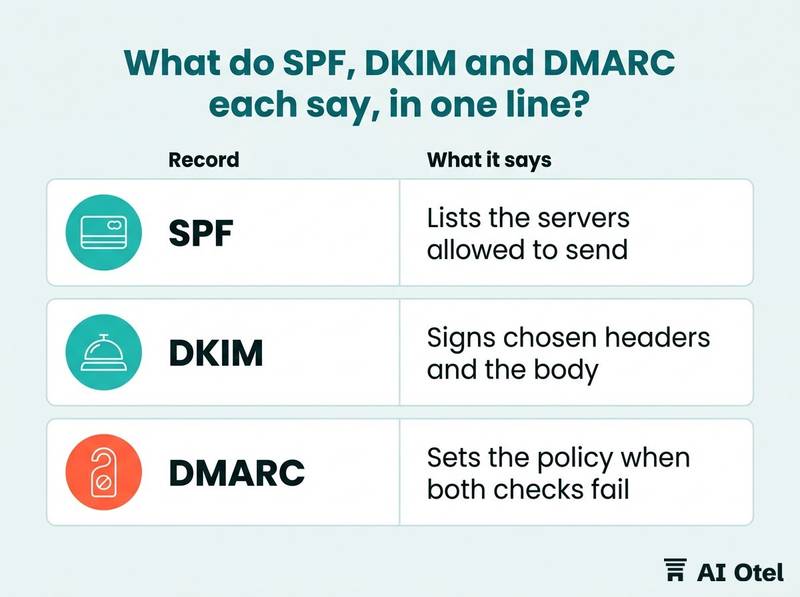
SPF is one text record in the domain's DNS that names the sending servers, often through an include statement supplied by a sending provider. The receiver compares the machine that connected against that list. It checks the envelope sender rather than the From line the guest sees, so it can pass on a message that still shows another address.
DKIM is a signature. The sending system signs chosen headers and the body with a private key, and publishes the matching public key in DNS under a selector name. The receiver verifies the signature, and a message changed on the way fails.
DMARC is the policy. It sits on the domain, names the addresses that receive reports, and says what a receiver should do when a message fails both SPF and DKIM in alignment with the From domain: nothing, treat it with suspicion, or refuse it.
Alignment is the part hotels miss. SPF or DKIM must match the domain in the visible From line, not just any domain. A provider that sends with its own domain in the envelope can pass SPF and still fail DMARC.
Google's email sender guidelines (opens in a new tab) say to set up SPF or DKIM email authentication for sending domains; for senders of 5,000 or more messages a day to Gmail accounts, the same guidelines ask for both SPF and DKIM and for DMARC on the sending domain, whose policy may be set to none (Google Workspace Admin Help, "Email sender guidelines", 17 November 2026). None of the three makes mail wanted, repairs a stale list, or stops someone registering a lookalike domain. They answer one question: is this message authorized by the domain it claims to come from.
| Record | What it says | Where it lives | What it does not do |
|---|---|---|---|
| SPF | Lists the servers allowed to send for the domain | A text record in the domain's DNS | Does not check the visible From line |
| DKIM | Signs chosen headers and the body with a private key, verified against a public key | A DNS record under a selector name | Does not say what to do when it fails |
| DMARC | Sets the policy when both checks fail in alignment, and the reporting addresses | A DNS record on the domain and on subdomains | Does not authenticate anything by itself |
Which systems send email in the hotel's name?
Every system that puts the hotel's domain in the From line is a sender, and the list is longer than most hotels expect. Walk the guest journey and write down each message: booking confirmation, prepayment link, voucher, pre-arrival offer, in-stay message, invoice, thank-you and review request, cancellation, newsletter. For each message record four things: the system that sends it, the From address, the domain in that address, and who can change its settings. The PMS, the booking engine, the newsletter tool, the payment provider, the review platform, the website contact form, the reservations mailbox and the sales team's own mailbox are all candidates.
Separate transactional from marketing. Confirmations and invoices belong on the main domain; offers and newsletters are usually better on a subdomain, so a bad campaign cannot damage the stream guests depend on. Each subdomain needs its own records.
Look for the hidden senders: a website contact form that sends through the web host, a booking widget that sends through its own service, a group sales tool nobody remembers buying. These are the ones that fail after a policy is tightened.
Know which messages are not yours. Online travel agencies and travel agencies send from their own domains; the hotel cannot and should not authenticate them, but reservations staff should know which guest messages come from where so a complaint reaches the right party. Ask each provider which domain appears in the From line and whether it signs with its own selector. A provider that sends on the hotel's behalf with its own domain will fail alignment no matter what the hotel publishes.
For the post-stay sequence itself, in the right order from the thank-you to the review request, see post-stay emails in the right order.
ChecklistSender inventory checklist, one line per message type
- Booking confirmation: system, From address, From domain, who controls the settings, DKIM selector if any
- Prepayment or payment link: same five fields
- Voucher or travel document: same five fields
- Pre-arrival offer: same five fields
- In-stay message: same five fields
- Invoice or e-document: same five fields
- Post-stay thank-you and review request: same five fields
- Cancellation or modification notice: same five fields
- Newsletter and campaigns: same five fields
- Website contact form replies: same five fields
- Group and corporate correspondence: same five fields
What should the hotel ask its domain or IT provider to set?
Hand over the sender list and ask, in writing, for three records and a reporting address, with the exact text and a rollback kept on file. Establish who controls the domain first: the registrar account, the DNS host and the logins. If a web agency holds them, ask for the zone and for the changes in writing. A domain the hotel cannot enter is a domain it does not control. If this is unfamiliar ground, start with who owns the domain and its logins.
The request has four parts: an SPF record that includes every sender on the list; a DKIM key for each sending system that supports its own selector; a DMARC record that starts in monitoring mode with a reporting address the hotel can read; and the removal of senders nobody uses.
Keep SPF short. Each include costs a lookup, the standard caps how many lookups one check may make, and a chain of includes fails as surely as a missing record. Every tool added later makes the record longer.
Do not move to a blocking policy before the inventory is complete. A strict policy with a forgotten sender in the list blocks real confirmations, and the guest does not complain; the guest simply does not arrive. Ask for the records as text the hotel keeps: the exact value, the date, who changed it, and how to put it back. DNS changes are small and reversible, but only if someone wrote down what was there before.
Make the provider commit to the maintenance. A new tool means a new record, and that belongs in the contract and in the renewal calendar, not in a conversation after the first failure.
NoteA note you can send as it stands
"We are setting up email authentication for our domain. Please (1) confirm who controls our DNS and give us a copy of the current records; (2) publish an SPF record that includes these senders: [list]; (3) publish a DKIM key for each of them and tell us the selector; (4) publish a DMARC record in monitoring mode with reports to [address]; (5) send us the exact text of every record you changed, with the date and the previous value."
How do you test the records before guests notice?
Send real messages through every sender on the list to a small set of mailboxes you control, and read the authentication result recorded in each message's headers. Test per sender, not per domain: a confirmation from the PMS, a voucher from the booking engine, an offer from the newsletter tool and a reply from the reservations mailbox each travel a different path.
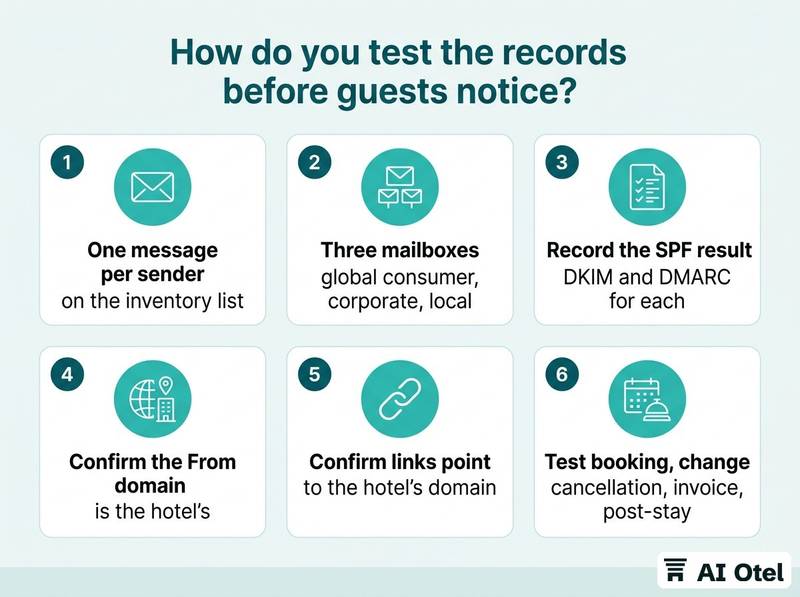
Use several mailboxes: one at a global consumer provider, one at a corporate mail system, one at a local provider. A message that passes at one can fail at another, and the guest's mailbox is the only one that matters.
Read the headers. The receiving system writes the SPF, DKIM and DMARC result into each message; ask the provider to show you where, and keep a screenshot per sender and per mailbox. Test the whole guest path, not one template: booking, modification, cancellation, invoice, pre-arrival offer, post-stay mail. A system that only sends on cancellation is easy to forget until a guest cancels.
Check the links and the display name as well. A confirmation whose buttons point at a domain the hotel does not own looks wrong to a guest and to a filter. Do it on a quiet weekday with a named person on each side and a rollback ready, and record the result on one page: sender, date, result at each mailbox, who fixed what.
ChecklistTest checklist
- One message per sender on the inventory list
- Three mailboxes: global consumer, corporate, local
- Record the SPF, DKIM and DMARC result for each
- Confirm the From domain is the hotel's
- Confirm links point to the hotel's domain
- Test booking, change, cancellation, invoice and post-stay
- Repeat after any record change
How do you read the reports and fix what fails?
The reports name every server that sends as the hotel, so the job is to read them on a fixed date and match them against the sender list. Aggregate reports arrive at the address in the DMARC record, commonly once a day, in a machine format. Someone has to own reading them, or a monitoring service has to; an address nobody opens is decoration.
What they show: which addresses and domains sent as the hotel, how many messages, and whether they passed. An unknown sender is either a tool nobody added or someone using the hotel's name.
The usual failures have known fixes: a new tool missing from SPF; a provider that changed its sending addresses; a rotated DKIM key whose new public key was never published; a forwarded message that fails SPF and passes DKIM; a marketing tool sending with its own domain and failing alignment.
Decide per unknown sender: add it to the list, or leave it failing and let the policy stop it. Both are decisions, and doing nothing is how a policy stays in monitoring mode for years. Tighten the policy only after a stretch of clean reports, and keep the reporting address afterwards. The reports are how the hotel learns that something changed.
Put two dates in the calendar: a monthly look at the reports, and an annual check that every sender on the list still exists and still sends. Access belongs there too: whoever can change DNS can redirect the domain's mail, so the registrar and DNS accounts need two-step sign-in, and the review dates belong in the software contract renewal calendar.
TipOne page, one owner, one date a month
Keep one page with the sender list, the date of the last report read, the open failures, and who is fixing each. Review it on the same date every month.
What to do next
Write the sender list this week, send the note with it, and put the first report review in the calendar. The records themselves are small and reversible; the discipline of keeping the list true is what keeps confirmations arriving. When you evaluate a new system that will send mail in the hotel's name, whether a hotel operating system or a marketing tool, ask the vendor one question before signing: which domain appears in the From line, and how does the system sign its messages. How a vendor handles guest data and access controls is worth asking in the same conversation; a plain-language trust and security overview is what a good answer looks like.
Frequently asked questions
Does SPF alone stop someone spoofing our domain?
No. SPF checks the machine that connected against the envelope sender, and it breaks when a message is forwarded. Someone can still put the hotel's address in the visible From line. DMARC is the record that ties the checks to the From domain the guest sees and sets a policy for what happens when they fail.
Can the hotel set these records itself?
It depends on who holds the DNS account, not on technical skill: the records are short text entries and every change can be reversed. If an agency holds the account, ask for a copy of the zone and for the changes in writing. Keep the previous values before anything is edited.
Will authentication keep our newsletter out of spam?
It removes one reason for filtering and it is necessary, but it is not sufficient. Content, list quality, complaint rates and unsubscribes still decide placement. A signed message that nobody wants still lands in spam.
Should marketing email use a separate domain?
A subdomain for campaigns is common practice, so a bad send cannot damage the confirmation stream guests depend on. Each subdomain needs its own records and its own policy. Decide once, write it down, and add every new tool to the right list.
Sources
- Email sender guidelines (opens in a new tab)Google Workspace Admin Helpsupport.google.com
- Email sender guidelines (opens in a new tab)Google Workspace Admin Helpsupport.google.com