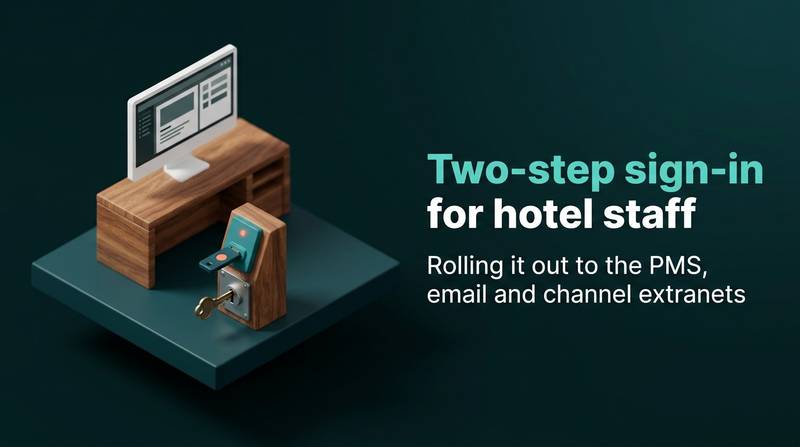
Two-step sign-in for hotel staff: rolling it out to the PMS, email and channel extranets
Roll out two-step sign-in by risk, starting with owner and manager accounts. Learn to replace shared logins, choose the right second factor, and manage recovery paths.
AI draft · awaiting editorial review
Contents
Key takeaways
- Two-step sign-in only works when the second factor belongs to one named person, so shared desk logins have to become named accounts before the rollout reaches reception.
- Start with the accounts that can change rates, move money or reset other passwords: the owner and manager profiles, the hotel mailbox and the channel extranets.
- An authenticator app or a hardware key is stronger than a text message, which can arrive on a phone that has been reassigned, borrowed or left in a drawer.
- A lost phone is a support task, not a security failure: write the recovery path, name two people who can reset a factor, and test it before anyone needs it.
- Access that is not removed on the leaving day makes every other control decorative, so the monthly review belongs on the same calendar as contract renewals and seasonal hiring.
Two-step sign-in, also called two-factor authentication, asks for a password plus a second proof, usually a code from an app or a small hardware key, before an account opens. Roll it out by risk: owner and manager accounts first, then the hotel mailbox, then channel extranets, then the front desk.
The reception password is written on a card in the drawer, three people know it, and it also opens the channel extranet where the rates live. Two-step sign-in is the cheapest fix available, but only if it is rolled out in the right order. This guide gives you that order: how to tier your accounts, which second factor to hand to whom, how to run a two-week rollout, what to do about the shared desk login, and how to keep the whole thing working after the first month.
Which hotel accounts should get two-step sign-in first?
Start with the accounts that can move money, change rates or reset other passwords: the owner and manager profiles, the hotel mailbox and the channel extranets. The front desk comes later, because it needs a different fix first.
Sort accounts by what a stolen password allows, not by how many people use them. The dangerous rights are the quiet ones: changing rates and availability, issuing refunds, exporting guest data, resetting other users, redirecting payments or payout details. An account with ten logins a day and no special rights is a smaller problem than an account nobody signs into but that can reset every other password.
Owner and general manager accounts go first. They usually carry the widest rights and are used least often, so the extra step costs almost nothing in daily work. The hotel mailbox goes second: it is the reset route for almost every other service, so whoever holds it can take over the rest without ever guessing a password. Channel extranets go third. An extranet is the web page a channel or agency gives the hotel to load rates, close dates and read guest messages; a stolen login there can move prices and speak to guests in the hotel's name. Then come the PMS desk and back-office accounts, then everything else: Wi-Fi administration, social accounts, review replies, the booking engine back end.
One rule settles most arguments: any account that can reset another account's password sits one tier above the accounts it can reset. Write the list down before you enroll anyone. The list is the project; the enrollment is only the execution. If you are also rethinking who can do what inside the property management system, PMS user roles and permissions: a setup checklist covers that layer separately.
| Tier | Accounts | What a stolen password allows | Who holds it today |
|---|---|---|---|
| 1 | Owner and general manager profiles in the PMS and booking engine | Change rates, refund, export guest data, reset other users | Owner, GM |
| 2 | Hotel mailbox | Reset passwords on nearly every connected service | GM, sometimes a manager |
| 3 | Channel extranets and agency panels | Move rates, close dates, message guests | Reservations or revenue manager |
| 4 | PMS reception and back-office users | Check guests in, post charges, see guest data | Front desk shift leads |
| 5 | Wi-Fi admin, social accounts, review replies, domain and website logins | Publish in the hotel's name | Whoever set them up |
Which second factor should hotel staff use: app, hardware key or text message?
Use an authenticator app as the default for most staff and a hardware key for the few accounts that can change rates or move money. Treat text messages as a fallback, not as the standard.
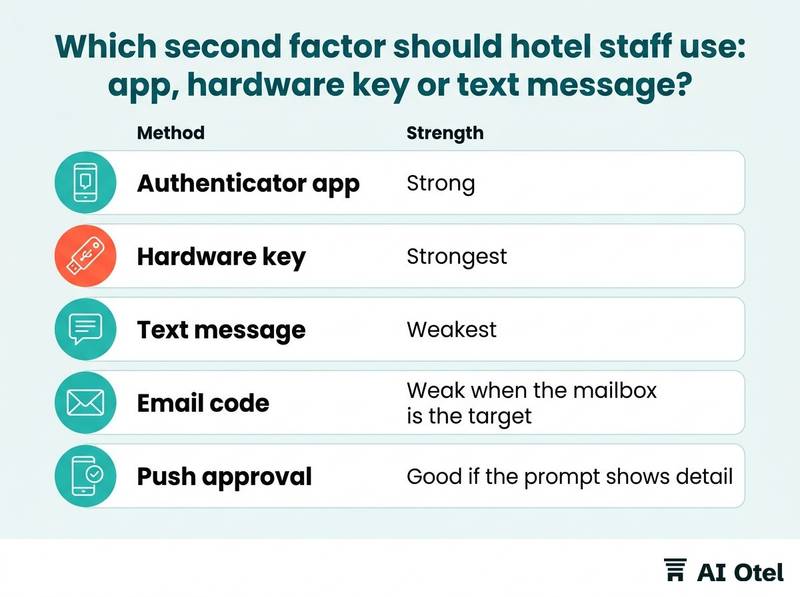
An authenticator app generates the code on the phone itself. It works without signal, costs nothing per message and survives a weak connection in a basement office; the cost is one smartphone per person and a re-enrollment whenever that phone changes. A hardware key is a small device that plugs into a USB port or is tapped against the phone. It has no battery and no app, it is the strongest of these options, and it is also the easiest to leave in a drawer; issue it to the owner, the general manager and the finance login.
A text message is the easiest method to start and the weakest to rely on. The code can arrive on a number that has since been reassigned, on a phone that is shared at the desk, or not at all when the signal drops. An email code is barely a second factor when the mailbox is the thing you are protecting: never use email as the second step for the mailbox itself. Push approval on a phone is convenient but trains people to tap approve without reading; if you use it, make sure the prompt shows what is being approved, with the amount or the change visible.
Passkeys, where the system offers them, prove possession without a typed code and are a good default for the accounts that support them. Check whether each system you use offers passkeys before you rely on them, and keep a second method recorded for each person. Record one method per person in the account list: support then knows who holds what, and the monthly review has something to check. If your mailbox is the tier-two account it should be, its deliverability is a separate question covered in SPF, DKIM and DMARC in plain words.
| Method | How it works | Strength | Cost and friction |
|---|---|---|---|
| Authenticator app | Code generated on the person's phone | Strong | Needs a smartphone; re-enroll on phone change |
| Hardware key | Physical device tapped or plugged in | Strongest | Purchase per key; easy to mislay |
| Text message | Code sent to a phone number | Weakest | Depends on signal and who holds the number |
| Email code | Code sent to a mailbox | Weak when the mailbox is the target | Never for the mailbox itself |
| Push approval | Tap to approve on a phone | Good if the prompt shows detail | Habit of approving blindly |
In what order should a hotel roll out two-step sign-in?
Roll out by tier across two weeks: owner and managers in week one, mailbox and channel extranets in week two, and desk accounts only after the shared-login problem is solved.
Days one and two: inventory every account that touches rates, money or guest data, and write down who holds it. Expect to find accounts nobody remembers creating. Days three and four: enroll the owner, general manager, revenue manager and whoever administers IT, and hand hardware keys to the accounts that can change rates. Day five: test the recovery path with one real person before anyone else depends on it. A recovery plan that has never been run is a guess.
Week two covers the hotel mailbox, then the channel extranets one at a time, checking after each that the team can still load rates, answer messages and take reservations. Announce the date, the method and the name of the person to call. A rollout that slips without a new date teaches staff that the rule is optional. Keep a written exception list with a name, a reason and a review date on every line: an exception without a name becomes a permanent hole. Front desk accounts come last, and only once named accounts exist. Enrolling a shared login first means five people sharing one code, which is a password with extra steps.
ChecklistTwo-week checklist
- Account inventory written and tiered
- Owner, general manager, revenue manager and IT enrolled
- Hardware keys issued for rate and money accounts
- Recovery path tested with one person
- Hotel mailbox enrolled
- Each channel extranet enrolled and daily work re-checked
- Staff told the date, method and support name
- Exception list opened with names and review dates
- Front desk deferred until named accounts exist
What do we do about the shared front desk login?
Replace it with named accounts, one per person, and keep a shared account only where the software forces it, protected by a device that stays in the office and a written rule about who uses it.
A shared login breaks the logic of two-step sign-in: the second factor has to belong to one person, so either the code is read aloud across the desk or the phone sits in a drawer for anyone to pick up. Named accounts give you something the shared login never could: a record of who changed the rate, who cancelled the booking, who checked the guest in. That record matters more after an incident than before one.
If the PMS charges per user, compare that cost with one manipulated rate or one refunded stay. The decision is commercial, not technical, and it belongs to the general manager. Where a shared account is unavoidable, such as a reservations inbox or a night audit profile, put the second factor on a device that stays in the office rather than on a personal phone, and log who used it and when. Handle the device at shift change like a key: it goes on the handover sheet, with a name next to it. Never let a shared account be the reset route for named accounts; that single setting undoes the whole rollout. A fuller routine for shared logins across extranets, Wi-Fi and social accounts is in a routine for shared passwords in hotels.
Watch outA shared second factor is not protection
A second factor shared by five people is a password with extra steps. If the code is read aloud or the phone stays in a drawer, the account is no safer than before, and the hotel now believes it is protected.
What happens when a staff member loses or changes their phone?
Nothing breaks if the recovery path was written first: a named person revokes the old device, issues a one-time recovery code, and logs the event.
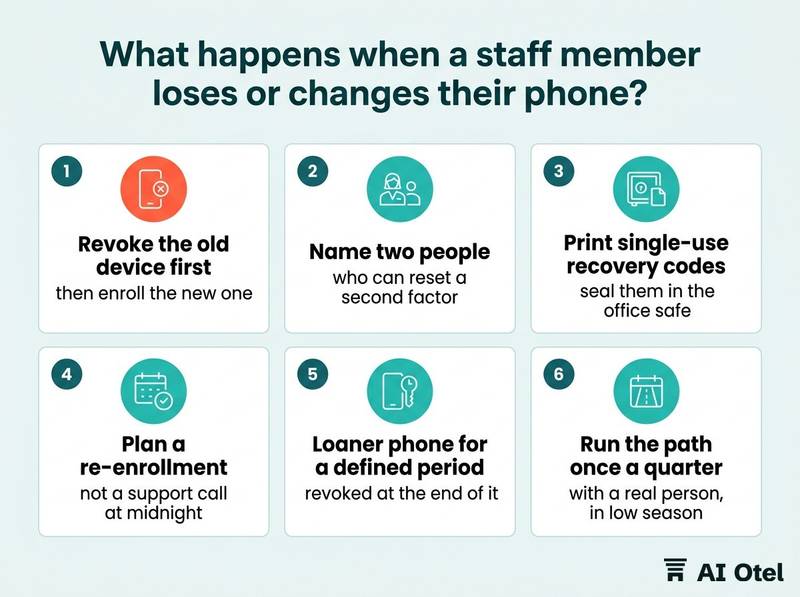
Before the rollout, name two people who can reset a second factor, plus one backup each. A single administrator who is on leave turns a lost phone into a locked-out department. At enrollment, print single-use recovery codes for each person and seal them in the office safe. Codes stored in the person's own mailbox are useless the moment that mailbox is the account being recovered.
Order matters: revoke the old device first, then enroll the new one. Enrolling first and revoking later leaves a window where two devices both work. A new phone with the same number does not carry the authenticator entries across, so plan a re-enrollment, not a support call at midnight. A loaner phone is acceptable for a defined period, recorded on the account list and revoked at the end of it. Run the path once a quarter with a real person, in low season, so the first live use is not during a full house.
TipBuild a recovery kit before the rollout
It holds ten printed single-use codes per person, sealed in the safe; the names of two administrators and their backups; a one-page script for the person taking the call; and a log with date, person, device revoked, device enrolled and who did it.
How do we keep two-step sign-in working after the rollout?
Review it monthly against the staff list: who has access, who left, which exceptions are still open, and whether anyone has quietly turned a factor off.
Once a month, export the user list from the PMS, the mailbox and each extranet, and compare it with the current staff list. Remove leavers the same day they leave, not at the next review; the same-day routine is described in closing a leaver's access on the same day. Walk the exception list line by line: each exception needs a name, a reason and a review date, and the ones whose reason has gone should be closed.
Count enrolled accounts against active accounts. The gap is the work still to do, and it is the only number this review needs. Watch for factors that have been re-shared in practice: a code read aloud, a phone left on the desk, a screenshot of recovery codes sent in a staff chat. Put the review on the same calendar as contract renewals and the seasonal staff intake, so it does not depend on anyone remembering; that calendar is covered in the software contract renewal calendar. Record the review: the date, who checked, what was removed. That record answers the question of who had access, whether it comes from a guest, an insurer or a lawyer. If a data question does reach you, answer it with your records and take your own case to a legal adviser: two-step sign-in lowers the chance of unauthorized access, it is not a compliance certificate.
ChecklistMonthly review checklist
- User list exported from PMS, mailbox and each extranet
- Compared with the staff list; leavers removed
- Exception list walked and closed where the reason has gone
- Enrolled accounts counted against active accounts
- Shared-factor habits checked at the desk
- Review recorded with date and name
What to do next
This week, write the account list: every login that touches rates, money or guest data, who holds it, and which second factor it will carry. Enroll the owner and the general manager from that list, test the recovery path with one of them, and let the rest of the rollout follow the tiers rather than the loudest request.
Frequently asked questions
Does two-step sign-in slow the front desk down?
At the desk the extra step happens once per shift, not once per guest, because the factor is confirmed when the person signs in. The real cost is the rework of shared logins into named accounts, and that cost is paid once.
Is a text message good enough for hotel staff?
It is far better than a password alone and it is the weakest of the common methods. Use it as a fallback, and not for the hotel mailbox or for an account that can change rates, where an app or a hardware key belongs.
Can reception share one phone for the second step?
Only where the software forces a shared account. The device then stays in the office, is signed over at shift change, and is logged. Everywhere else, one named account per person is the point of the exercise.
What if a channel extranet only offers text messages?
You use what the extranet offers. Put the number on a SIM the hotel controls rather than a personal phone, record who holds it, and check what the extranet's terms say about account security before the season starts.
Does two-step sign-in make the hotel compliant with data protection rules?
No. It reduces the chance that someone else signs in with a stolen password, which is one risk among several. What your own obligations require, and how they apply to your property, is a question for your legal adviser.