Guest preference notes and AI: what to record, what never to store and what the assistant may read
Record only stated preferences in fixed fields, never health data or opinions. Ensure AI assistants summarize safely while a person confirms any guest communication.
AI draft · awaiting editorial review
Contents
Key takeaways
- A note earns its place only if it records something the guest said or did, with a date, in a field someone will actually read before arrival.
- Free text is where health details, opinions about people and guesses end up; a short list of fixed fields stops most of it before it is typed.
- An AI assistant may read the structured fields and summarize them for staff, but it must never write a note about a guest on its own.
- Old notes are the real risk: one hour spent on the longest notes removes most of what should never have been written.
- Access should follow the job, so the desk sees service notes while billing disputes and incident reports stay with the manager and the folio.
A guest preference note is a short, dated record of what a guest asked for, held in a fixed field rather than free text. Record preferences the guest stated, never health, religion, nationality, opinions or guesses. Let an AI assistant read the structured fields and summarize them, but a person confirms anything sent to the guest.
Open the profile of a repeat guest and read the free-text box. Somewhere in it there is usually a sentence nobody should have written: a diagnosis, a guess about money, or an opinion about a person who is coming back next summer. Guest preference notes are where AI in a hotel will read first, so the quality of what is in them decides the quality of what the assistant says. After reading this, you will have a field list, a rewrite standard for bad notes, an access rule, a one-hour cleanup plan and a five-minute rule for the desk. For the wider legal frame, see KVKK (the Turkish Personal Data Protection Law) for hotels: notices, consent, staff access and retention.
Why do guest preference notes help, and where do they go wrong?
Notes help when they carry a small set of stable preferences to the person who acts on them. They go wrong when the free-text box becomes a diary of guesses, complaints and details the hotel never needed.
The mechanism is simple: a note is worth keeping if it changes an action before arrival, such as the room assignment, the welcome language or a late check-out offer. A note nobody reads costs attention and adds risk. If it does not change anything, it is a habit, not a record.
Free text has no format, no owner and no expiry date, so it collects whatever the last person felt like typing, and it stays there for years. Three harms follow. The hotel holds data it did not need to collect. A wrong inference gets repeated back to the guest, for example, "I see you always take a twin." And access quietly spreads to everyone on the property, because free-text boxes are usually visible to every login.
Keep one distinction clear. A preference is something the guest asked for. A fact about the person, such as a health condition, a religion or a family situation, is something the hotel was never asked to hold. A note tied to a named person is personal data, so the same questions apply as to any other record: why do we hold it, who reads it, and when do we delete it.
Key pointThe test for every note
A note earns its place only if it changes an action. If nothing changes when you delete it, delete it.
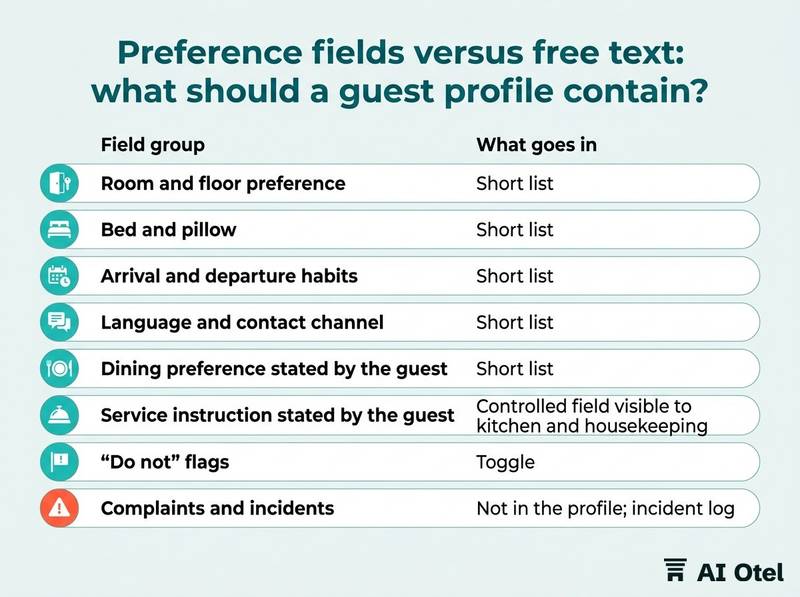
Preference fields versus free text: what should a guest profile contain?
A profile should contain a short list of fixed fields filled from what the guest said, and almost no free text. Fields can be read by a colleague at 7 a.m. and by software; a paragraph can only be read by the person who wrote it.
Every field carries a source and a date. "Said at check-in on 12.03" is a record. "We think" is not. Some information belongs somewhere else and should never be copied into the profile: complaints go to an incident log, billing disputes to the folio, identity data to the reservation and the guest identity notification flow.
Allergies and accessibility needs are the hard case. If the hotel must act on them, record only what the guest said, as a narrow service instruction in a controlled field that the kitchen and housekeeping can see, never as a narrative about the person's condition. Fixed fields also make the profile usable by software: a field can be filtered, counted, expired and permissioned. A paragraph cannot.
Start with eight fields and add one only when a real request cannot be served without it. Every added field is a new thing to protect, review and delete.
| Field group | What goes in | Who may edit | Review |
|---|---|---|---|
| Room and floor preference | Short list | Front desk | 24 months |
| Bed and pillow | Short list | Housekeeping and desk | 24 months |
| Arrival and departure habits | Short list | Front desk | 24 months |
| Language and contact channel | Short list | Front desk | Until the guest changes it |
| Dining preference stated by the guest | Short list | Restaurant and desk | 12 months |
| Service instruction stated by the guest (allergy, accessibility) | Controlled field visible to kitchen and housekeeping | Manager only | Every stay |
| "Do not" flags (do not disturb, do not offer an upgrade) | Toggle | Front desk | Until withdrawn |
| Complaints and incidents | Not in the profile; incident log | Manager | Per your retention decision |
| Identity and billing | Not in the profile; reservation and folio | Per system roles | Per your retention decision |
What should never go in a guest note?
Never write health details, religion, nationality used to explain behavior, opinions about the person, information about people who never spoke to the hotel, or a copy of identity documents.
Use the same five questions before typing: did the guest say this, does the hotel need it to serve them, would I read it aloud to them, does it expire, and does it already live somewhere else in the system. If any answer is no, do not type it.
Opinions are the most common problem. "Difficult guest" is a judgment that follows a person for years and biases every colleague who reads it before they meet them. Third parties are the second: a note about a spouse, a child or a colleague is data about someone who never gave it to the hotel and cannot correct it. Inference is not observation. "Big spender", taken from a room type, becomes a fact the moment it is written down, and the next colleague treats it as one.
Identity data copied into notes duplicates a record that already exists in the reservation and the guest identity notification flow, with weaker protection around the copy. Wherever possible, write the rewrite, not the deletion: a note that says what to do next time is useful; a note that says what kind of person the guest is, is not.
| Example note (illustrative) | Why it is a problem | Safe rewrite |
|---|---|---|
| "Diabetic, no sugar in the minibar." | Health detail the hotel does not need | "Asked for no sweet items in the minibar (said at check-in, 12.03)." |
| "Difficult guest, complained about everything last time." | Opinion about a person | "In July reported noise from the street; a room away from the street was offered and accepted." |
| "Russian couple, big spenders, tip well." | Nationality plus an inference about money | "Prefers receipts and messages in English. Books a suite." |
| "Guest's wife is pregnant, send fruit." | Health data about a third party | "Asked for a quiet room and a late check-out." |
| "Passport number copied here for the agency." | Duplicate identity data | "Agency booking; passport data is in the reservation and the guest identity notification flow." |
| "Argument with her husband in the lobby." | Private life, no service value | Delete; keep only "Asked to change rooms." |
Who may read a guest note, and how long should it stay?
Access should follow the job, not seniority, and every note should carry a review date. A note with no owner and no expiry is the one that causes trouble.
Split the roles. The desk and housekeeping need service notes to do their work. Billing disputes, incident reports and anything about a complaint belong to the manager and the folio. Know who opened a profile and when: a read log turns a leak from a suspicion into a fact you can trace.
A guest can ask what the hotel holds about them, and can object to a decision made by software alone, as explained in Decisions made by software: the right to object under KVKK, explained for hotels. You must be able to produce the note and explain it in plain words. Set a retention period per field group and write it down next to the field; a preference recorded four years ago is usually not a preference any more. This article does not state KVKK retention periods, so set yours with your data protection adviser and record the reasoning.
Deletion is a routine, not an event. A monthly sweep of expired notes takes minutes and keeps the profile honest. When a note is wrong, correct it rather than adding a second note that contradicts the first. Two conflicting notes are worse than one wrong one, because the reader picks whichever they saw first.
NoteThe explanation test
If you cannot explain a note to the guest it is about, it should not exist.
What may an AI assistant read, and what must a person check first?
An assistant may read the structured fields and the notes that pass the standard, and summarize them for staff. It should not be the first reader of raw free text, and it must never write a note about a guest on its own.
Scope the read. The assistant sees what the person using it is allowed to see, for that hotel only, not the whole database and not another property's profiles. Summarize, do not decide. "This guest asked for a high floor twice" is a summary of the record. "This guest will want a suite" is an inference the hotel should not act on automatically.
The stale-note problem is the real one. An assistant repeats what is written, so a wrong note becomes a wrong message faster and to more people than a colleague ever could. Anything that reaches the guest, such as a message, an offer or a room move, is confirmed by a person first. The assistant proposes; a person sends. Log what the assistant read and what it produced, so a wrong answer can be traced back to the note that caused it.
Keep the line between reading and learning clear. Reading a hotel's own notes to answer a staff question is not the same as a model trained on guests, and the second is not something to claim. For the wider frame, see Generative AI and KVKK for hotels: what to take to your adviser. Train staff on the boundary too: what they may paste into an outside AI chat tool is a separate policy question from what the hotel's own assistant may read, covered in Hotel AI policy: what staff may share with AI chat tools.
Watch outScale multiplies the note
An assistant that repeats a note repeats it at scale. Fix the note before you connect the assistant.
How do you clean up old notes in one hour?
Take the longest notes first, apply the same five questions to each, and rewrite or delete. An hour with two people is enough to clear a year of desk notes.
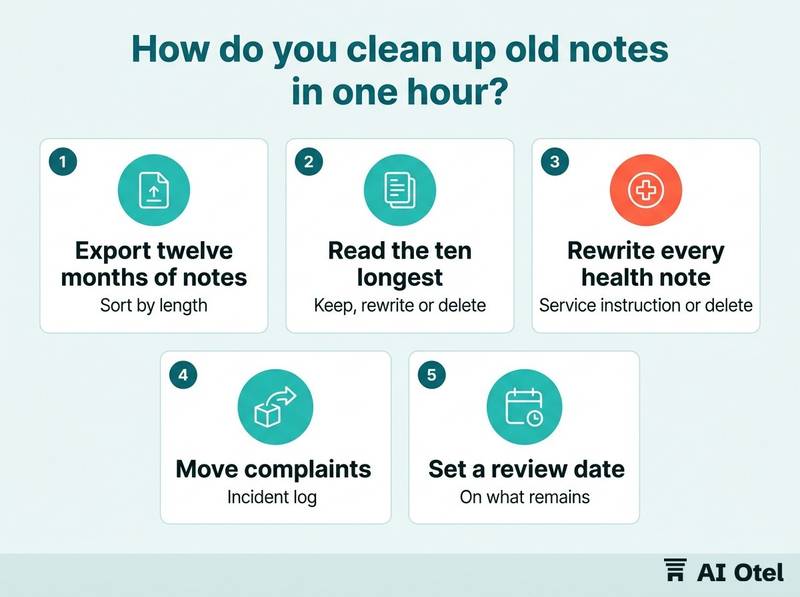
Export the last twelve months of notes and sort by length. Length is where the problems are: a two-line note is usually a preference, a paragraph is usually a story. Apply the five questions to each and force one of three outcomes: keep as it is, rewrite into a field, or delete.
Record what you deleted and why, in one line each. The decision then survives staff turnover, and the next person does not re-add the same guess. Look for patterns rather than individual notes: the same writer, the same field, the same kind of inference. A pattern is a training problem, not a data problem. Put a review date on everything you keep, and move the sweep into the monthly routine so it never becomes a project again. Finish by telling the desk what changed and why; a cleanup nobody explains is undone within a month.
ChecklistThe one-hour note cleanup
- Export twelve months of notes and sort by length.
- Read the ten longest and mark each one keep, rewrite or delete.
- Rewrite every health, religion or opinion note into a service instruction or delete it.
- Move complaints into the incident log and remove them from the profile.
- Remove copied identity data and point to the reservation instead.
- Set a review date on what remains.
- Write one line on what was deleted and why.
- Brief the desk at the next shift handover.
What is the five-minute rule for the front desk?
Write what the guest said, in one line, in the right field, with a date, or write nothing.
Print the rule and keep it at the desk. One sentence is enough, and it fits on the same card as the check-in steps. Three questions before typing: did they say it, will we act on it, and would I read it to them.
Where it goes matters as much as what it says. If there is no field for it, ask the manager to add one instead of using the free-text box as a shortcut. When a guest asks to see their notes, show them, explain them and correct them. That conversation is a test of the standard, not an exception to it. The manager reads ten notes at random each week, rewrites one in front of the team, and says why. Five minutes of that teaches more than an hour of policy.
TipThe surprise test
If the guest would be surprised to read it, it does not go in the note.
What to do next
This week, export the last fifty notes, apply the five questions to each, and rewrite or delete them before anyone connects an assistant to that data. The parts fit together as one standard: fixed fields instead of free text, a short list of what never goes in, access that follows the job, a review date on everything kept, and an assistant that reads and summarizes while a person confirms anything that reaches the guest.
Frequently asked questions
Can we keep a note saying a guest is allergic to nuts?
An allergy is a health detail, so the hotel should hold only what the guest said, as a narrow service instruction in a controlled field that the kitchen and housekeeping can see, never as a diagnosis or a guess. Tell the kitchen, put a review date on it, and confirm with your adviser how long to keep it and who may see it.
Is a guest's nationality sensitive data we cannot record?
The practical problem is not the label but the use. Recording nationality to explain behavior or spending is profiling, and it produces notes that are wrong about most individuals. Record the language the guest wants to be served in instead, which is what staff actually act on.
Can the AI assistant write notes back into the guest profile?
No. The assistant may summarize what is already there and propose a structured field value, and a person confirms it. Free-text notes written by software are the fastest way to fill a profile with inferences nobody can explain to the guest.
What do we do when a guest asks to see the notes about them?
Produce them, read them out in plain words, and correct anything wrong. A note you cannot explain is a liability rather than an asset, and a guest can also object to a decision made about them by software alone.
Do we need consent to keep preference notes?
It depends on the basis the hotel relies on and on how the note was made. A preference the guest gave to get better service is a different case from a profile built by staff inference. Take your own case and your notice wording to your data protection adviser rather than copying another hotel's form.