No-code automation tools in a hotel back office: what to automate, and what to leave alone
Discover which hotel back-office tasks are safe to automate with no-code tools and which require human oversight. Learn to define triggers, actions and ownership rules.
AI draft · awaiting editorial review
Contents
Key takeaways
- A no-code flow is a trigger, an optional condition and one or more actions; a connector is only the pre-built link that lets the tool reach another system.
- The safe first jobs read data and produce a copy or a message, so a wrong result costs minutes and reaches nobody outside the hotel.
- Payments, guest identity notifications, published rates and e-invoices can be prepared by a flow, but a person confirms them before anything leaves the building.
- Every flow needs one named owner, a name that says which systems it touches, and a pause switch held by someone other than the person who built it.
- When a flow starts writing back into the system of record, or becomes the only place a rule lives, it has outgrown the tool.
No-code automation links forms, sheets and mail through a trigger (the event that starts a flow) and an action (what the flow does). In a hotel back office, start with reminders, daily summary mail and file copies. Leave payments, guest identity data, published rates and invoices with a person who confirms.
Every morning someone at the hotel opens the same spreadsheet, copies last night's figures into it and mails it to four people. The job takes ten minutes and goes wrong about once a month. No code automation for hotel back offices can do the copying. The question is what else it should be allowed to touch. After reading this, you will be able to pick a first flow, test it, name an owner and know where the line is.
What are a trigger, an action and a connector?
A trigger is the event that starts a flow, an action is what the flow then does, and a connector is the ready-made link that lets the tool reach another system without anyone writing code.
Triggers are few and boring: a new row in a sheet, a submitted form, a scheduled time, an incoming mail, or a signal from another system that something changed. Actions are equally few: add a row, send a mail, copy a file, post a message, update a record. A flow is just these, run in order.
A condition or filter is not a trigger. It sits between the trigger and the actions and decides whether the actions run at all, for example only when the row's status column says closed. A connector hides the hard part of reaching another system: sign-in, field names and the paging of large results. It also hides the failure modes, which is why the run history matters more than the flow diagram.
Every run is recorded, with the time, the result and usually the data that passed through. That record is the closest thing a no-code tool has to an audit trail, and it is also a second copy of your data. Learn these four words and the rest of the tool is variation: trigger, condition, action, connector.
| Term | Plain meaning | Hotel back-office example |
|---|---|---|
| Trigger | The event that starts the flow | A new row appears in the maintenance request sheet |
| Condition | A test that decides whether the actions run | Only if the request is marked urgent |
| Action | What the flow does | Mail the duty engineer and add a line to the log sheet |
| Connector | The pre-built link to another system | The link that lets the tool read the shared mailbox |
| Run | One execution of the flow, with a start time and a result | The 06:00 summary that ran and sent two mails |
| Run history | The stored record of past runs and their data | The list you open to see why yesterday's summary never arrived |
Which back-office jobs are safe to automate first?
Start with jobs that read data and produce a copy or a message, where a wrong result costs a few minutes and reaches nobody outside the hotel.
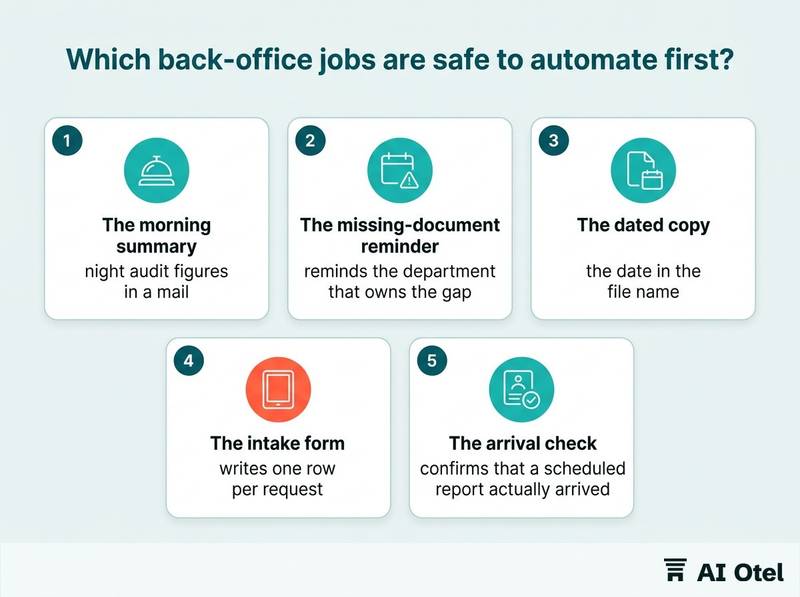
The morning summary is the classic first flow: take the night audit figures from the report the system already produces, put them in a mail and send it to a fixed list at a fixed time. The missing-document reminder checks a folder or a sheet for the documents a booking file should contain and reminds the department that owns the gap. The dated copy moves an export into a shared folder with the date in the file name, so the same file is never overwritten.
The intake form lets a department submit a request through a form that writes one row per request, instead of a phone call and a sticky note. The arrival check confirms that a scheduled report actually arrived, and says so when it did not. These jobs share a shape: they read, they copy, they notify.
The test for any candidate job is this: if the flow failed silently for a week, would anyone notice, and what would it cost? If the answer is "we would notice and redo ten minutes of work", it is a good first job. If you are choosing flows because PMS reports are not enough and exports or dashboards have taken over, the same test applies to whatever the flow feeds.
ChecklistBefore building a first flow, a department head ticks every line
- The flow only reads from systems and writes to a copy.
- Running it twice produces the same result as running it once.
- Nothing it produces is sent to a guest, an authority or a payment provider.
- A failure is visible within one working day.
- The output has one named reader who would miss it.
- Another person could rebuild it from a written description in an hour.
Which jobs should stay with a person?
Anything that moves money, touches a guest's identity document, publishes a price or issues a fiscal document should be prepared by a flow and confirmed by a person.
In Türkiye, every stay involves a payment, a fiscal document (an invoice or e-document), a guest identity notification (KBS) and personal data (KVKK). Each of those four steps has a consequence that a wrong row in a sheet cannot undo.
Money comes first: recording a payment, applying a refund or voiding a charge changes a guest's bill. A flow can gather the figures; a person posts them. Guest documents come second: identity data collected at check-in is the most sensitive record the hotel holds, and the capture and the notification belong inside the check-in flow, where a person sees what is being sent.
Rates and availability are an offer a guest can accept. A flow that writes a price into a channel without review turns a typing error into a contract. E-invoices are fiscal documents once sent; human review before sending is good practice, and it is also the point where a mistake is still cheap to fix. Messages to guests cannot be recalled, so let a flow draft them and a person release them, at least until the wording has been stable for months.
The rule is not "never automate". It is "automate the preparation, keep the decision".
Watch outThe four steps that keep a person in the loop
Payment posting: a wrong automated entry changes a guest's bill and takes a correction to undo. Guest identity notification: a wrong or duplicate submission to KBS cannot be unsent. Published rates: a wrong price on a channel is an offer a guest can accept. E-invoice sending: a sent invoice is a fiscal document. A flow may prepare any of these, but the confirmation stays with a named person.
Where does guest data go when a flow runs?
It goes wherever the connector sends it, and that is usually an account outside the hotel's own systems, plus a copy in the tool's run history.
Each connector is a copy. The moment a flow reads a reservation, that reservation exists in a second company's account, under that company's terms. The run history is the copy nobody remembers: it often stores the whole payload, including names and document numbers, for as long as the plan's retention allows.
The usual leaks are ordinary: a sheet shared by link, a shared mailbox, a test flow left running against live data. Reduce at the trigger. If the flow needs a room number and a time, do not hand it the whole reservation. Fewer fields in means fewer fields to protect, delete and explain.
Write the hotel's own rule: which fields may leave the hotel system, to which tool, for how long. That rule, not the tool's feature list, is what a new department head should be handed. The contract with the tool provider decides where the data sits and who else can reach it. Where the legal detail matters for your own case, your legal adviser confirms it.
NoteThree questions before you connect anything
Which fields does this flow actually need; if nobody can answer it today, the flow waits. Where does the tool store them and for how long; if nobody can answer it today, the flow waits. Who inside the hotel can open the run history; if nobody can answer it today, the flow waits.
The same discipline applies to vendors: before connecting any system, work through the data-handling questions we publish for any vendor.
Who owns a flow, what is it called, and how do you switch it off?
One named role owns it, its name says what it does and which systems it touches, and someone other than its author can pause it in under a minute.
Owner means a role, not only a person: front office manager, financial controller. People leave; roles stay, and the handover has a destination. Name the flow so a stranger can read it: department, system, purpose, version. A flow called "test 3" is a flow nobody will dare to turn off.
Keep a register, one row per flow, in a place the whole management team can open. Run flows under an account the hotel owns, not a personal mailbox; when the author leaves, the account and the flows survive. The pause switch has to work for someone who did not build the flow. Test it once, on purpose, and write down what breaks while it is off.
ChecklistReview each flow once a year against the job it was built for. Most stale flows are not wrong, they are answering a question nobody asks anymore. The register holds one row per flow with these fields
- Flow name.
- Owning role.
- The person who built it.
- Systems and connectors it touches.
- Which data fields pass through it.
- Trigger and schedule.
- Who receives its output.
- Where the run history lives.
- The pause procedure.
- Last review date.
- What happens to the job if the flow is switched off.
How do you test a flow before it touches real data?
Run it on a copy, with dummy records that include the awkward cases, and compare its output with what a person would have produced.
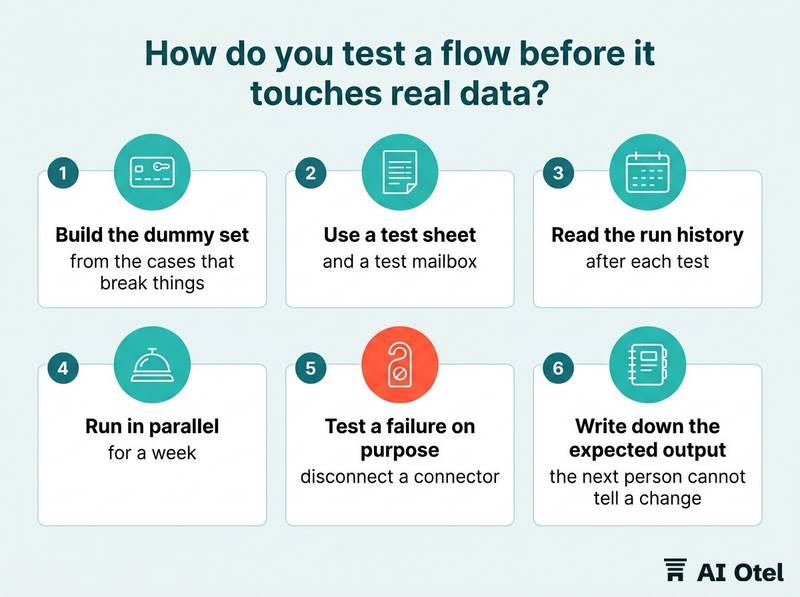
Build the dummy set from the cases that break things: a reservation with no mail address, a guest with two rooms, a name with characters the tool mangles, an empty night with no arrivals, a duplicate row. Use a test sheet and a test mailbox. A flow that mails the real distribution list during testing has already failed the ownership test.
Read the run history after each test. It shows what the tool stored, which is often more than you intended to send. Then run in parallel for a week: a person does the job as before, the flow does it too, and someone compares the two outputs daily.
Test a failure on purpose: disconnect a connector or revoke a credential, and see whether anyone notices and how long it takes. Write down the expected output. Without it, the next person cannot tell a change in the flow from a change in the numbers.
When does a flow outgrow the tool?
When it needs to write back into the system of record, when its failure carries a real cost, or when nobody can explain what it does anymore.
Read-only to write-back is the line. Copying figures out is a convenience; writing a rate, a charge or a status back into the hotel system is a change of record and belongs where the record lives. If the flow becomes the only place a rule exists, for example a deposit rule or a rounding rule, the rule is now invisible to everyone who does not open the tool. Move it into the system that owns the data.
Volume and rate limits arrive quietly. A flow that runs fine on a hundred rows a day may time out on a month-end export. Two flows that depend on each other are a system, and a system needs the things a flow does not have: a version, a test, an owner who is not on holiday.
The move is usually not to a bigger no-code plan but to a hotel operating system that holds reservations, billing and reports in one place, where the same logic sits next to the data it changes. Keep the small flows small. The ones that stay useful are the ones that never had to become important.
TipThe one-line decision rule
If the flow only reads, it can live in the tool. If it writes back, or if a person cannot explain it in one sentence, it belongs in the system of record. The same logic applies to channel connections, where delays and errors have to be visible; see how a channel manager connection works, with its messages, delays and errors.
What to do next
Pick one job this week. Write down its trigger, its action, its owning role and how to switch it off. Then run it beside the person who does it today for a week and compare the two outputs daily. The pattern behind every section here is the same: a no-code tool is good at moving and copying, and a person stays responsible for anything that moves money, identity, price or a fiscal document.
Frequently asked questions
Is no-code automation allowed under KVKK?
The tool is not the question; the fields, the recipient and the retention period are. The hotel decides which fields may leave its system, the contract with the provider sets where they sit, and the run history is a copy like any other. Where the detail matters for your own case, your legal adviser confirms it.
Can a no-code tool replace our PMS reports?
No. It can move, format and mail a report, but the numbers still come from the system of record. If the figure does not exist there, the tool cannot produce it, and a flow that recalculates a number in a sheet creates a second version of the truth.
What happens to the flows when the person who built them leaves?
Only what the register and the handover note say. Flows run under an account the hotel owns, the register names the owning role, and the description says what the flow does, which systems it touches and how to pause it. Without those three, the flows usually keep running until something breaks.
Do we need IT to approve a no-code tool?
A department head can own a flow, but the account, the connectors and the credentials should belong to the hotel and be approved once, centrally. Otherwise the hotel ends up with several tools, several copies of guest data and no list of either.
How do we know a flow has stopped working?
By making failure visible: a flow that sends a summary should also report when it fails, the output needs one named reader who would miss it, and the run history should be opened on a schedule rather than after a complaint. Silent success and silent failure look identical from the outside.