Planning a weekly hotel menu with an AI assistant: the cost limit, the stock on hand and the chef’s check
Use an AI assistant to draft weekly hotel menus, but rely on recipe cards and human checks for cost and allergens. This guide details the inputs, prompt structure, and verification steps needed to ensure accuracy and compliance.
AI draft · awaiting editorial review

Contents
Key takeaways
- The assistant drafts; the recipe card, this week's purchase price and a named person's signature decide what gets printed.
- Every dish on the draft must map to an existing standard recipe card, or it is a new item that needs costing and a trial before it reaches a menu.
- Cost per portion is rebuilt from the recipe card's quantities, the usable yield and the current purchase price, never copied from the draft.
- Allergen labels are written and signed off by a person from the recipe card and the supplier specification, with the assistant's column used only as a starting list.
- The assistant does not remember your hotel between sessions: the saved inputs, corrections and cost sheet are the memory.
Give a general-purpose AI assistant four inputs: the guest count range per meal, the stock on hand with use-by dates, a cost per portion ceiling and the allergen list. It drafts a week of menus. A person then checks every dish against the standard recipe card, recalculates cost per portion and signs off allergens.
The menu for next week is written on Thursday, the purchase order goes out on Friday, and by Tuesday the same three desserts have appeared twice and one main course costs more than the meal period allows. Nobody compared the draft against the recipe cards, the cold room or the price the supplier charged this month. This article gives you the working procedure for AI weekly menu planning in a hotel: the inputs, the prompt structure, and the three checks that stand between a draft and a printed menu.
What inputs does an AI assistant need to plan a week of hotel menus?
It needs the four things a sous-chef would ask for: how many guests to expect, what is already in the store, what a portion may cost and what must not appear on a plate. Everything else is context that improves the draft.
Guest counts go in as a range per meal period, a low and a high figure taken from the arrivals and occupancy forecast. A buffet must hold at the low end and stretch at the high end, and a single average number hides both problems. The same logic applies when setting buffet quantities from arrivals, not from habit.
Stock on hand is a dated snapshot: item, unit, quantity, use-by date and location, whether cold room, dry store or freezer. State the date and hour of the snapshot inside the prompt, because the assistant cannot see the store and will treat whatever quantities you give as current.
The cost per portion ceiling belongs to each meal period, in the currency you buy in, and is set by the F&B manager from the food cost budget. The assistant does not set ceilings; it works inside them. Add the allergen and dietary list your kitchen works to, plus the dietary patterns your guests actually ask for: vegetarian, vegan, gluten-free, no pork, halal.
Two more inputs prevent the classic failures. An exclusion list of themes and dishes served in the last two to three weeks makes repetition a decision rather than an accident. And kitchen reality, which stations are staffed on which night, what the equipment can hold and reheat, supplier delivery days and order cut-off times, keeps the draft inside what your line can actually execute.
ChecklistBefore the first prompt, tick these boxes
- Guest count range per meal period (low and high)
- Dated stock snapshot with units and use-by dates
- Cost per portion ceiling per meal period
- Allergen and dietary list
- Exclusion list of recent dishes
- Staffed stations and equipment limits
- Supplier delivery days and order cut-offs
No guest or staff personal data in the prompt.
How should the prompt for a week of menus be structured?
As one prompt with fixed blocks, asking for a table rather than prose, and asking the assistant to list every assumption it made separately from the menu.
Open with role and scope in one line: drafting a seven-day lunch and dinner cycle for a hotel kitchen, with no prices beyond those supplied. Write the constraints as a numbered block, one constraint per line, so a missing line is visible at a glance when the draft comes back wrong.
Fix the output format: a table with columns for day, meal period, dish, main ingredients, portion, cost per portion, allergens and station. Two drafts can then be compared column by column. State the price rule plainly: use only the unit prices given, and write "price needed" where a price is missing instead of estimating one.
| Prompt block | What goes in it | Why it matters |
|---|---|---|
| Role and scope | One line: seven-day lunch and dinner cycle | Sets the task's boundary |
| Guest count range | Low and high per meal period | Buffet must hold and stretch |
| Dated stock snapshot | Items, units, use-by dates, location | The assistant cannot see the store |
| Cost ceilings | Per meal period, in buying currency | Keeps the draft inside budget |
| Allergens and dietary | Kitchen list plus guest patterns | Prevents unusable dishes |
| Exclusion list | Last two to three weeks of dishes | Repetition becomes a decision |
| Stations and equipment | Staffed sections, holding limits | The line must be able to cook it |
| Output table format | Fixed columns, one row per dish | Drafts become comparable |
| Assumptions | Listed at the end, outside the table | Shows what the draft decided alone |
Run one day first, correct the format and the vocabulary, then ask for the week. A week in the wrong format costs more reading time than it saves. Ask for two alternatives for the two or three most expensive dishes, so a swap exists before the supplier confirms.
How do you check each dish against the standard recipe card?
Line by line: every dish on the draft must either match an existing recipe card or be flagged as a new item that needs costing and a trial before it can be printed.
The recipe card carries ingredients, quantity per portion, yield, station, skill level and plating. It is the only document that turns a dish name into a cost and an allergen list, which is why standard recipes and portion cost are how hotel kitchens price a plate. Compare the ingredient list the assistant wrote with the card: a missing stock, sauce, marinade or garnish changes both the cost and the allergen column.
Check the portion count against the card's yield. A recipe yielding 40 portions cannot serve a 300-cover buffet without a written production plan. Check the station and the skill: a dish that needs a section nobody staffs that night is not a menu item, however good it reads. Check holding time and equipment, because what sits on a buffet line for two hours must still be worth eating after two hours.
Treat a dish with no card as a decision, not a menu line: cost it, cook it once, taste it, then decide whether it enters the cycle. Record which dishes you changed and why. The corrections are the part of the week worth keeping.
How do you recalculate cost per portion instead of trusting the draft?
Rebuild the number from the recipe card, the usable yield and this week's purchase price, then compare it with the ceiling. The figure in the draft is an estimate built from whatever prices the prompt contained.
The formula is simple and unforgiving: for every ingredient in one portion, multiply the quantity by the unit price you are paying this week, from the invoice or the current supplier list, not from last season's file. Sum the results, then divide by the usable yield after trim and cooking loss. Where the prompt had no price, the draft's number is a guess: mark it, fill it in, and recost that dish before the menu is approved.
Key pointThe recosting formula in plain words
Cost per portion equals the sum of each ingredient's quantity multiplied by this week's unit price, divided by the usable yield after trim and cooking loss. Add the buffet allowance before comparing with the ceiling.
The buffet allowance matters because food produced and not eaten still costs money, so the plate cost is not the portion cost on a buffet line. Compare dish by dish against the ceiling, then the week's total against the food cost budget for those meal periods, in the same way food and beverage cost control in hotels works across the department.
When a dish is over the ceiling, the options are a smaller portion, a cheaper ingredient with the same technique, a different day part, or removal. The assistant can propose; the F&B manager decides. Recost again after the supplier confirms, because prices move between the draft and the delivery.
Who signs off the allergen labels?
A named person in the kitchen, every time, working from the recipe card and the supplier's specification. The assistant's allergen column is a starting list, not a label.
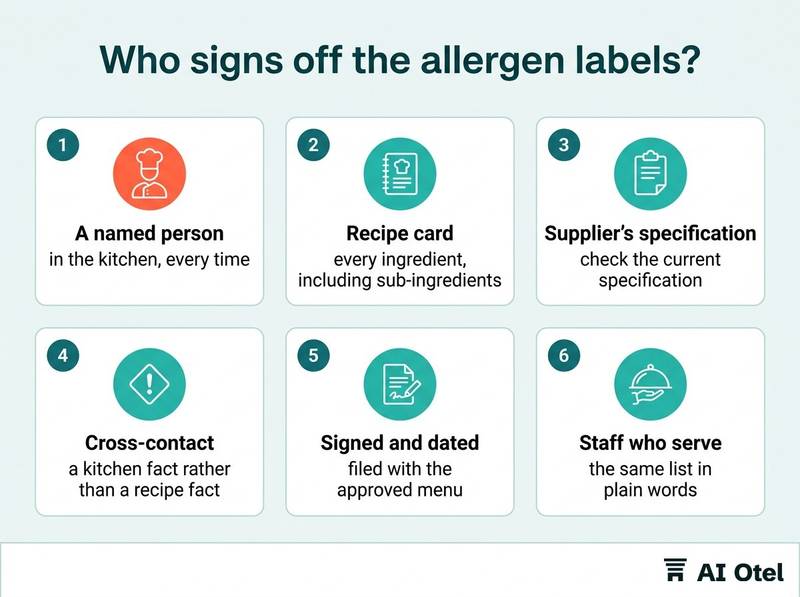
Build the list from every ingredient in the card, including sub-ingredients: stocks, sauces, dressings, marinades, bread, garnish, frying oil and shared fryers. Cross-contact is a kitchen fact rather than a recipe fact, so the label must reflect how the dish is cooked and served, not only what is in it. Supplier specifications change without notice, so check the current specification for bought-in items, not the copy in last year's folder.
The label printed for the buffet is signed and dated by a named person, and the sign-off is filed with the approved menu. Staff who serve and answer questions need the same list in plain words, plus one rule: if you do not know, say so and check.
Watch outThe assistant's list is not a label
An allergen list produced by an assistant is a draft of ingredients, not a finished label. The printed label carries the name and date of the person who checked it against the recipe card and the current supplier specification.
How do you stop a week of menus from repeating itself?
By giving the assistant an exclusion list of what was served in the last two to three weeks, then reading the draft as a guest would, day by day, before anyone approves it.
Set the cycle length against the average length of stay: a guest staying seven nights sees every dinner, so a seven-day cycle with no repeat inside it is the minimum. Repetition hides in components rather than dish names: the same rice, the same sauce base, the same garnish, the same three vegetables. Check by component, not by title.
Rotate the main protein and the cooking method across the week, and spread station load so one section is not buried on the same night every week. Theme nights are a planning tool: they fix part of the menu and free the rest, and they make the cycle visible to the guest. Use menu engineering's four groups to keep the mix balanced across the week rather than to chase a single bestseller.
What to keep with the approved menu
File the draft, the corrected menu, the dated stock snapshot, the cost sheet with this week's prices, the allergen sign-offs and the exclusion list together. Next week's planner starts from that file, not from memory.
What to do next
Start with one meal period rather than a week: take tomorrow's lunch, write the four inputs down, run the draft, and check it against the recipe cards with the cost sheet open. The pattern you build in that hour is the one you repeat every week: inputs, draft, recipe card check, recost, allergen sign-off, file. Save the inputs and the corrections alongside the approved menu, because that file, not the assistant, is what carries the knowledge into next season. If you want the menu plan to sit next to reservations, billing and reports in a hotel operating system, or to see what that covers in the PMS layer, those pages describe the scope.
Frequently asked questions
Can an AI assistant plan a hotel menu without standard recipe cards?
It can produce a plausible list of dishes, but without cards there is no portion, no yield and no cost, so nothing can be checked. Build the cards first, starting with the twenty dishes that appear most often in the cycle. The assistant is useful only once each dish name maps to quantities.
What should never go into a menu planning prompt?
Guest names, room numbers, reservation or contact records, dietary requirements tied to an identified guest, staff names and pay. Use aggregate counts and a dietary tally instead, and treat the prompt as an outbound document that may be stored outside your systems. Personal data protection rules apply to what you send, not only to what you store.
Does the assistant need to see live stock levels?
No. A dated snapshot with units and use-by dates is enough, and the date matters: the assistant cannot see the store, so it will treat old quantities as current. Refresh the snapshot each week before the draft. A snapshot also keeps the menu plan inside your own systems rather than opening a live connection.
What do you do when a supplier price changes after the menu is approved?
Recost the affected dishes with the new price, compare against the ceiling, and choose between substituting an ingredient, adjusting the portion or accepting the lower margin. Note the change in the file and tell the chef before service. The approved menu is a living document with a cost sheet behind it, not a fixed printout.
How long should a hotel menu cycle be?
Long enough that a guest staying the average length of stay does not see the same dinner twice. For a seven-night average, that means a seven-day cycle with no repeat inside it, plus rotation of components and cooking methods rather than only dish names. Shorter stays allow shorter cycles, but component rotation still applies.