Screens at the breakfast buffet: digital menu boards or printed cards
Learn how to choose between digital menu boards and printed cards for your hotel breakfast buffet. This guide covers cost, readability, update workflows, and fallback plans.
Contents
Key takeaways
- The cost of a buffet label is the update, not the medium: a card reprinted every morning costs staff minutes, a screen nobody updates costs trust.
- A screen at a buffet must be readable in daylight, so brightness and a matte surface matter more than size.
- Every screen needs a printed fallback kept outside the screen, because a frozen board shows yesterday's dish with today's confidence.
- Split the board by change frequency: fixed items on cards at the shelf, the daily change on one screen at the entrance.
- The allergen line is the hotel's own written rule; write it once, apply it to both media, and confirm your own duty with an adviser.
A digital menu board at a hotel buffet is a screen showing the day's dishes and their labels, updated from a content system rather than reprinted. Printed cards win where the board rarely changes; a screen wins where dishes, languages or allergen lines change daily. Most hotels do best with both: cards at the shelf, one screen at the entrance.
At 07:40 a guest asks whether the granola contains nuts. The card under the jar was printed when the recipe last changed three weeks ago, and the kitchen changed the recipe on Tuesday. This article shows you how to decide between a screen and printed cards, how to run both together, and what to do when the screen fails during service.
What changes at a breakfast buffet, and how often?
Four kinds of change: the daily board, the seasonal list, the supplier substitution and the mid-service swap when a dish runs out. Each moves at a different speed, and that speed, not the price of the hardware, decides between a screen and a card.
Sort every item into four buckets: fixed core (bread, butter, preserves, coffee), weekly rotation, daily specials, and the substitution that happens during service when a delivery arrives different or a dish empties. The label changes when the recipe changes, not when the menu changes: a granola that now contains nuts needs a new label even though the dish name stayed the same. The same logic applies to the whole hotel breakfast buffet item list, set-up and refills at peak.
Write the item list once, in one place, and let both media read from it. Two lists kept by two people drift apart within a week, and the drift shows up as a wrong label.
Count before you decide: take last month's breakfast sheets and count how many labels actually changed per day. That number is the whole argument. Also separate the buffet labels from the à la carte menu: a price change on the menu does not touch the buffet, but a dish that moves between them changes both. And plan for the item that disappears at 09:15: a screen update mid-service is usually slower than a marker on a blank card, so the fallback has to be physical.
| Item type | How often it changes | Better medium | Why |
|---|---|---|---|
| Fixed core (bread, butter, preserves) | Rarely, seasonally | Printed card | Reprint cost is near zero; a card cannot freeze |
| Hot dish or daily special | Daily | Screen at the entrance | One update reaches every language at once |
| Seasonal fruit | Weekly to monthly | Printed card | The change is planned and can be printed ahead |
| Substitution or sold-out dish | During service | Handwritten card or a staff line | A marker is faster than a login |
What should a buffet label say, and in how many languages?
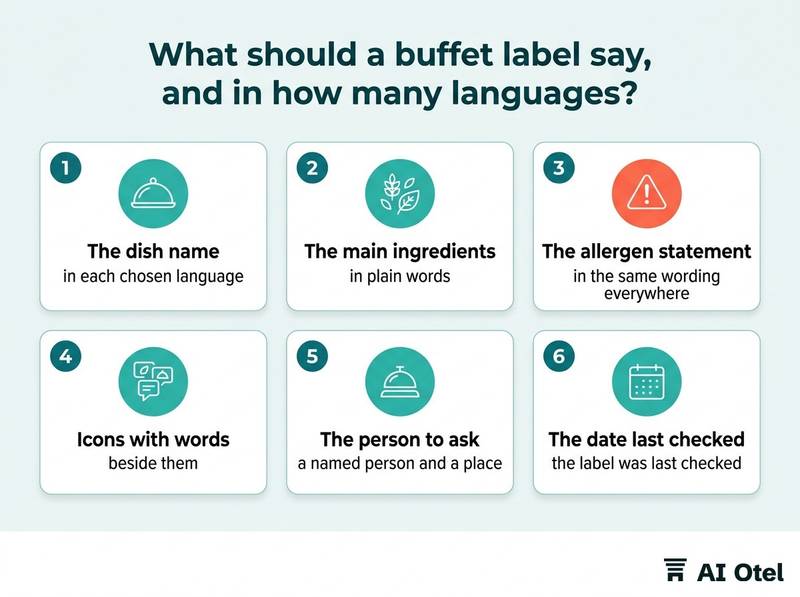
The dish name, the ingredients a guest needs in order to judge the dish, the allergen line and a clear way to ask a person. The language set follows your own guests, not the number of languages a screen can rotate.
Choose the languages from your own reservation mix over the last season, not from a template. A card holds fewer languages than a rotating screen, so decide the card's short list first. Translate the dish name and the allergen words, not the full ingredient list: a half-translated list reads worse than a short accurate one. The same principle applies to every sign in several languages for hotel guests.
Use icon plus word, never icon alone: an icon set the guest does not recognize is decoration, and a symbol without a word invites a guess. Test legibility at the real distance before you order anything: a card read at arm's length from a shelf needs larger type than a screen read from three meters away. Keep one term for one concept across cards, screens, the printed menu and the guest app, so a guest who reads two of them gets the same answer.
The allergen line is the hotel's own written rule. Write it once, apply it to every medium, and confirm your own labeling duty with an adviser. The same discipline belongs to the wider food allergies at hotel buffets: a guest safety routine. Replace "please ask our staff" with a named person and a place, because a guest with an allergy needs a destination, not a suggestion.
ChecklistWhat every buffet label carries
- The dish name in each chosen language
- The main ingredients in plain words
- The allergen statement in the same wording everywhere
- Icons with words beside them
- Markers for vegetarian, vegan, pork and alcohol where they apply
- The name of the person to ask
- The date the label was last checked
What does a screen cost to run at a buffet?
The panel is the smallest line. Mounting, power, brightness for a bright room, cleaning around food and the person who keeps the content right cost more over the screen's life than the hardware does.
Glare decides more installations than size does. A dining room with windows is far brighter than a shop, so compare the screen's brightness rating with the room at 08:00 and choose a matte surface over a glossy one. Position the screen at eye height or slightly above, out of the reflection line from the window, and never where the guest in the queue has to read it over someone's shoulder.
Route power and cabling away from water and hot-holding equipment, use a sealed enclosure, and decide before installation how the surface will be cleaned between services. Steam, heat and grease shorten the life of a consumer panel, so a food-service enclosure belongs in the budget, not in the afterthought. Mounting changes both cost and sightline: a floor stand, a wall bracket into a suitable wall, or a ceiling drop each gives a different reading angle.
The content system is a running cost. A USB stick means somebody walks to the screen; a network player means somebody can update from the office but adds a device to maintain. Add it up honestly: panel, mount, player, cabling, enclosure, installation and the annual staff minutes, then compare that with a printer, a template and card stock.
Watch outJudge the screen where it will hang
Do not judge a screen in a shop. Stand where the guest stands at 08:00 with the window behind you; if you can see the window in the panel, the label is unreadable. And never spray cleaner at a screen mounted over food: unplug it, follow the maker's cleaning instruction, and keep the surface sealed.
Who updates the board, and how fast can they?
The update path is the real difference between the two media. A card is updated by whoever holds the marker; a screen is updated by whoever holds the login.
Name one owner for the item list and one owner for the medium. When they are different people with no handover, the list and the label drift apart. Write down the path from "the kitchen changed the dish" to "the label changed": who tells whom, in what form, and by when. Before service, never during it.
An allergen change needs a second pair of eyes; a routine spelling correction does not. Say so in the rule, or every change becomes slow. Print the last-checked date on the card and show it on the screen, so a stale label is visible to the person checking rather than invisible to everyone.
Print on demand beats pre-printed stock: a small printer in the back office and one template turn a card change into a two-minute job. For a screen, record who holds the login, what happens when that person is on leave, and whether the front desk can change a label at 06:30 without calling IT. The same ownership questions come up with any hotel digital signage: what it shows and who updates it. Test the path once a month: change one label and time it from the kitchen's decision to the guest reading it.
What happens when the screen fails during service?
The guest sees a dark panel or, worse, yesterday's dish presented as today's. The fallback has to be physical and stored somewhere other than the screen.
Treat five failures as one problem: a power cut, a network cut, a player crash, a frozen image and a dead panel all end with no usable label. Keep a printed set of the current board in a marked folder at the station, and refresh it every time the screen changes, not once a season. Put blank cards and a marker at each station for the substitution that happens mid-service, because that is the change a screen handles worst.
Name the person who checks the screen at opening and knows where the folder is; an unnamed check is not a check. Give staff one line for a missing label: the answer comes from the kitchen, not from a guess, and the guest is told who is finding out. Log the failures: several in one month is a maintenance decision about the player, the network or the enclosure, not bad luck.
ChecklistThe fallback kit at the buffet station
- A printed copy of the current board in a marked folder
- Blank cards and a marker at every station
- The name and number of the person who fixes the screen
- A spare player or a written plan to run the service on cards
- The opening screen check on the duty list
- A line in the logbook for every failure
Which is better: a screen or printed cards?
Neither, on its own. Cards at the shelf for what rarely changes, one screen at the entrance for the day's board, and a single item list feeding both.
Split by change frequency: fixed core and seasonal items on cards, the daily specials and the language rotation on the screen. One screen at the entrance, not one per station: the guest reads the day's board once on the way in, then reads the card standing at the dish. The screen carries what a card cannot: several languages in rotation, the day's specials in one place, and a visible note when a dish has run out. The cards carry what a screen cannot: no power, no glare, no login, and a label exactly where the guest is looking.
Budget the person, not the panel. Whichever medium you choose, the recurring cost is the minutes spent keeping the label true. Revisit the split once a season, when the menu changes anyway, rather than after a wrong label has reached a guest.
The decision rule
| Question | Points to printed cards | Points to a screen |
|---|---|---|
| How often does the label change? | Rarely, and the change is planned | Daily, decided in the morning |
| How many languages at once? | Two or three fit on the card | Rotation or several panels |
| Is the room bright? | No issue | Needs brightness and a matte surface |
| Who is on shift at 06:30? | Anyone with a marker | Whoever holds the login |
| What happens when it fails? | Nothing to fail | Needs a printed fallback |
| What does it cost over a year? | Card stock and a printer | Panel, mount, player, enclosure, staff minutes |
If you also use QR codes at the tables, the same single-list rule applies: see QR menus in hotels: setup, languages and the printed list rule. Whatever the medium, keep the item list and its labels in the system your teams already work in, so the buffet, the menu and any screen read from one source; the hotel operating system we built, ahead of launch, is designed to hold that list in one place. Decisions like this depend on trust in the underlying data, which is why we describe how our approach to data handling and security works.
What to do next
Take last month's breakfast sheets and count how many labels changed per day. That number, plus the languages you actually serve and the light in the room, settles the choice. Then write the item list once and let both the cards and the screen read from it.
Frequently asked questions
Do we need a screen at every buffet station?
No. One board at the entrance covers the day's dishes and the languages; the label at the dish stays a card, because the guest reads it standing at the shelf. More screens multiply the update work and the glare without improving the answer.
How do we keep printed cards accurate when a dish changes mid-service?
Keep blank cards and a marker at each station, give one person the authority to write the replacement, and put the change on the same list the screen reads from. A handwritten card beats a stale printed one, and both beat a frozen screen.
Can one screen show several languages?
Yes, by rotating the content, but a guest who arrives during the wrong cycle may miss the language they read. Either repeat the language line on a static part of the screen or point to a full list the guest can open on a phone.
How should a screen mounted over food be cleaned?
Unplug it, follow the manufacturer's cleaning instruction, and use a sealed enclosure so liquid cannot reach the bezel or the vents. Never spray cleaner toward a screen above open food; wipe the surface and let it dry before service.
Is a screen cheaper than printed cards?
It depends on how often the label changes and how many languages you show. A board that changes daily makes a screen cheaper in staff minutes; a board that holds for weeks makes cards cheaper, because the panel, mount, player and enclosure never pay for themselves.