A wrong rate went live on a booking site: the first hour, step by step
A wrong rate on a booking site is an operational incident. This guide walks you through the first hour: stopping the sale, correcting the price, and deciding on bookings by rule.
AI draft · awaiting editorial review
Contents
Key takeaways
- Stop the sale before you diagnose: a wrong price that is still bookable costs money every minute it stays open.
- Fix the price once in the channel manager and let it push; editing each extranet by hand leaves the channels disagreeing with each other.
- Count the damage from the booking site's own reservation list, filtered by rate code and arrival date, not from memory.
- Decide honor, alternative or cancel by a written rule applied the same way every time, and record the reason for each booking.
- A minimum and maximum rate limit plus a second pair of eyes on bulk updates prevents most of these incidents.
A wrong rate on a booking site is fixed in three moves: close sales on the affected room type and rate plan everywhere, correct the price once in the channel manager (the system that pushes rates to booking sites), then list every booking taken at the wrong price and decide each one by a written rule.
It is 09:40 and a guest has just booked a double room for a price with one zero missing. The rate is still live on three channels, the front desk has not been told, and the first question is not who typed it, it is what happens in the next sixty minutes. A wrong rate published on a booking site is an operational incident, not a mystery. This article walks the first hour in order: stop the sale, correct the price once, count the bookings, decide by rule, write to the guest, and record what happened so it does not repeat.
What do you do in the first ten minutes?
Close the sale first and investigate second, because every minute the wrong price stays bookable adds another booking you will have to decide about.
Close availability for the affected room type and rate plan on every channel, not only the one where you spotted the error. A wrong price usually sits in the source that feeds all of them, so closing one site leaves the others selling the mistake.
Choose deliberately between a stop sale (closing availability) and closing the rate plan (removing the product). A stop sale is faster and easier to reverse, so note which one you used. Take a screenshot of the wrong price with the date, time and channel name before you change anything: that image is the evidence for the guest conversation and for the incident record.
Send one message to the front desk and to reservations: what is closed, which bookings to expect, who is deciding. Silence at the desk turns a pricing error into an argument at check-in. Do not delete or rename the rate code yet; you need it unchanged to find the bookings that came in on it.
ChecklistFirst ten minutes
- Screenshot the wrong price with time and channel
- Close availability on the affected room type and rate plan on every channel
- Note whether you used a stop sale or closed the rate plan
- Message the front desk and reservations
- Write down the time sales were closed
- Leave the rate code untouched until the booking list is complete
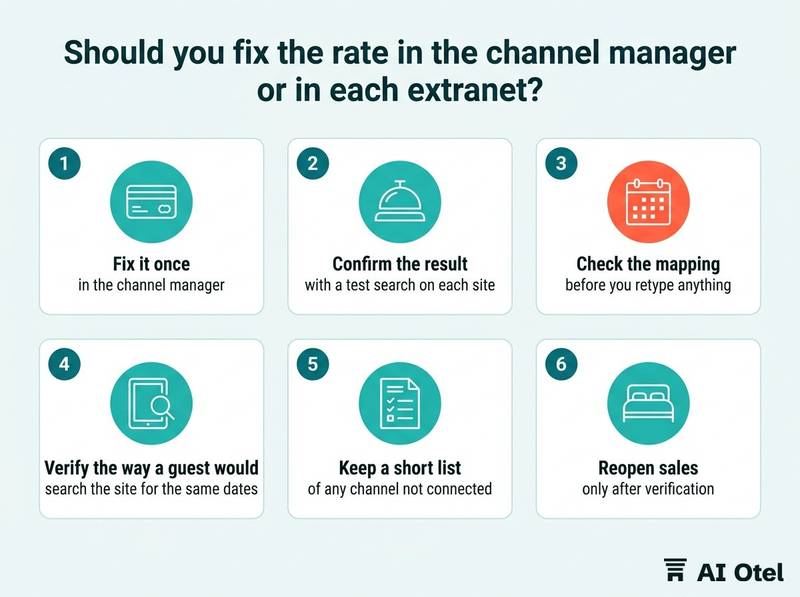
Should you fix the rate in the channel manager or in each extranet?
Fix it once in the channel manager, the system where you set price and availability for a room type and rate plan and it sends them to each connected booking site, then confirm the result with a test search on each site.
A channel manager is a single place that holds your price and availability and pushes them outward. Editing each booking site's own back office (its extranet) by hand creates two versions of the truth. The next automatic push from the channel manager can overwrite your manual fix, or the manual fix can survive and leave that channel permanently out of step. Both outcomes are worse than one clean correction.
Check the mapping before you retype anything: which room type and which rate plan the price belongs to. A price typed into the wrong rate plan is a mapping error, not a typing error, and it will come back. The same logic applies when you build the setup in the first place: careful channel manager mapping of room types, rate plans and testing is what makes a single correction reach every site.
After the push, verify the way a guest would: search the site for the same dates and the same room type. A success message in the channel manager is not proof that the site is showing the new price. Keep a short list of any channel that is not connected through the channel manager; those few need their own manual fix, and the list stops you hunting for them mid-incident. Reopen sales only after verification, in the same order you closed them, and note the reopen time next to the close time.
TipVerify before you reopen
Before you reopen, run one test search per channel for the affected dates and room type. If a site still shows the old price, that channel has not picked up the change yet, and reopening it reopens the error.
How do you find every booking made at the wrong rate?
Pull the booking site's own reservation list for the affected dates and rate code, export it, and count from that list rather than from memory or from what the phone has told you.
Filter by rate code and by an arrival date range wide enough to cover the whole period the wrong price was live, including stays far in the future. Cross-check the channel manager's reservation log against the hotel's own reservation record in the property management system (PMS), because a booking can appear in one and not yet in the other.
Look specifically at bookings that arrived between the fix and the moment each channel actually showed the new price. Those are the ones most often missed. Include unpaid and held reservations: they can convert days later, so keep the list open for a few days instead of closing it on the first afternoon.
Do not start writing to guests until the list is complete. A second message correcting the first is worse than one message sent two hours later.
| Field | Where it comes from | Why it matters |
|---|---|---|
| Booking reference | Booking site extranet | The guest's only handle on the reservation |
| Channel and rate code | Extranet and channel manager | Shows which error produced it |
| Arrival date and nights | Extranet | Sets the value at stake |
| Price paid | Extranet | The number the decision rests on |
| Time received | Extranet and channel manager | Separates bookings before and after the fix |
| Status: paid, unpaid or held | PMS | Tells you which ones can still change |
Building this list is easier if the daily extranet routine of checking booking sites every morning already exists, because the filters and exports are then familiar rather than improvised under pressure.
Do you honor the wrong rate, offer an alternative, or cancel?
Decide by a written rule that you apply the same way to every booking, and record the reason for each decision, because the expensive part of a rate error is usually inconsistency rather than the money.
There are three options: honor the price as booked, offer an alternative at the corrected price with something added, or cancel and release the room. The frame is set by the rate's own terms (refundable or non-refundable), the confirmation the guest holds, and the hotel's contract with the booking site. Where the contract is silent on a genuine mistake, that is a question for your legal adviser, asked once and written down.
Honoring is usually the cheapest route when the booking is small, the arrival is close, or the guest is a repeat or corporate account. Cancelling is usually the most expensive in reputation, whatever it saves on the room. An alternative must be in writing, with a clear deadline for the guest to accept and a named person to contact.
Name the decider in advance: a duty manager at night, a revenue manager during the day. A decision taken at the desk at two in the morning without a rule becomes a precedent you cannot defend later. Give each decision a short reason code (honored, alternative accepted, cancelled by guest, cancelled by hotel) so patterns are visible when you review the incident.
| Situation | Usual first choice | Who decides | What to record |
|---|---|---|---|
| One booking, small value, arrival close | Honor | Duty manager | Reason code and time |
| Several bookings, same rate code | Apply one rule to all | Revenue manager | The rule used |
| Guest has already paid in full | Honor or alternative | Revenue manager, contract open | Payment status |
| Repeat or corporate guest | Honor or alternative | Revenue manager | Account name |
| Arrived after fix, before channel updated | Honor | Duty manager | Propagation time |
What do you write to the guest and to the booking site?
Write to the guest once, in plain language, with the decision and the next step, and write to the booking site separately through its own reservation or partner channel.
The guest message has four parts: what happened in one sentence, what the hotel is doing, what the guest needs to do, and by when. No blame on a system, a person or a shift. Do not promise what the booking site will do: whether it cancels, refunds or waives anything is its decision under its own terms, and a promise you cannot keep turns a pricing error into a complaint.
Send the message through the booking site's guest messaging and from the hotel's own address, so the guest has a record outside the platform. For the booking site, quote the booking references, the corrected price and the time the fix was pushed, and keep the reply. Use the same thread for every booking in the incident rather than opening a new one each time.
Keep every message, screenshot and export in one folder per incident, named by date. It is the file you will want when the same error happens again.
Watch outNever announce a cancellation early
Never tell a guest that a booking has been cancelled until the cancellation is confirmed in the channel where the booking was made. Until then the reservation is still live, and the guest may still arrive.
How do you record the incident and stop it happening again?
Keep a one-page record with a timeline and a single root cause, then change one thing in the routine, because an incident that produces five changes produces none that stick.
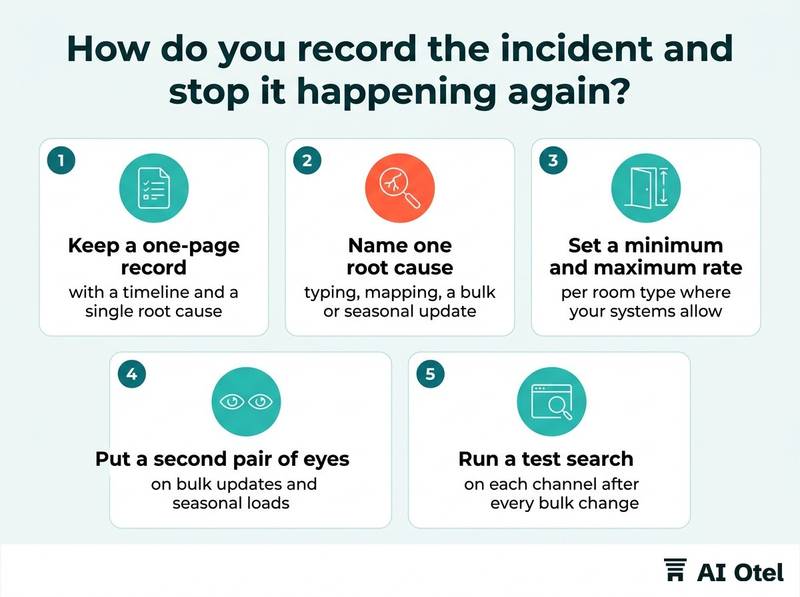
The timeline has six points: when the wrong price went live, when it was noticed, when sales were closed, when the fix was pushed, when it was verified on each channel, and when the last wrong-rate booking arrived. Name one root cause from a short list: typing, mapping (wrong room type or rate plan), a bulk or seasonal update, a currency or decimal error, an imported file, or someone working outside the process.
Set a minimum and a maximum rate per room type where your systems allow it, so a price with a missing zero is refused rather than published. Put a second pair of eyes on bulk updates and seasonal loads: a named doer and a named checker, with the check written into the task rather than assumed. Run a test search on each channel after every bulk change, at a fixed time of day, and keep the result in the same place each week.
Review rate codes so the wrong plan is harder to pick, and check direct and booking-site prices against each other on a fixed weekly routine, the kind described in a rate parity check for direct and OTA prices. A clean-up checklist for your rate plans removes the near-duplicate codes that make the wrong plan easy to select in the first place.
Key pointOne incident, one root cause, one change
Write the change into the routine with a name and a time attached, or it will not survive the next busy week.
Write the one-page rule today
Write the one-page rule today, before the next incident: who closes sales, who decides honor or alternative or cancel, and what the guest is told. Everything in this article is a sequence, and the sequence only works if the names and the timings are already on paper when the wrong price appears. If you are reviewing the systems that support this sequence, a hotel operating system and a distribution setup that feeds booking sites from one inventory are the two places where rate limits, mapping and one-source pricing are decided.
Frequently asked questions
Can I just cancel the bookings that came in at the wrong price?
A confirmed booking is a commitment, so cancellation is one option among three, not the default. The rate's own terms, the confirmation the guest holds and the hotel's contract with the booking site set the frame. Decide by a written rule, apply it to every booking in the incident, and record the reason. Where the contract is silent on a genuine mistake, ask your legal adviser once and keep the answer on file.
Should I close the whole hotel or only the affected room type?
Close the narrowest thing that stops the wrong price: the affected room type and rate plan. Closing the whole property stops good business too and is harder to reopen cleanly. Check that the stop sale actually reaches every channel, because a closure that only exists in one extranet leaves the others selling.
How long does the old price stay visible after I fix it?
It depends on how each channel picks up changes: some pull on request, some hold a cached copy for a while. The channel manager's success message is not proof. Verify with a guest-style search on each site for the affected dates, and keep sales closed until that search shows the corrected price.
What is the difference between a stop sale and closing the rate plan?
A stop sale closes availability while the product stays in place, so it is quick and easy to reverse. Closing the rate plan removes the product from sale and takes longer to restore. For a wrong price you need the price corrected, not only availability closed, so use the stop sale to buy time and then fix the number.
Who should be allowed to change rates in the channel manager?
Fewer people than today, and never one person alone on a bulk change. Name who may edit rates, require a second person to check bulk and seasonal updates, and set minimum and maximum rate limits so an obvious typing error is refused by the system rather than published to every channel.