Alt text and plain-language room descriptions with AI: making a hotel's pages readable for every guest
Alt text describes the photograph, not the room. This guide shows how to prompt AI for drafts, verify them against the actual room, and write plain descriptions that help every guest decide.
AI draft · awaiting editorial review
Contents
Key takeaways
- Alt text describes the photograph, not the room: anything the picture cannot show belongs in the room description, never in the alt attribute.
- An AI tool sees pixels; give it the bed type, floor and view direction and it will describe, withhold those facts and it will invent them.
- Every AI-drafted line is checked against the room on five points: bed, view, steps, bathroom and what the frame crops out.
- Accessibility details, step-free routes, grab bars, door widths and shower seats, are written and signed by a person who has stood in the room.
- Refresh alt text and descriptions when the room changes, and use a calendar only as a sampling check.
Alt text is the short written description attached to an image, read aloud by a screen reader in place of the photo and shown when a photo fails to load. An AI tool can draft alt text for hotel images from the picture plus facts you supply, but a person must check every line against the real room, and accessibility details must always be written by a person.
Open a hotel's photo gallery with a screen reader and you often hear the same word repeated: image, image, image. The photographs are there; the words that would let a guest understand them are not. This article shows how to write alt text that carries the details a guest uses to decide, how to prompt an AI tool for first drafts, how to check each draft against the actual room, and which lines a person must always write. The same discipline produces plainer room descriptions, which every guest benefits from, not only those using assistive technology.
What is alt text, and why does it matter to guests and to search?
Alt text is the sentence attached to an image in the page code, read aloud by a screen reader in place of the photo and shown when the photo fails to load. It matters because for some guests it is the only version of that photograph they will ever receive.
A screen reader announces the alt text where the image sits in the reading order. A missing description is announced as a bare image or skipped entirely, so a gallery of forty photos becomes forty unlabeled stops. Alt text is not a caption: a caption is visible to everyone and adds context, while alt text replaces the image for someone who cannot see it.
Some images should carry no description at all. Decorative images such as dividers, background patterns and spacer graphics take an empty alt attribute on purpose so the screen reader skips them; that is a decision, not neglect. An image that sits inside a link takes alt text naming the destination, for example "view the deluxe room", not a description of the picture.
Search engines read alt text as one small piece of what the page is about. It is not a place to stack keywords, and no ranking claim should be made for it. Text baked into an image, such as a price, a menu or a "breakfast included" badge, has to appear in the alt text or, better, as real text on the page.
| Image on the page | What the alt text must do | Illustrative example |
|---|---|---|
| Room photo | Carry the distinguishing detail | "Double bed facing a balcony door, armchair in the corner" |
| Bathroom photo | Name shower or tub, and any step | "Shower with a low step at the entrance" |
| Restaurant or pool | Say what is shown, and whether people are in frame | "Indoor restaurant with set tables, no guests" |
| Hotel logo in the header | Name the hotel, or stay empty if the name is text beside it | "Hotel Meridian" or empty |
| Decorative divider | Empty alt attribute, on purpose | (empty) |
| Icon that is a link | Name the destination | "Go to booking" |
| Floor plan or map | Point to a longer text description elsewhere on the page | "Floor plan, text version below" |
| Photo containing text | Repeat the words that carry meaning | "Sign reading 'breakfast included'" |
The same discipline applies to the rest of the page; a hotel website checklist: content, legal information and the booking path keeps this from becoming a one-off cleanup.
What does a good image description say, and how long should it be?
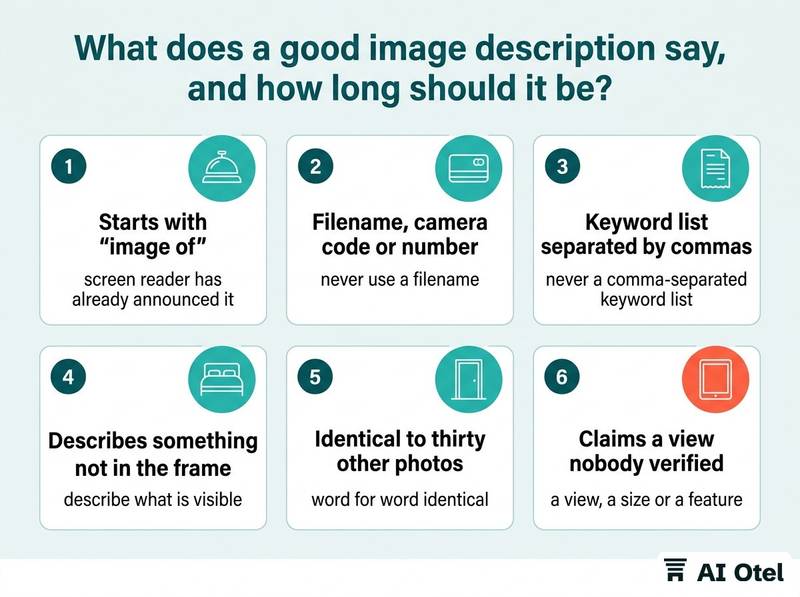
One sentence that carries the detail a guest would use to decide, written in the language of the page, with no throat-clearing. If the photograph is complex, the long version belongs in the room description or in a text alternative beside the image, not in the alt attribute.
Lead with the distinguishing fact: the bed, the view, the layout, whatever makes this photo different from the other photos of the same room type. Keep it short enough to be heard in one breath; a screen reader user hears every word, and a paragraph per photo slows a gallery to a crawl.
Never open with "image of" or "photo of", because the screen reader has already announced that it is an image. Never use a filename, a camera reference or a comma-separated keyword list. Describe what is visible, not what the photographer intended or what the marketing team hopes the guest will feel.
Write in the language of the page. A multilingual site needs a separate line per language, not a machine translation of the English line. Keep wording consistent across photos of the same room type so a guest comparing them hears the same facts in the same order. Finally, alt text does not replace structured data and structured data does not replace alt text; they answer different questions for different readers, as covered in structured data for hotel websites: which fields matter and what it will not do.
ChecklistSigns an alt text line is wrong
- It starts with "image of" or "photo of"
- It is a filename, a camera code or a number
- It is a list of keywords separated by commas
- It describes something that is not in the frame
- It is word for word identical to thirty other photos
- It claims a view, a size or a feature that nobody verified on site
- It repeats the caption printed underneath
How do I prompt an AI tool so it describes the photo instead of inventing it?
Give the tool the facts you already know, tell it to describe only what is visible, and require it to say when it is unsure. The tool's job is wording, not knowledge.
The tool sees pixels. It cannot know that the balcony faces west, that the bed is a queen, or that the bathroom has a walk-in shower rather than a tub with a step over it. Supply a fact sheet per photo: room type, bed configuration, floor, view direction, and anything in the frame that is easy to misread, such as a sofa bed, a connecting door or a minibar.
Forbid marketing adjectives explicitly, for example "luxurious", "stunning", "perfect" and "elegant"; ask for nouns and measurements instead. Add an uncertainty rule: if the tool cannot tell a bathtub from a shower tray, it must write "unclear" and flag the photo for a person.
Ask for two outputs per photo, a short alt line and a longer plain-language description for the room page, so the two never get mixed up. Batch by room type so the vocabulary stays consistent, and keep the prompt text under version control so you know which wording produced which line. Record which lines were drafted by the tool and who approved them; that record is what makes a later audit possible.
| Prompt slot | What to put there | Why it matters |
|---|---|---|
| The task | Describe this photograph for a guest who cannot see it | Sets the reader and the purpose |
| The facts you supply | Room type, bed, floor, view direction, objects in frame | The tool cannot know these from pixels |
| What to describe | Only what is visible in the frame | Keeps the line about the photograph |
| What to refuse | No adjectives, no guesses, no claims about size, quiet or view | Prevents invention |
| Uncertainty | Write "unclear" and flag for a person | Catches the guesses before publication |
| Output shape | One short alt line plus one longer description, in the page's language | Keeps the two uses separate |
How do I check AI-written alt text against the actual room?
Open the photo and the room side by side and verify five things: the bed, the view, the steps, the bathroom and what the frame leaves out. Anything you cannot confirm from the room itself comes out of the line.
Bed: count and type. A photo of a twin room with the beds pushed together reads as a double to a guest who cannot see it. View: direction, and whether it is full, partial or over a neighboring roof; a photo taken at the balcony rail is not the view from the bed.
Steps and thresholds matter most: a step down to a terrace, a raised bathroom floor, a lip at the balcony door. These are the details a guest with limited mobility is reading for. Bathroom: shower or tub, and whether the tub has a step over it; this is where a tool guesses most often.
What the frame crops out is the fifth check: the car park behind the camera, the service corridor, the neighboring wall, the air-conditioning unit. If the room description says "quiet", the photograph cannot confirm it. Watch also for seasonal and staging mismatch: a summer photo on a winter page, flowers that are not there in January, a tray that is not part of the room.
The rule that settles most arguments: alt text describes the photograph, and the room description carries the facts the photograph cannot show. Apply the same honesty test to images the hotel did not shoot itself; the same questions apply to AI-generated images in hotel marketing: an honesty checklist.
ChecklistFive-point check for every AI-drafted line
- Bed count and type confirmed against the room
- View direction and quality confirmed from the window, not the balcony rail
- Every step and threshold in the frame identified
- Bathroom fittings named correctly, shower or tub, with or without a step
- Everything the frame crops out written down and moved into the room description
- Date and initials of the person who checked
How do I write plain-language room descriptions?
Short sentences, one idea each, concrete nouns, and the facts a guest needs in order to decide. Replace every brochure word with something a guest could measure or picture.
Order the description the way a guest inspects a room: what it is, the bed, the bathroom, the view, the floor and the noise, then access. Replace evaluation with fact: "spacious" becomes the room's size, "partial sea view" becomes what you can actually see from where you stand. One idea per sentence, and cut the second clause when it only repeats the first.
Name the ambiguity a guest will otherwise guess at: double or twin, sofa bed or extra bed, connecting door or corridor door. Drop internal jargon; folio, allotment, pick-up and rack rate mean nothing to a guest reading a room page.
Read the description aloud, then hand it to someone who has never seen the room and ask them to sketch it; what they get wrong is what the text is missing. Keep one description per room type and let the photographs vary, because a description per photo multiplies both the maintenance and the inconsistency. The same method works across the rest of the marketing copy, as covered in AI for hotel marketing copy: room descriptions, posts and newsletters, but the room description is where accuracy matters most.
| Brochure phrase | Plain replacement |
|---|---|
| "Elegantly appointed" | Bed size, furniture and floor covering |
| "Uninterrupted sea view" | What is visible from the window, and whether anything stands between |
| "Steps from the beach" | Walking time, and whether the route is flat |
| "Fully equipped bathroom" | Shower or tub, and what is fixed to the wall |
| "Ideal for business travelers" | The desk, the chair and the power sockets |
| "Cozy" | The room's size and the size of the bed |
Which details must a person write, never the tool?
Accessibility details: the step-free route, door widths, grab bars, shower seats, bed height, turning space, visual alarms and signage. A camera cannot see them, and a tool that guesses can send a guest to a room that does not work for them.
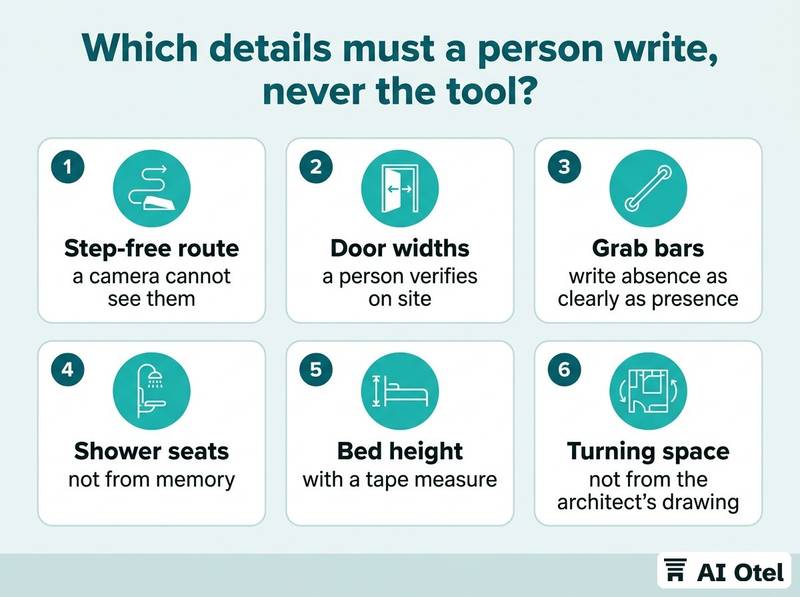
The tool has no way to know whether the bathroom door is wide enough, whether the lift reaches the pool floor, or whether the shower has a seat. A person verifies on site with a tape measure, not from memory and not from the architect's drawing.
Write absence as clearly as presence: "no grab bars in this bathroom" is more useful to a guest than silence. Put an owner and a date on every accessibility line, because fittings are removed during refurbishment and nobody updates the page. Keep the detail as text on the page, not inside an image or a PDF that a screen reader cannot follow.
Accessibility duties differ by country and this article does not state them; if you need to know what applies to your property, ask a legal adviser. The rest of the property needs the same treatment, entrances, routes, restaurants and pool areas, not only rooms; an accessible hotel checklist: rooms, routes and service for guests with disabilities covers the full walk-through.
Key pointOne rule for the line that matters most
If a wrong line could send a guest to a room that does not work for them, a person writes it, checks it on site and signs it with a date.
A review sheet, and when to refresh
Keep one sheet per photo and one per room type, and refresh on change rather than on a calendar alone. The sheet is what turns a one-time cleanup into something that stays true.
The photo sheet carries columns for the file name, room type, alt text, whether it was AI-drafted, who approved it, the date and the result of the five-point check. The room sheet carries the plain-language description, the accessibility lines with owner and date, and the date of the last on-site verification.
Refresh triggers are changes, not dates: refurbishment, new furniture, a changed view such as a new building next door, a re-shot photo, a new room type, a new language, a renamed room category. Use the calendar as a sample rather than a rewrite: a handful of pages each quarter, read against the room. Keep the sheet beside the image library, not in someone's inbox, so the next person to upload a photo sees it. When a line changes, change it everywhere it appears: the gallery, the booking engine, the travel agency content and the guest app. Version the prompt and the sheet together, so a later reader can see why a line says what it says.
ChecklistRefresh the line when any of these happens
- The room is refurbished
- Furniture or bedding changes
- A new building or planting changes the view
- A photo is re-shot
- A room type is added, renamed or withdrawn
- A new language version goes live
- A fixture such as a grab bar or shower seat is added or removed
- The quarterly sample read finds a line that no longer matches the room
What to do next
Pick one room type this week: pull its photos, run the five-point check, rewrite the alt text and the description, and have someone who has never seen the room read it back to you. Then write the review sheet before you touch the next room type, because the sheet is what keeps the words true after the people who wrote them have moved on.
Frequently asked questions
Can I reuse the same alt text for every photo of the same room type?
No. Each photograph shows a different angle, a different crop and different objects, so a repeated line describes none of them. What stays consistent is the underlying facts, the bed, the bathroom and the view; the sentence changes with what is actually in the frame.
Does good alt text improve search rankings?
It helps a search engine understand what an image shows and it is required for guests who use screen readers, but it is one small signal and no ranking promise should be attached to it. A comma-separated keyword list in the alt attribute helps nobody and reads badly aloud.
Should alt text be in the guest's language or the site's language?
In the language of the page it sits on, because that is the language the screen reader will be reading in. A site with several language versions needs a separate, properly written line for each version, not a machine translation of the English line.
Can an AI tool write the accessibility information if I give it the facts?
It can format facts a person has already confirmed, but it cannot confirm them. Door widths, grab bars, shower seats and step-free routes are measured on site by a person, written with an owner and a date, and stated as clearly when something is absent as when it is present.
How often should room descriptions be rewritten?
Whenever the room changes, and that is the main trigger: refurbishment, new furniture, a changed view, a re-shot photo, a new room type or a new language. A quarterly sample read of a few pages catches the drift that no one reported.