Meeting room sound, screen and Wi-Fi: a check before every event
A meeting room fails at the joints, not the devices. This guide provides a fixed sequence of tests for audio, video, power and network, plus a spare kit and handover note.
AI draft · awaiting editorial review
Contents
Key takeaways
- A meeting room fails at the joints, not the devices: an adapter, a source setting, a muted channel, a dead battery or a password nobody wrote down.
- Test the display chain with the presenter's own laptop and the actual file, at the room's resolution and aspect ratio, never with the hotel's laptop alone.
- A microphone is tested with a voice from the position it will be used in and listened to from the back row; a tap only proves the channel is open.
- Wi-Fi is tested seated at the back row by doing the real task: join with the printed password, open a page, upload a file, start a video call.
- The event ends with a written fault list per room, because the same fault returns at the next event until someone owns the permanent fix.
An AV check is a fixed sequence of tests on a meeting room's audio, video, power and network, run from the night before an event to its opening minutes. It covers screens and cables, microphones and speakers, Wi-Fi at the back row, spare adapters, and one named person who owns the room.
The room is set, the chairs are straight, the coffee is out, and forty people are watching a presenter hold a cable into a laptop while the screen says no signal. The five minutes that follow decide how the group remembers the hotel. This article gives you a hotel meeting room AV checklist that runs from the night before to the opening minutes, a spare kit for the room, and a handover note for the organizer.
What does a hotel meeting room AV check cover?
It covers six things that fail independently: power, the display chain, the audio chain, the network, the cabling and control, and the person who owns them. A check is a pass or fail on each, written down, not a walk-through.
AV means audio-visual: everything the presenter's voice and image travel through, from the laptop to the screen and the speakers. Test the joints rather than the boxes: the adapter between laptop and cable, the input selected on the switcher, the muted channel, the battery in the handheld, the password on the card.
Test from where the guest sits. A projector that looks fine from the technician's position at the rack can be unreadable from the back row. The check must run on the presenter's own device and file, or on an identical replica the hotel keeps for that purpose.
Record the result per room: what passed, what was worked around, what is broken and who is fixing it before the next event. Hang the AV check off a document the event already has: the banquet event order that runs the day carries the times, the room, the layout and the contacts, and the technical check belongs beside it. One person signs the check. A form signed by three departments is a form nobody owns.
| Subsystem | What it includes | What a pass looks like |
|---|---|---|
| Power | Outlets at lectern and rack, breaker location, battery backup | Every outlet live, breaker labeled, backup tested |
| Display | Projector or screen, switcher, inputs, presenter device | Real file shown at the room's resolution |
| Audio | Microphones, mixer, speakers, recording feed | Voice understood at the back row |
| Network | Event Wi-Fi, wired port, room access point | Real task done seated at the back row |
| Cabling and control | Adapters, cable lengths, clicker, control panel | Every advertised connector works |
| People | Named technician, contact number, fallback plan | One name and number on the handover note |
What should be tested the night before an event?
Everything that needs time to fix: a dead outlet, a projector that will not warm up, a microphone with a failing battery, a network port that was never patched. The night before is when a fault is still cheap.
Start with power. Find which circuit feeds the lectern and the AV rack, what else sits on it, and where the breaker is. A lectern on the same circuit as a coffee machine is a fault waiting for the coffee break. If the room has an uninterruptible power supply, a battery that carries the lectern and the control laptop through a brief outage, test it by pulling the mains and watching what stays on.
Then the display: run a full warm-up, switch through every input that will be used, and confirm the fallback source works. Test every microphone with fresh batteries, at the level the event will actually run at. On the network side, join the event network with the password you will hand out, test the wired port at the lectern, and confirm the cabinet feeding the room is powered and labeled. If you want the wider picture, the network cabinet and small server room has its own power, cooling and access rules.
Check room conditions too: lighting scenes, blinds, and the noise the air conditioning makes at the level it will run during a session. Photograph the rack and the settings, so the morning repeat can be compared against a known state rather than someone's memory.
ChecklistNight-before checklist
- Breaker identified and labeled
- Battery backup tested by pulling the mains
- Projector warmed and all inputs switched
- Fallback source confirmed
- Every microphone tested with a fresh battery
- Event Wi-Fi joined with the printed password
- Wired lectern port tested
- Cabinet powered and labeled
- Lighting scenes and blinds set
- Air conditioning noise checked at session level
- Rack photographed
- Faults logged with an owner and a deadline before the event
How do you test the screen, projector and cables?
Test the whole chain with the file that will actually be shown: from the presenter's device, through the cable and adapter, into the switcher, out to the screen, at the resolution and aspect ratio of the room.
Resolution and aspect ratio matter because a presentation built for one shape letterboxes or crops on a screen of another. Change the setting on the source device, not on the projector, and check what the audience will see. A presenter who expects a confidence monitor showing notes needs extended mode, where the laptop screen and the room screen show different things. Test the mode the presenter will use.
State at the lectern which connector types the room supports, and hold the adapters in the room rather than asking the presenter to bring one. Long cable runs lose signal intermittently: a passive cable beyond its reliable length produces dropouts that look like a faulty laptop, and the fix is an active cable or a shorter run. Some sources refuse to display through certain splitters and switches, so test the actual source device, not a substitute.
When the screen says no signal, work the ladder in order: the input selected on the switcher, the cable seated at both ends, the adapter, the laptop's output setting, then the switcher itself. Keep a fallback: a second input, a spare projector or a large screen, and a copy of the presentation the hotel can open on its own machine.
Watch outNever sign off with the hotel's laptop alone
The hotel's laptop is the one device guaranteed to work with the hotel's cable, and it is the one device that will not be on the lectern.
How do you test microphones and speakers with a voice?
Speak into every microphone from the position it will be used in, and listen at the back row. A tap proves the channel is open; a voice proves it is usable.
Test three positions separately: the lectern, the panel table and the roaming handheld. Each has a different distance from the mouth and needs a different gain. Feedback, the howl a room makes when a microphone hears its own speaker, appears at the volume and the position the event will use, so test at that volume, with someone standing where the presenter will stand, not at a safe low level.
Batteries are fresh for every event, and used ones leave the kit marked rather than returning to the drawer to be found again. Set levels for the loudest and the quietest speaker you expect, then write the setting down so the morning repeat matches the night before. If the session is recorded or streamed, that is a separate output with its own level: test it separately, with the recording running.
Hand the organizer one microphone they control, with a spare beside it and a person who can swap it mid-session without walking in front of the audience.
TipThe spoken check
Stand at the lectern, count to ten, say your own name, then ask the person at the back row to repeat the last sentence back to you. If they cannot, the room is not ready, whatever the meter says.
How do you check Wi-Fi in a meeting room?
Sit in the back row and do what a guest will do: join the network with the password you will hand out, open a page, upload a file and start a video call. A signal bar is not a test.
Test seated, at the back row and in the corners. People absorb signal, so a room full of attendees is a different room from the empty one you tested. Test the real task, not the connection: a page load, an upload of a file the size of a presentation, and a video call with the camera on.
Where the hotel can, give the event its own network name so a corridor of streaming guests does not compete with a session. Put the password on a card, on the opening slide and on a sign by the door, and make sure the person at the lectern knows it without leaving the room. Keep a wired connection at the lectern for anything that must not fail, and test the cable, not just the port. Test the whole join flow, including the screen a guest sees after joining: a login page nobody expected costs the first minutes of the session. Know who to call when the access point serving the room drops, and whether that person is in the building.
| Where to test | What to do | What counts as usable |
|---|---|---|
| Back row, seated | Join with the printed password, open a page, start a video call | Call holds with camera on |
| Corners and the door | Same join, check the call holds | No dropouts |
| Lectern | Wired connection, upload the presentation file | Upload completes in seconds |
| Corridor outside | Join as guests arrive | Event network does not drop |
What spares should be in the room, and who holds them?
A small, labeled kit in the room covers most failures; anything beyond it belongs to a named person who can bring it before the session starts.
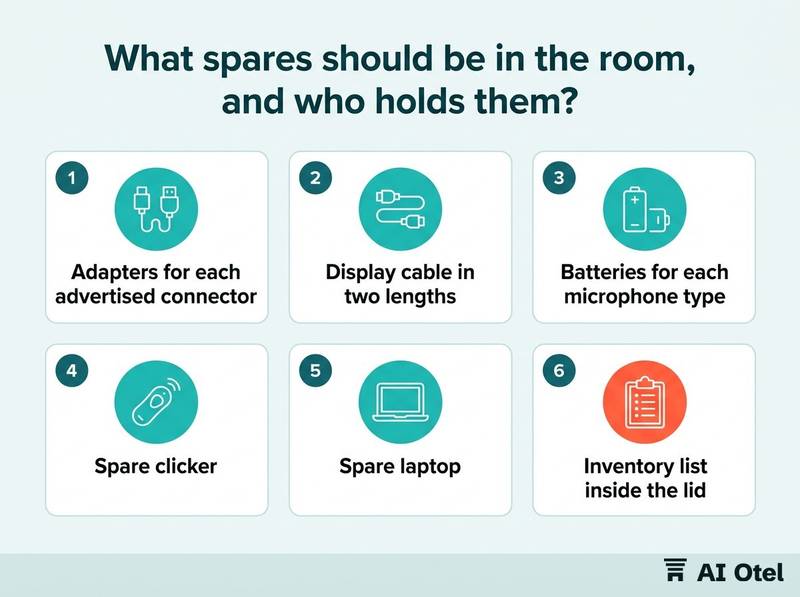
Hold adapters for every connector type the room advertises, in more than one of each, because the one that fails is the one in use. Keep two lengths of the display cable, a spare network cable and a power strip. Add batteries for every microphone type in the room, a spare microphone of the type the event is using, a spare clicker and a spare laptop known to work with the room's screen. Tape, markers and a labeled box with an inventory list inside the lid make a missing item visible before the event rather than during it.
The kit is checked back in after the event and anything used is replaced before the next one. Decide in the contract what the hotel supplies and what the organizer brings, and price the difference deliberately rather than discovering it on the day. The same boundary question runs through what a day delegate package includes and what it does not.
ChecklistRoom kit
- Adapters for each advertised connector, two of each
- Display cable in two lengths
- Spare network cable
- Power strip
- Batteries for each microphone type
- One spare handheld microphone
- Spare clicker
- Spare laptop
- Tape and markers
- Inventory list inside the lid
- Named owner for restocking
Who stands by during the event, and what happens after?
One named person is reachable for the whole event, in the room for the opening, and the room's faults are written down before the team goes home.
The technician is in the room for the start, not on call from another floor, because the first minutes are when the presenter is most exposed. Hand the organizer a short note: what was tested, what is spare and where it is, the network details, the contact name and number, and the fallback plan if the screen fails. Agree a rule for when to intervene, because a technician walking to the lectern mid-session is itself a disruption; fix what can wait at the break.
After the event, write a fault list per room: date, symptom, cause, temporary fix, permanent fix and owner. The list feeds three things: the next event's check, the maintenance plan and the replacement budget. A fault that returns three events running is a decision about replacement, not another workaround. When buyers come to see the space, that fault history is also part of showing the meeting room on a site inspection.
Key pointThe handover note
Room name; what was tested and when; the spare kit and where it sits; network name and password; the name and number of the person on duty; the fallback plan if the display or the network fails; the time the technician will return before the next session.
Write the check this week
Write the room's one-page check and handover note this week, then run it in the room it describes, from the night before to the opening minutes. The check, the spare kit and the fault list are one loop: the night-before test finds the fault, the kit covers what cannot be fixed in time, and the fault list makes sure the same failure is not waiting at the next event.
Frequently asked questions
Should the banquet team or IT own the meeting room tech check?
The room belongs to the banquet operation, so the banquet manager owns the check and signs it; IT or technical service owns the network, the cabinet and the permanent fixes. Name one person in the room on the day, and one person to escalate to, and write both into the event document.
When should the meeting room be tested before an event?
The hotel sets its own rule, and the rule should have three moments: a full test the night before, a short repeat on the morning of the event to confirm nothing changed, and a final check in the room during the opening minutes. Anything that needs a part or a repair has to be found at the first moment, not the third.
What do we do if the projector fails during a session?
Switch to the fallback that was tested the night before: a second input, a spare projector or a large screen, and a copy of the presentation the hotel can open itself. The handover note should already say who makes that call, so nobody debates it in front of the audience.
Should the hotel supply laptops, clickers and adapters to meeting guests?
Adapters and clickers are cheap to hold and expensive to lack, so keeping them in the room is usually the better trade. Laptops are a different decision, because a hotel machine has to be maintained and kept current. Whatever the hotel decides, the contract should say what is supplied and what the organizer brings.
How do we stop the same AV fault from repeating at every event?
Write a fault list per room with the symptom, the cause, the temporary fix and the owner of the permanent one, and read it at the start of the next event's check. A fault that keeps returning is a replacement decision for the maintenance plan, not a workaround to be repeated.