Turning walk-through notes into an SOP with AI: what to record, what to draft and what to check
Turn walk-through notes into a reliable hotel SOP using AI. Learn what to record, how to prompt for steps, and how to verify the draft with staff.
Contents
Key takeaways
- An SOP written from memory records the routine people believe they follow; a walk-through records the one they actually do.
- Record every step with five fields: trigger, action, owner, tool, and the sign that the step is finished.
- Ask the AI for numbered steps and a list of open questions, never for policy, thresholds or time limits.
- The person who does the job owns the routine and the manager owns the rule; where they disagree, the SOP records both.
- Every SOP carries a version date and a review date, and a printed copy without a visible date is the first sign it has drifted.
A standard operating procedure (SOP) is a versioned, one-page set of steps for one recurring task. To draft one with AI, observe the real routine, record notes in fixed fields, ask the AI for numbered steps and open questions only, then walk the draft back with the person who does the job before publishing it with a date.
The binder behind the front desk describes a check-in that nobody has performed for a year, while the routine that actually works lives in the head of one receptionist and leaves with her on her day off. The gap is not laziness. It is that the procedure was written from memory, at a desk, by someone who was not there. This guide shows how to observe a routine, turn the notes into a draft with AI, and check the draft with the person who does the work, so the page that ends up at the desk describes the hotel you actually run.
Why does the walk-through come first?
Because the routine you write from memory is the one people think they follow, and the routine you observe is the one that produces the guest's experience, the bill and the record.
Define the object before writing it. An SOP is a written, versioned set of steps for one recurring task, with a named owner, a date and a defined place to live. It is not a training deck, not a job description and not a policy memo. If you want to go deeper on structure, see our guide on writing hotel SOPs that staff actually follow.
Two routines run in every department. The official one lives in the training deck; the working one appears at 02:00 when the system is slow and the queue is long. Errors, disputes and rework live in the gap between them, and only observation closes that gap.
Observe without correcting. If you fix a step mid-shift, the rest of the shift becomes a performance for you. Note the fault and leave it until the review, where it becomes a decision rather than an interruption.
Choose the task by risk, not by convenience. Pick the tasks where a missed step costs money, loses a guest or leaves a record incomplete. Check-in, night audit, shift handover and complaint handling are usual candidates; filing the office invoices is not.
Shadow two people. The one who does the task most often shows you the shortcuts; one who does it rarely shows you what the SOP has to carry for someone who is not fluent yet. Write down both versions of every step where they differ.
Note the trigger before anything else: what starts the task. A guest at the desk, a light on the panel, a message from housekeeping, a departure list. A step without a trigger is a wish.
Key pointThe document is a summary, not the source
An SOP describes the work as it is done, corrected where it must be, not the work as it should have been. The walk-through is the evidence; the document is the summary.
What should you write in the walk-through notes?
Write what you saw, in the order it happened, with the trigger, the action, the person, the tool and the sign that the step is finished.
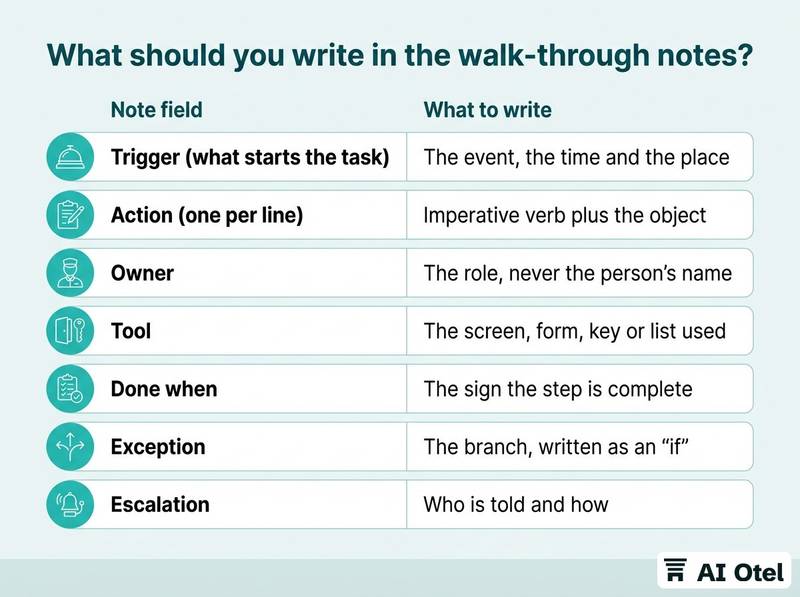
Use the same five fields for every step so the notes can be read as a sequence later, by you and by the AI you hand them to. Fixed fields are what make an AI draft SOP from hotel notes reliable: the machine can only structure what you structured first.
Record waiting and handovers as steps in their own right. The minute spent waiting for housekeeping to answer, and the handover between shifts, are where procedures usually break. If your handover itself is a task worth documenting, our shift handover forms for hotel departments cover kitchen, floors, technical and security.
Record the exceptions as branches under the step they belong to: the room is not ready, the guest has no reservation, the card reader is down. Each branch becomes one line in the final SOP.
Record the artifacts: which form, which screen, which key, which list, which signature. A step that says "register the guest" teaches nothing; a step that names the screen and the field can be followed.
Record the recovery: what the person does when the step fails, and who they tell. Recovery is the part staff most need written down and the part memory loses first.
Keep personal data out of the notes. No guest names, identity numbers, room charges, contact details or staff personal details; write "the guest" and "the receptionist on duty" instead. The notes must be safe to store, share and paste.
| Note field | What to write | Illustrative example |
|---|---|---|
| Trigger (what starts the task) | The event, the time and the place | For example: a guest arrives at the desk with a reservation number |
| Action (one per line) | Imperative verb plus the object | For example: check the reservation against today's arrival list |
| Owner | The role, never the person's name | For example: receptionist on duty |
| Tool | The screen, form, key or list used | For example: the arrival list and the key card encoder |
| Done when | The sign the step is complete | For example: the room is assigned and the key is cut |
| Exception | The branch, written as an "if" | For example: if the room is not ready, offer the lobby and give a time |
| Escalation | Who is told and how | For example: duty manager by phone |
How do you ask AI for steps rather than policy?
Give the notes as the only permitted source and ask for numbered steps with an owner, a trigger and a completion check, plus a separate list of everything the notes do not settle.
The instruction that does the work is one sentence: use only the notes below, write "to be confirmed" wherever the notes are silent, add each gap to an open-questions list, and add no rules, time limits, thresholds or legal requirements of its own. This single constraint is what separates a useful draft from a plausible one.
Ask for steps, not paragraphs. One action per numbered line, an imperative verb, the tool named, the completion check on the same line. Ask for the exceptions as branches under the step they belong to, so the reader meets the branch where it happens rather than in a block at the end.
Keep the open-questions list separate and treat it as the manager's work. A draft that answers its own gaps is the most dangerous output, because the answers read as if the hotel had decided them.
Policy stays with people. Who may authorize a refund, what the security deposit is, when a situation counts as an emergency: the draft can restate a rule you give it, but it cannot know a rule you have not written. If you are building a wider set of safe everyday uses, see our overview of AI tools for hotel teams, department by department.
Keep the prompt clean. No guest data, no staff names, no screenshots of a guest record, no scanned identity documents. Describe the role and the situation instead, and follow the hotel's own written rule on what may be pasted into an AI tool; our piece on hotel AI policy and what staff may share with AI chat tools gives a starting structure.
Keep the raw notes. The draft is disposable and will be rewritten; the notes are the evidence the SOP was built on and the input for the next review.
ChecklistPrompt instructions to include
- Use only the notes provided
- Write "to be confirmed" where the notes are silent
- List every gap as an open question
- Add no thresholds, time limits or legal duties
- One action per numbered step
- Name the tool in each step
- State how the person knows the step is done
- Put each exception under its step
- Return the steps as a numbered list, not prose
How do you check the draft with the person who does the job?
Read it back step by step, at the place where the work happens, and ask the person to correct it out loud rather than approve it.
Separate two authorities. The person who does the job owns the routine; the manager owns the rule. Where they disagree, the SOP records both: what is done today and what must be done from now on. Neither side wins by silence.
Ask three questions per step: is this what you do, is anything missing, and what would you do if this step failed. The third question finds most of the missing branches, because people describe failure paths only when asked directly.
Look for the three typical faults of a machine draft. Two actions merged into one line. Invented specifics, such as a time limit or a form number that does not exist in your hotel. Branches that were dropped because the notes mentioned them only once.
Check the completion check on every step. If the reader cannot tell whether the step is finished, the step will be skipped or repeated.
Test the draft on someone who does not know the task. If they can follow it without asking a colleague, it is close; every question they ask is a line to add.
Write the disagreements into the change log, with the date and who raised them. The next review needs the reason, not just the result.
ChecklistReview questions to ask per step
- Is this what you actually do?
- What is missing?
- What do you do when this fails?
- Who do you tell?
- How do you know it is done?
- Which tool do you open first?
- Has this changed since last season?
What does a one-page SOP contain, and how is it versioned?
One task, one page, a header with an owner and a version date, numbered steps with their completion checks, the exceptions, and a short line saying what changed.
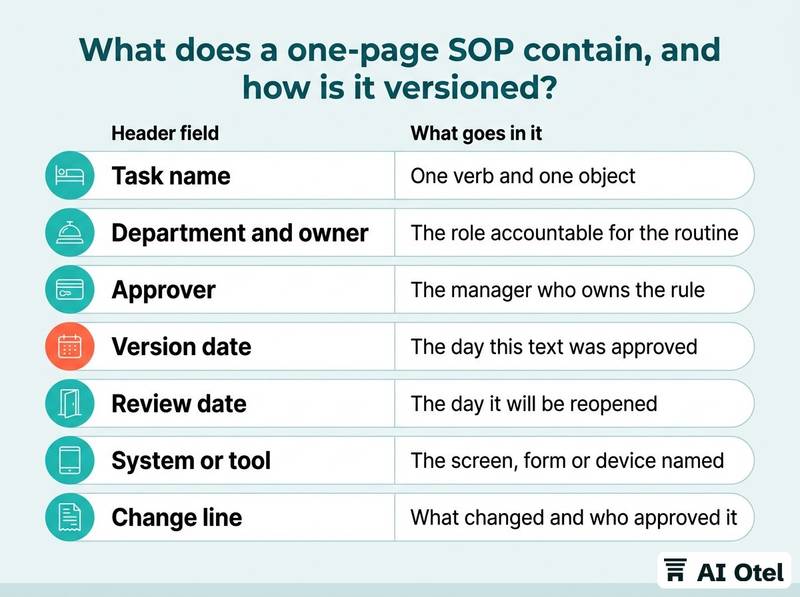
The header carries the task name, the department, the owner, the approver, the version date, the next review date and the system or tool the procedure refers to. The body is numbered steps, one action each, with the completion check on the same line so the reader does not hold two lists in mind. The exceptions sit under the steps as short "if" lines, in the order a person would meet them. The footer carries the change line: what changed in this version, who approved it and when.
Keep it to one page. If it runs longer, it is usually two tasks sharing a title, and splitting it makes both followable.
Give it two homes: a link the team can open from a phone, and one printed copy at the workstation with the version date visible, so an outdated sheet is obvious at a glance. If your procedures live inside your hotel software rather than a shared folder, a system such as the hotel operating system on ai-otel.com, built and working and ahead of launch, is one place the steps, screens and reports can be named against the same tool the team opens each day.
Write it in the language the team reads at work. A translated procedure nobody proofread is worse than no procedure, because it looks authoritative and reads wrong.
| Header field | What goes in it | Why it matters |
|---|---|---|
| Task name | One verb and one object | Keeps the page to a single task |
| Department and owner | The role accountable for the routine | Gives the review a person to call |
| Approver | The manager who owns the rule | Separates the routine from the policy |
| Version date | The day this text was approved | Lets a reader tell current from old |
| Review date | The day it will be reopened | Stops silent decay |
| System or tool | The screen, form or device named in the steps | Shows which steps break when software changes |
| Change line | What changed and who approved it | Makes two versions comparable |
When should you review it, and what do you change?
At thirty days, then whenever the tool, the rule or the layout changes, because a procedure decays fastest where the software underneath it moves.
Thirty days is long enough for the novelty to fade and short enough that the person still remembers why a step was written that way.
Ask three questions in the review: which step do you skip, which step takes longer than the page suggests, and what has happened that the page does not cover.
Treat a handwritten line on a printed copy as a signal that the SOP is wrong, not that the staff is careless. Someone needed that line at the desk and had nowhere else to put it.
Change the version date and the change line every time, even for one word. An undated edit makes every earlier copy indistinguishable from the current one.
Retire the old copies in all three places they hide: the printed sheet at the workstation, the file in the shared folder and the slide in the training deck.
Watch the software. A renamed field or a moved button turns every step that names it into a wrong instruction, and the person following it will assume they are the problem. A single platform such as the hotel technology described on ai-otel.com, built and working and ahead of launch, would show this decay at one point instead of five, but no system removes the need for the review date.
TipPair the review date with a reminder
Put the review date in the header and a calendar reminder on the owner's account at the same time you publish the page. A review date nobody is reminded of is a decoration.
What to do next
Pick one recurring task this week, shadow the person who does it, and take notes in the five fields: trigger, action, owner, tool, done when. Ask the AI for numbered steps and a list of open questions, walk the draft back with that person, publish one page with a version date and a review date, and reopen it in thirty days. The observation is the work; the drafting is the easy part, and the review is what keeps the page true.
Frequently asked questions
Can AI write the SOP from a template instead of a walk-through?
It can produce a plausible generic procedure, which is exactly the problem: it will describe how the task is usually done elsewhere, not how it is done here. Use a template for the page format and the header fields, and use the walk-through for the content. The two are not interchangeable.
What should never go into the notes or the prompt?
Guest names, identity numbers, contact details, room charges and payment data, scanned documents, and staff personal details. Describe the role and the situation instead. The notes should be safe to store and share, and the hotel's own written rule on AI tools decides what may be pasted where.
How long should one SOP be?
One page for one task. If it needs more, it is usually two tasks sharing a title, and splitting them makes both followable. Length is not the measure; whether a new colleague can follow it without asking a question is.
Who signs off on the final version?
Two people: the person who does the job confirms the routine is described correctly, and the manager confirms the rule is stated correctly. The header names both, and the version date is the day the second signature lands.
How do I know the SOP is being followed?
Watch the task again rather than reading the page. Compare what you see with the numbered steps and note where they diverge. Divergence is information: either the page is wrong or the rule has changed, and both are worth a version.