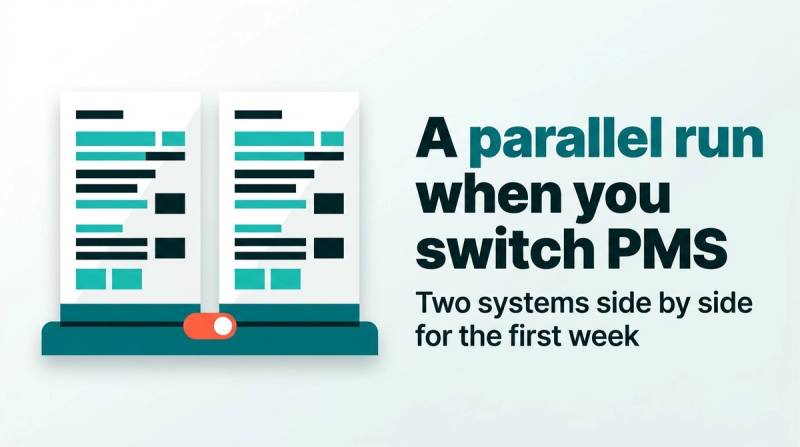
A parallel run when you switch PMS: two systems side by side for the first week
A PMS parallel run produces the evidence needed to switch off the old system. Learn what to enter twice, how to compare nightly totals, and who signs off the decision.
AI draft · awaiting editorial review
Contents
Key takeaways
- A parallel run is a decision tool, not a safety net: it exists to produce the evidence the hotel needs before switching the old system off.
- Enter twice only what someone will later be asked to prove: money, the guest's presence and the room's state.
- Every external message, from the guest identity notification to the invoice, the door key and the channel update, must leave from one system only.
- Compare three totals after both night audits on the same business date: who is in the house, what they owe, and what was taken in.
- Keep read access to the old system after switch-off for as long as your record-keeping duties and your contract require, and settle that period with your accountant and legal adviser.
A PMS parallel run is a fixed period, usually the first week after go-live, when the old and new property management systems both hold the same live data: staff enter the key items twice and compare arrivals, in-house guests and balances every night. The hotel, not the vendor, decides when the old system is switched off.
It is just before midnight on the first night of the switch. The new system shows one more guest in house than the old one, the two payment totals differ by a small amount, and nobody wrote down which system is right. The first week is decided by what you wrote down before it started. This article gives you that page: what to enter twice, what to compare each night, how to close a difference, and who signs the old system off.
When is a PMS parallel run worth the extra work?
It is worth it when a wrong balance or a missed arrival would cost more than a week of double entry at the desk and in accounting. For a quiet week in a small property with a clean data export, a read-only shadow period is usually enough.
Know the three shapes before you choose one. A read-only shadow means the new system receives the data but nobody posts twice. A partial parallel means only the front desk and accounting work in both systems. A full parallel means the outlets post twice as well.
The cost is staff attention, not license fees. The desk enters a reservation twice, the night auditor closes two business days, the accountant reconciles two ledgers, and all three do it while serving guests. That cost is real, and it grows with every outlet and every corporate account.
Some conditions push toward a full parallel: group blocks and allotments, city ledger and corporate accounts, several outlets posting to the guest bill, interfaces that move money or open doors, or an old system with known gaps in its data. Others let you run lighter: a single outlet, few corporate accounts, a genuinely quiet week, and a vendor willing to leave the old system open in read-only mode.
A parallel run does not replace the practice copy. Room types, rate codes, revenue codes and user rights are proven in a test environment before day one, not discovered at the desk; why a test environment protects the live system is worth reading before you schedule anything. Choose the week deliberately too: not the first week of a school holiday, not a week with a wedding block, and inside a change freeze so that nothing else in the hotel moves at the same time.
Be honest about the purpose. The parallel run produces evidence for one decision. If nobody is going to read the evidence, do not pay for the double entry.
What should you enter twice during the parallel run?
Enter twice only what someone will later be asked to prove: money, the guest's presence and the room's state. Everything else is entered once, in the system that will survive.
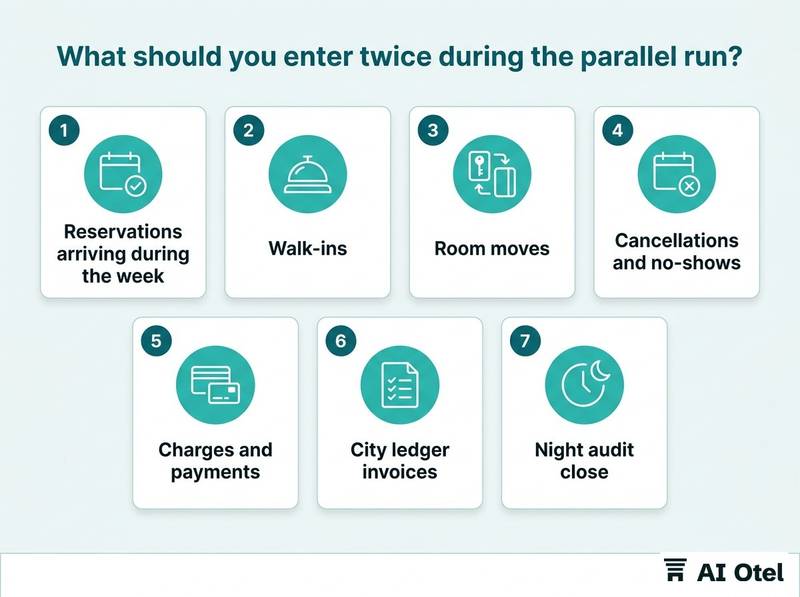
The double-entry set is: reservations arriving during the week with their rate code and market code, walk-ins, room moves, cancellations and no-shows, charges and payments, city ledger invoices, and the night audit close. Entered once only: housekeeping status detail, maintenance tickets, guest notes and preferences, marketing consent records and shift handover notes. Duplicating these adds work and settles nothing.
External messages leave from one system only: the guest identity notification (KBS, the misafir kimlik bildirimi), the invoice or e-document, the door key encoding, and the availability and rate push to channels. Sending from both creates a duplicate that a guest or an authority will see. Name the master for each interface in writing before day one, and name the person who owns it. An interface with two owners has none.
Keep the same identifiers in both systems: the same confirmation number, the same spelling of the guest name, the same rate code. Identifiers that drift make the nightly comparison unreadable by day three. Rate codes and revenue codes must exist in the new system with the same meaning and the same order as the old one, or every difference will look like a mapping error; setting up a new PMS in the right order covers that preparation.
If the desk falls behind, cut the set openly instead of skipping entries quietly: drop the outlets first and keep arrivals, payments and the night audit.
ChecklistBefore day one, write and sign
- the list of items entered twice
- the list of external messages with one owning system each
- the identifiers both systems will share
- the person who runs the nightly comparison
- the tolerance allowed on each total
- the escalation contact at the vendor
- the exit criteria for switching the old system off
What does the nightly comparison actually compare?
Three things, every night, after both night audits have closed the same business date: who is in the house, what they owe, and what was taken in.
Close both night audits on the same business date before comparing. A comparison against a half-closed day produces differences that are not real and hides the ones that are. Then separate count differences from value differences: a count difference is a state problem (a room, a guest or a reservation), a value difference is a posting problem (a charge, a payment or a routing).
Read the direction of a difference. A repeating, one-directional difference points to a rule or a mapping, such as a charge that always lands in the wrong revenue code. A random, two-directional difference points to timing or to a person. Keep one reconciliation sheet with one row per difference: business date, item, old value, new value, difference, cause code, action taken, who closed it and when.
The comparison belongs to the accountant working with the night auditor, not to the vendor's project team. Tell the vendor what does not match; do not ask them whether it matches. And never adjust the new system to agree with the old one without recording why.
| What to compare | Where it comes from | Typical cause | Who signs off |
|---|---|---|---|
| Arrivals and departures list | Reservations in both systems | Timing, duplicate booking | Front office manager |
| In-house guest count | In-house list | Room move missed in one system | Night auditor |
| Room revenue by rate code | Night audit report | Wrong revenue code mapping | Accountant |
| Payments by method | Payment totals | Posting after one audit closed | Accountant |
| City ledger balances | City ledger report | Invoice posted to wrong account | Accountant |
| Invoice numbers issued | Invoice register | Gap in numbering, wrong system | Accountant |
| No-shows and cancellations | Reservations list | Status change entered once | Front office manager |
| Out-of-order and blocked rooms | Housekeeping and status report | Status not mirrored | Front office manager |
For what sits behind these lists, PMS data migration: what to move, check and leave behind is the companion piece.
How do you resolve a difference and record it?
Find the cause, correct it in the system that will survive, and record the correction with its reason. A difference closed with an unexplained journal entry is a difference you will meet again.
Classify before fixing. Timing: a posting was made after one system's night audit. Mapping: a charge is routed to the wrong revenue code. Training: a clerk posted to the wrong guest bill. Interface: a channel booking reached only one system.
Correct at the source: move the charge to the right guest bill, re-route the revenue code, re-post the payment. Do not edit the total to make the report agree. Void and reverse rather than delete, so financial records keep their history and the correction itself becomes part of the record. Log the correction in the shared sheet the same night, with the guest or invoice reference and a cause code, so the pattern is visible by the third night.
Escalate to the vendor with a reproducible case: the business date, the screen, the exact values in both systems and the steps that produced them. A report that says only that the numbers do not match cannot be fixed. Set one rule: no difference stays open past the next night audit. If it cannot be closed, it goes to the person who owns the switch-off decision. Watch for the same difference twice: the second occurrence is a configuration problem, not an incident, and it belongs in the exit criteria discussion.
Watch outNever balance the new system with a rounding line
A plug or a miscellaneous charge that makes the totals agree closes today's sheet, hides the mapping error that produced the gap, and the same error returns on the next busy night.
Who signs off switching the old system off?
The hotel signs, not the vendor: the general manager signs the decision, and the front office manager and the accountant each confirm their own list in writing.
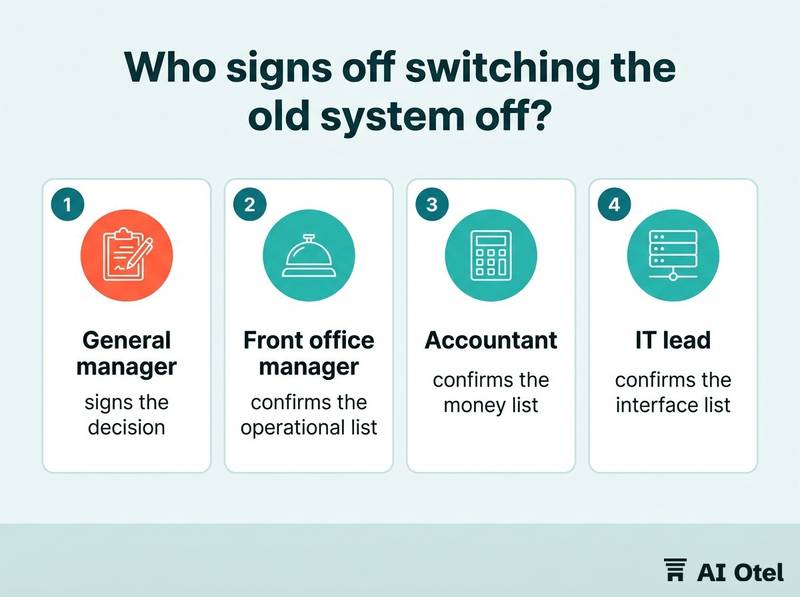
Write the exit criteria before day one, in numbers the hotel chooses: how many consecutive nights with all three totals inside an agreed tolerance, zero open guest-facing errors, and every interface confirmed running from the new system alone.
The front office manager confirms the operational list: a full arrival and departure cycle, a room move, a no-show, a walk-in, a group check-in and a split bill, each completed without opening the old screens. The accountant confirms the money list: night audit closed on both sides for the agreed nights, city ledger balances agreed, invoice numbering continuous, and payments reconciled by method. The IT lead confirms the interface list: channel availability and rates flowing from the new system only, door locks encoding, the fiscal device printing, and the e-document flow reaching the integrator.
Staff readiness is evidence, not a separate project. If a shift cannot be run without the old screens, the criterion is not met, whatever the totals say; a training plan by role is how that evidence is produced. Record accepted exceptions with a name and a date: a known cosmetic gap can be accepted, an unexplained balance cannot. Name the person who may extend the parallel run, and the conditions under which they would. An open-ended parallel run quietly becomes two systems nobody trusts.
Key pointThe sign-off sheet
Five columns: criterion, evidence attached, confirmed by, date, exceptions accepted. Signed by the general manager, the front office manager, the accountant and the IT lead, it is the only document that authorizes the old system to be closed.
How do you keep the old system readable afterwards?
Keep read access, not write access, for as long as your record-keeping duties and your contract require, and settle that period with your accountant and legal adviser before anything is switched off.
Decide what you will still need to look up: guest history, guest bills and invoices, city ledger, group blocks, rate history, and the audit trail of who changed what. Read access and a data export are different things. An export you cannot query answers a request slowly; a read-only login answers it in a minute. Ask for both, and test both before the last parallel night.
Check the contract before the switch-off conversation: what the vendor returns, in what format, for how long they keep it, and what they charge for access afterwards. The questions to ask are listed in the exit plan for leaving a hotel software vendor.
Close the interfaces deliberately, one by one: channel connections, the payment terminal, the door lock system, the fiscal device and the e-document integrator. A connection left open is a booking or a document landing in a system nobody watches. Stop the old night audit on the last parallel night and confirm it is not still scheduled: a night audit that keeps running keeps posting. Keep one named person with a working login and the recovery steps written down, so access does not depend on someone's memory of a password. Match the access period to what your accountant and legal adviser confirm for fiscal and personal data records, and write that date into the contract file.
What to do next
Write the one page tonight: what gets entered twice, which system owns each external message, the three totals you compare every night, and the criteria for switching the old system off. Have the general manager, the front office manager and the accountant sign it. Everything else follows from that page: the double entry exists to produce the nightly comparison, the comparison exists to produce the evidence, and the evidence is what lets the hotel, rather than the vendor, close the old system. If you are still choosing the software, read how a hotel operating system covers reservations, billing and compliance in one place, built and working, ahead of launch, and how its trust and audit approach treats financial records that are never deleted.
Frequently asked questions
How long should a PMS parallel run last?
The length is set by the exit criteria, not by the calendar: consecutive nights with all three totals inside the agreed tolerance and no open guest-facing errors. A week is a common starting point because it covers a full arrival pattern, including a weekend. If a difference is still unexplained on the last night, extend the run rather than accept it.
Do we have to enter everything twice?
No. Enter twice only money, the guest's presence and the room's state: reservations, walk-ins, room moves, cancellations, no-shows, charges, payments, city ledger invoices and the night audit close. Housekeeping detail, notes and preferences are entered once, in the new system. External messages such as the guest identity notification or the invoice must leave from one system only.
Can we run the parallel run in high season?
You can, but the trade-off is sharper: errors are more expensive and staff time is scarcer at the same moment. If the switch cannot wait, cut the double-entry set to arrivals, payments and the night audit, extend the number of nights, and keep a change freeze around the week so nothing else moves.
What if the two systems disagree on a guest's balance?
Find the cause first and classify it: timing, mapping, training or interface. Correct it at the source in the system that will survive, void and reverse rather than delete, and log the correction with its reason the same night. Do not post a plug to make the totals agree, and do not let the difference stay open past the next night audit.
What happens to the old system's data after switch-off?
Ask for read-only access and a queryable export, test both before the last parallel night, and check what the contract says about format, retention and the cost of access afterwards. Close the interfaces one by one so nothing lands in a system nobody watches. The period you keep access for follows the record-keeping answer your accountant and legal adviser give you.