Retiring the old system after a switch: a read-only archive, a date and who keeps the keys
Retiring an old hotel system requires four clear decisions: what history to keep, which copy format to use, the exact closing date, and who holds access. This guide explains how to secure a read-only archive and confirm data deletion.
AI draft · awaiting editorial review
Contents
Key takeaways
- A read-only archive answers the question a folder of exports cannot: what did this guest's bill look like on the night of the 14th.
- Set the closing date at the last business day the old system closed with its night audit, so no day's revenue is split across two systems.
- Name two people who keep access, each with an individual read-only login and a log you can read; a shared password is not access control.
- Ask the vendor for a short written deletion confirmation that names the systems, the date and the signer, and keep it with the contract.
- The hotel's own written rule decides how long the archive stays open; set it with your accountant and legal adviser, not with the vendor's default.
A read-only archive is a frozen copy of the old system's data that staff can search but not change. Retiring the old hotel system archive properly needs four decisions: what history you must still open, whether you keep a searchable copy or exported files, the date the old system stops, and the named people who keep access.
Go-live is over, the new system is running, and the old one is still there: still invoicing, still holding the only copy of last season's folios. The quiet months after a switch decide whether that history stays readable or becomes a folder nobody can open. This article walks through the four decisions that settle it: what you will still need to look up, which form of copy you need, when the old system stops, and who holds the keys afterwards.
What will you still need to look up after the switch?
A small set of questions repeats for years after a switch, and each one needs a record you can open, not a backup file you hope is complete.
Start with who asks, not what the database holds. The accountant reconciling an agency commission invoice, a guest disputing a minibar charge, a corporate client asking how many rooms its block picked up last season, a lawyer or insurer asking about an incident, an inspector asking for a folio or an invoice reference: each of these arrives without warning, months or years later.
Turn that list into lookups. Guest name plus date leads to a folio. Reservation number leads to the rate and package. Agency name leads to the commission and cancellation trail. Business day leads to the night audit totals. Document number leads to the invoice. If your copy cannot answer these five paths, it is not an archive, it is a souvenir.
Separate data from documents. The numbers live in tables; the signed registration form, the printed folio and the invoice live as files. A plan that covers only one of the two fails the first real request.
Apply one test: can a person who never used the old system find a folio from fourteen months ago in under five minutes, given only a guest name and a date? If not, the copy is not good enough yet.
Write down that old records are reference, not live balances. Nobody posts a correction into a read-only copy, and nobody treats an old deposit list as money still held. For what should move into the new system and what should stay behind, see what a PMS migration should move and what it should leave behind.
Read-only archive or exported files: which do you actually need?
A read-only archive keeps the old screens and the links between records; exported files keep the values but lose the context, so most hotels need both, with the archive as the primary.
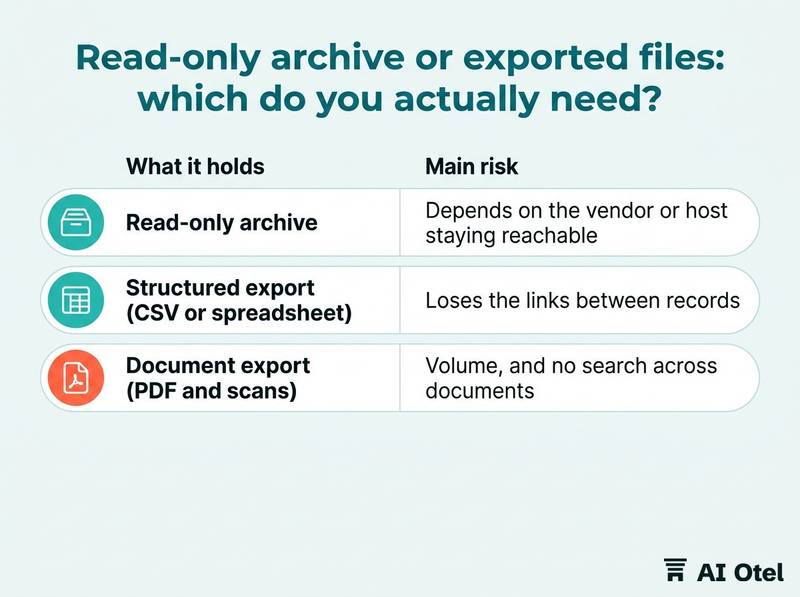
A read-only archive is a frozen copy of the old database served through a viewer: no adding, no editing, no deleting, searched by the same keys the old system used. An export is a set of files per module (reservations, folios, invoices, guest cards) plus PDFs of documents. It is readable without the vendor, but a single folio split across three files has to be reassembled by hand.
The trade-off is context against independence. The archive gives search and links but needs a host and a fee. The export gives independence but is weak on "show me everything about this stay".
| What it holds | How you search it | Who can use it | Main risk |
|---|---|---|---|
| Read-only archive: old database and its links | By the old keys (name, folio, date) | Named staff through a viewer | Depends on the vendor or host staying reachable |
| Structured export (CSV or spreadsheet) | By sorting and filtering | Finance and IT | Loses the links between records |
| Document export (PDF and scans) | Opened one at a time | Anyone | Volume, and no search across documents |
Insist on stable identifiers: reservation number, folio number, invoice number, and the guest name spelled as it was entered, so a lookup is a search and not an investigation. Ask for the document set separately from the data set: scanned registration forms, signed folios, invoices and correspondence.
Test before the final payment. Pick three records you know, open them in the archive, compare them with a printout from the old system, and write down the result.
What date should the old system stop at?
The closing date should be the last business day the old system closed with its night audit, so that no day's revenue is split across two systems.
The night audit closes the business day. A date in the middle of a day leaves a half-posted day that neither system totals correctly, and the accountant finds it weeks later.
The parallel run comes first. Two systems side by side for the first week means the old system is still writable for a few days; the closing date follows that period, it does not coincide with go-live. If you are at that stage now, read about running two systems side by side for the first week.
Decide now where the late tail is entered: deposits, refunds, chargebacks, agency commission invoices, cancellation penalties and group blocks that pick up after the switch. The rule that works is a new entry in the new system with a note naming the old record, approved by a named person.
Key pointThree conditions before the closing date is fixed
The last night audit has closed in the old system; the parallel run has ended and its differences are reconciled; the archive or export has been delivered and opened once by someone at the hotel.
Write the date into the exit schedule and into the correspondence with the vendor. A date nobody wrote down is a date that moves. Tell the front desk, reservations and accounting in one message: from that day the old system is for lookups only, and here is who to ask when a lookup is needed. Save the old system's final reports as files you hold: the last night audit, the trial balance, the open deposit list, the outstanding group blocks.
Who keeps access, and how is it logged?
Name two people, each with an individual read-only login, and make sure the archive writes an access log you can read; a department or a shared password is not access control.
Two named people plus a deputy, usually the finance lead and the IT lead: one answers money questions, one answers technical ones, and both are named in the retirement note rather than in someone's memory.
Individual accounts get a read-only role. Exporting out of the archive is a separate permission, granted on a written request and recorded, because an export leaves the controlled environment and cannot be recalled.
Ask to see a sample of the access log before you accept the archive: who opened which record and when. If you cannot read the log, you cannot answer a guest who asks who looked at their data. The vendor's own support account is the one everyone forgets: close it at the closing date, or keep it time-limited with a named contact and a written reason. Leavers are the second thing everyone forgets; add the archive to the same joiner and leaver checklist you use for the new system, on the same day.
Availability matters too. An archive that is down when a lawyer asks is worth little, so ask what response time and what restore point the archive carries.
ChecklistAccess checklist
- A named owner and a named deputy
- Individual read-only logins, no shared account
- Export permission separate and approved in writing
- Access log readable, sampled once before acceptance
- Vendor support account closed or time-limited at the closing date
- Leavers removed through the same process as the new system
- A one-page written rule stating who may open the archive, who may export from it and who approves each
How do you get the vendor to confirm deletion, in writing?
Ask for a short letter that names what was deleted, from which systems, on what date, and who signed it, and treat a verbal assurance as nothing.
Scope the letter across environments, not just the live one: the production database, the backups and their rotation, test and staging copies, support copies and screenshots, and any subcontractor holding a copy.
Ask what will remain and why, rather than asking for a clean sweep. The vendor's own invoices to you, aggregate logs, and whatever their own accountant requires will stay; a list you can read beats a promise you cannot check. Deletion from the live system and expiry from backup are two different dates: ask for both, because the second one is usually later.
Watch outRead the scope line before you accept the letter
A deletion confirmation that names only the live database leaves the backups, the test copy and the support copy untouched. Ask for the backup expiry date in the same document.
Your side is separate. How long the hotel keeps guest data, folios and fiscal records is the hotel's own decision, taken with your accountant and legal adviser; the vendor's letter does not settle it. Ask before the final payment and before the notice period runs out, while you still have something the vendor wants. File the letter with the contract and the closing-date note. If the vendor is acquired or stops trading, that file is the only record of what happened to your data. The questions to ask before you are even in this position are in the exit questions to ask before you sign with a hotel software vendor.
How do you close the subscription without losing the data?
Close in order: archive delivered and tested, access accounts created, closing date passed, deletion confirmed, then the subscription cancelled. Reversing that order is how hotels lose their history.
Read the termination clause before you need it: the notice period, the auto-renewal date, what happens to access after the end date, and whether the archive is a separate paid line.
Price the archive now, not later: per year, per seat or per gigabyte. The price after termination is not the price you negotiated at the start, and it is the one number nobody asks about at signature. Decide who hosts the archive and who pays. If the vendor hosts it, keep a copy you hold; if the hotel hosts it, name the person who can run it.
Reconcile the final invoice against deposits, credits and the last month's fee before you release the final payment. Keep a structured export and the document set on storage the hotel controls, refreshed at the closing date, even when a hosted archive exists. Put the renewal and notice dates into the calendar you already keep for software contracts; the same habit that runs the twelve-month software contract renewal calendar covers the archive fee and the notice period, so neither arrives as a surprise.
Write the retirement note this week
Write the one-page retirement note now: the closing date, the lookup list, the archive type, the two named people and the deletion request. Send the deletion request before the next invoice arrives, because the order of those steps is the whole article: history you can open, a date everyone agreed, and keys held by people you can name.
If you are evaluating what a modern hotel operating system should carry forward from day one, the hotel operating system overview (the system: built, ahead of launch) and the trust and data-handling notes describe one approach in full, with its honest status.
Frequently asked questions
How long should we keep the old hotel system's archive open?
There is no single period that fits every hotel. Base it on the lookup list you actually wrote and on what your accountant and legal adviser require for fiscal records and personal data, put the result in a written rule with a review date, and treat the vendor's default as a starting point rather than your policy.
Is a PDF export of every folio enough to retire the old system?
PDFs answer "show me this document". They do not answer "which reservations used this rate" or "total commission by agency last season". Keep structured data for searches and PDFs for documents, and test both against a real question before you accept the delivery.
What if the old vendor goes out of business before we finish?
Get the copy you hold early: a structured export plus the document set on storage the hotel controls. A hosted archive depends on the vendor staying reachable, so ask what happens to the archive if the company is sold or closes, and keep the deletion letter and the final export in the same file.
Can we keep the old system writable for a few months, just in case?
Two writable systems produce two versions of the same folio, and nobody can say which one is true. The parallel run is a short, planned exception with a fixed end. After the closing date the old system is read-only, and any correction is posted in the new system with a note naming the old record.
Who should be allowed to export data out of the archive?
One named person, on a written request, with the export logged. An export leaves the controlled environment and cannot be recalled, so it is a different permission from opening a record, and it should be reviewed whenever the person or the role changes.