A lost or stolen staff phone or laptop: the first hour, the checklist and what to change
Follow a fixed five-step order in the first hour: report, lock, sign out, change, and record. Learn how to secure guest data and prevent the next incident.
AI draft · awaiting editorial review
Contents
Key takeaways
- The first hour has five steps in a fixed order: report to one named person, lock, sign out sessions, change passwords starting with email, and write down what the device could reach.
- A remote lock and a password change are not the same as ending a session: a service can keep a device signed in until someone ends that session in its security settings.
- The item most often overlooked is the photo gallery, where images of guest identity documents sit outside the systems built for identity notification and personal data.
- Two things survive a password change unless someone looks for them: a forwarding rule on the mailbox and the lost phone still listed as a trusted device for two-step sign-in.
- The next-day review asks what the device was allowed to hold, not who lost it, and ends with a one-page card kept at the front desk.
Report it to one named person, lock the device remotely, sign out its sessions, then change the passwords it could reach, email first. Write down what the device held: mail, chats, booking extranet, photos of guest identity documents. A remote lock is a command sent from the hotel's device management or the account itself that blocks the screen without erasing data.
The phone was on the desk at shift handover and now it is not, and the person who used it is not sure whether it was the taxi or the back office. Before anyone starts guessing, one person needs to know and one device needs to be locked. This guide gives you the lost staff phone hotel procedure in a fixed order, the words for the first call, and a card you can print and keep at the desk today. It assumes the device could reach hotel mail, messaging or a booking system, which is the case for almost every phone a hotel issues.
What should you do in the first hour after a staff phone or laptop disappears?
Report, lock, sign out, change, record: in that order, and all five inside the hour if the device could reach hotel mail or a booking system.
Name one person who owns the hour. Usually the IT lead, and the duty manager outside office hours. The point is not that everyone acts, it is that one person holds the timeline and everyone else calls that person. Without that, three people lock three different things and nobody records any of it.
Write the timeline before you act: when the device was last seen, where, who had it, whether it was protected by a PIN or a password, and which accounts were signed in on it. Five minutes of writing saves an hour of reconstruction later, and the note becomes the backbone of the incident record.
Lock before you erase. A remote lock blocks the screen and leaves everything on the device intact; an erase destroys the evidence of whether it was opened and what it held. Erase only after you have confirmed what was on it and that nothing on it is still needed. Do not keep calling the number or sending messages that name the hotel's systems, because whoever is holding the device sees the screen light up.
Warn the front desk and the switchboard in one sentence: any caller asking for a password reset or a verification code, claiming to be from IT or from the device's owner, is now suspect. Lost devices are often followed by exactly that call. Note the time of every action as you take it; you will need the sequence for the review, and for whatever the hotel decides about guest data later. If the device is a laptop left in a meeting room or a car, the same five steps apply, with the difference that a laptop usually holds more files and fewer photographs.
ChecklistThe first-hour card
- Report: device, owner, time last seen, to the IT lead or duty manager
- Lock: remote lock from the account or the device management tool
- Sign out: end every session the device opened, email first
- Change: email password, then booking extranet, then PMS, then anything holding money
- Record: what the device could reach, what you did, at what time
- Footer: two phone numbers (IT lead, duty manager). Do not erase before the lock is confirmed.
For the wider picture of what to secure before anything goes missing, see the hotel cybersecurity checklist for owners and general managers.
Who do you call first, and what do you say?
The person's manager and the IT lead, in that order, and the general manager as well if the device could reach guest data or money.
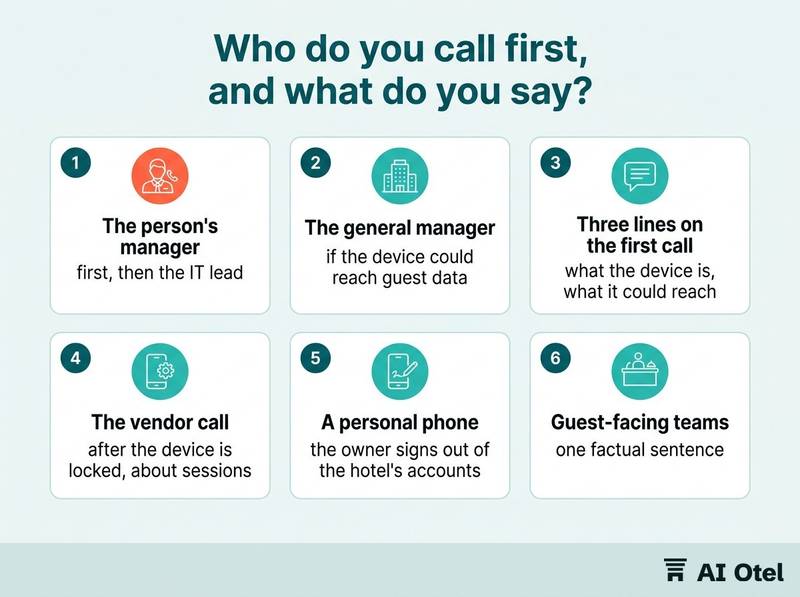
Three lines are enough on the first call: what the device is, what it could reach, and when it was last seen. Everything else can wait until the lock is done. Department heads call the IT lead, not the software vendor; the vendor call comes after the device is locked, and it is about sessions and access, not about the loss.
If the device is a personal phone that carried hotel mail, the hotel cannot lock it. The owner signs out of the hotel's accounts themselves, with someone from IT beside them, and the hotel records that it asked and when. This is why the rules for which hotel accounts may sit on a personal phone at all need to be written down in advance, not improvised during an incident; see company devices, personal phones and the rules for both.
Decide who speaks to guest-facing teams, and give them one factual sentence. Speculation at the front desk turns into a story by the afternoon. Keep the detail out of wide group chats: what the device could reach is the sensitive part, and a message thread is a copy of it. If the device belonged to a manager with approval rights in the hotel's systems, treat the call as urgent regardless of the hour, because approval rights are worth more to a stranger than the handset.
TipThe three-line report
Device: [phone or laptop, whose]. Could reach: [mail, booking extranet, PMS, messaging, files]. Last seen: [place and time]. Send this to the IT lead in writing, even if you also called.
How do you lock the device and sign out its sessions?
Lock from the account or the device management tool, then end every session that device opened, because a lock alone leaves the session alive on the service side.
There are two levers and you need both: the account, meaning mail, booking extranet, PMS and messaging, and the device itself, meaning the screen lock and, later, the erase. Ending a session is a separate action from changing a password. Many services keep a device signed in until someone ends that session in the security settings, and some keep it signed in for a long time. This is the single most skipped step in the whole procedure.
Work in order of reach: email first, because a mailbox can reset almost everything else; then the booking extranet and the PMS; then messaging; then anything that moves money. Revoke app-specific passwords and tokens as well. They are issued to a single app and do not expire when the main password changes, which is exactly why they are useful to whoever has the device.
Do not count on the erase command. If the device is offline or switched off, the command waits and may never arrive, so treat the erase as a hope and the session sign-out as the actual control. Check the result rather than assuming it: ask the owner to open the same account on a different device and confirm the lost device no longer appears in the session list.
| What the device could reach | First action | Second action | How you check |
|---|---|---|---|
| Hotel email | Lock device | End sessions, change password | Session list on another device |
| Booking extranet | End sessions | Change password | Rates and availability unchanged |
| PMS login | End sessions | Change password | IT lead reviews recent activity |
| Messaging groups | Remove the device | Re-add person on new phone | Tell the group why |
| Cloud drive (rate sheets, contracts) | End sessions | Check sharing links | Re-share only what is needed |
| Photo gallery with guest IDs | Lock | Treat as personal data | See the section below |
| Bank and e-invoice portal | Call the provider | Change credentials | Check for new payees |
For the vocabulary behind these steps, see two-step sign-in, password managers and the rest of the account vocabulary.
Which passwords and two-step sign-in settings do you change?
Change the email password first, from a device that is not the lost one, then remove the lost phone from the trusted devices and re-register two-step sign-in on the new one.
Change from a known device on a known network. A password changed on a shared lobby computer is a second incident waiting to be reported. Check the mailbox's recovery email address and recovery phone number, and look for a forwarding rule: someone who adds a forwarding rule keeps reading the mail after the password changes, which is why the rule matters more than the password.
Remove the lost phone from the trusted device list, otherwise the second factor still points at a device that is no longer in the hotel's hands. Do not build the new password by adding a number to the old one; use the password manager and a fresh passphrase, and let it generate the rest. If the same password protected two systems, change both now. The loss is the reason to break the reuse, not just to rotate one password.
Write down what changed and when, and hand the note to the person who will next touch the account. A password change nobody recorded gets repeated or, worse, half-repeated.
Watch outTwo things a password change does not fix
A forwarding rule on the mailbox, and the lost phone still listed as a trusted device for two-step sign-in. Both are found in the account's security settings, and both take a minute to check.
For the background on why these two settings matter so much, see phishing, ransomware and two-step sign-in in plain terms.
What was on the device, and does it matter?
Usually more than the owner remembers: mail, chats, rate sheets and, very often, photographs of guest identity documents.
Walk the list out loud with the owner rather than asking an open question: mail, messaging, booking extranet, PMS, cloud drive, photo gallery, notes app, and the passwords the browser saved. People under-report what a device held, not out of dishonesty but because a gallery or a notes app is invisible until someone names it.
Photographs of passports and identity cards are the item most often overlooked in this walk-through. In Türkiye, every stay involves a payment, a fiscal document, a guest identity notification (KBS, the guest identity notification system) and personal data (KVKK, the personal data protection law). A photograph of a card in a phone gallery sits outside the systems the hotel built for those two steps, which is what makes it hard to find and hard to clean up.
The hotel's own written rule decides whether staff may photograph identity documents at all. Where the device held guest personal data, what the hotel must do next, including whether it must notify anyone, is a question for its data protection adviser, and the hotel should ask before it decides, not after.
Separate what the device could reach from what it did reach. The account's sign-in and session history shows what was actually opened, and that distinction belongs in the record. Rate sheets, contracts and supplier terms are commercial damage rather than personal data; treat them in their own line of the record, with the question of who else now knows the hotel's prices. A laptop usually carries files that exist nowhere else: if that is the case, say so plainly in the record and treat the file as gone until a copy is found.
NoteIdentity photos are personal data
A photograph of a guest's identity document is personal data whether it sits in the hotel's system or in a staff phone's gallery. The hotel's rule should say whether such photographs may be taken at all, and where they are kept if they may.
How do you record the incident and stop the next one?
One page: what happened, what the device could reach, what you did and when, and the two changes that make the next loss smaller.
The record has fixed fields: date and time, device and owner, last seen, accounts involved, each action with its time, who decided, whether guest data was involved, and how the incident was closed. Review it the next day with the owner and their manager. The question is not who lost the device, it is what the device was allowed to hold and reach in the first place.
Prevention that costs nothing: a screen lock with a short timeout on every work device, and no photographs of identity documents on any phone that leaves the building. Separate the work accounts from the personal gallery: a work profile or a dedicated mail and messaging app keeps hotel mail out of the place where personal photos live, and makes a personal phone a smaller problem when it goes missing.
Keep a spare, locked phone at the desk for the rest of the shift, so that a lost handset does not take the hotel's messaging offline for four hours. Print the first-hour card, laminate it, and keep it at the front desk and in the back office. Then test it once a quarter: ask a department head to walk the card as if the phone were gone, and watch where it stops.
ChecklistPrevention checklist
- Every work device has a screen lock with a short timeout
- No photographs of guest identity documents on any phone
- Work accounts in a separate profile or app
- A named owner for the device list
- A spare locked phone at the front desk
- The first-hour card printed and placed
- One walk-through of the card each quarter
- The record reviewed the next working day
What to do next
Print the five-step card today and put a name and two phone numbers on it, because the value of the whole procedure is that nobody has to invent it at the moment a device disappears. The order is what holds it together: report to one person, lock, end sessions, change the passwords starting with email, then record what the device could reach and review it the next day. If you want to go further than the card, the broader controls around accounts and devices are covered in the hotel cybersecurity checklist for owners and general managers, and the way a hotel operating system is built so that each hotel's data is separated at the database level, and the trust and security approach behind it, are worth reading before you choose or change your property management software.
Frequently asked questions
Should we erase the phone as soon as it is reported lost?
Lock first and erase later. An erase destroys the evidence of whether the device was opened and what it held, and the command may never arrive if the device is offline or switched off. Erase once the hotel has confirmed what was on the device and has decided it no longer needs to know.
The phone belonged to the employee. What can the hotel actually do?
The hotel cannot lock a device it does not manage. The owner signs out of the hotel's accounts with someone from IT beside them, and the hotel records that it asked and when. The device rules should say in advance which hotel accounts may be on a personal phone at all.
Do we have to report a lost device to anyone outside the hotel?
That depends on what the device held and on the hotel's own position, and it is a question for the hotel's data protection adviser. What the hotel controls is the record: what the device could reach, what was done and at what time, so that the decision can be made on facts rather than memory.
What if the lost laptop held the only copy of a file?
Treat the file as gone until a copy is found in cloud storage, a mailbox attachment or a colleague's download folder. Record it as a separate commercial loss from the access problem, and change the habit that produced it: files that matter live in a shared place, not on one machine.
How long should the first hour take?
The lock and the email password are minutes. Ending sessions across mail, the booking extranet, the PMS and messaging is the slow part, and it is the part people skip. Do the lock and the email first, then work through the rest in order of reach rather than trying to finish everything at once.