A settings change log for the PMS: who changed tax codes, room types and print layouts, and why
A PMS settings change log records who changed tax codes, room types, and print layouts, and why. Learn which settings to log, who may change them, and how to review the log at month end.
AI draft · awaiting editorial review
Contents
Key takeaways
- A reservation, a bill line and a payment leave a record by design; a tax code, a room type name or a print layout changes silently, and the only evidence is that yesterday's document looked different.
- Log any setting that changes money, a document handed to a guest, guest-facing text, access rights, or the meaning of last month's reports.
- An entry needs five things: who, when, the value before, the value after, and why; a sixth, the reference to the request that caused it, is what makes the log usable months later.
- The person who changes a tax code should not be the person who reconciles the tax report.
- After a wrong change, restore the previous value first, then record the reversal as a new entry, and never delete the wrong one.
A PMS settings change log is a dated record of every change to the system's configuration, tax codes, room types, print layouts and user rights, with who made it, what the setting was before and after, and why. It turns "nobody knows who did it" into a traceable entry the hotel and its vendor can act on.
The tax code on the invoice is not the one you set in January, the room type guests see is spelled differently than in the rate plan, and the folio now prints on the wrong tray. Nobody in the building admits to changing anything, and the vendor says the software is unchanged. After reading this guide you will know which settings to log, what each entry must hold, who may change what, how to link a change to a ticket, and how to review the log at month end without reading every line.
What is a PMS settings change log, and why does a hotel need one?
A settings change log is a dated record of every change to the system's configuration, with who made it, what the setting was before and after, and why. It exists because configuration changes leave no trace in the reservation or the bill.
Separate configuration from transactions. A reservation, a folio line and a payment each write their own record by design: the system was built to remember them. A tax code, a room type name or a print layout changes silently, and the only evidence is that yesterday's document looked different. The log answers four questions in one place: who made the change, when, what the value was before and after, and why. Without the before value the entry cannot be reversed, which is the moment you need it most.
Three teams read the same entry differently. Front office sees a renamed room type break a rate plan or a confirmation email. Accounting sees a tax code change alter every document issued from that moment. IT sees a print layout change break the folio printer at 23:00. The log gives all three the same facts.
The log is not the transaction audit trail. The audit trail says what was sold and charged; the change log says why the system behaved differently on Tuesday than on Monday. A hotel needs both, and they answer different questions. The log also protects the vendor as much as the hotel: when a hotel reports a fault, the entry shows whether the setting or the software changed, which decides who investigates and how fast.
For example, a hotel renames "Standard Twin" to "Standard Twin Garden" in March. Rate plans, the guest app and the confirmation email keep working only if they point at the internal room type code, not at the display name. The log records which of the two was edited.
Key pointThe single test
Would a colleague looking at last month's numbers or last month's documents reach a different conclusion because of this change? If yes, it belongs in the log.
Which settings deserve a log?
Log any setting that changes money, a document handed to a guest, guest-facing text, access rights, or the meaning of past reports. Everything else can wait until someone asks for it.
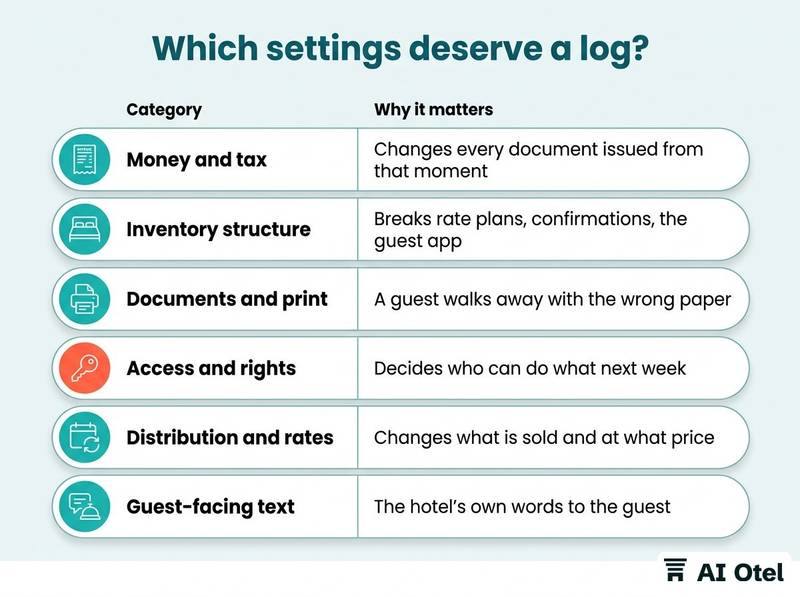
Money and tax comes first: tax codes and the rates they carry, service charge handling, city or accommodation tax lines, currency, rounding, and the order in which discounts and taxes are applied. Inventory structure follows: room types, room numbers, bed configurations, connecting-room flags, and the mapping between a room type and the rate plans that sell it. Then documents and print: invoice and e-document templates, folio headers, registration forms, printer and tray assignments, and the layout that decides where the guest signature lands.
Access and rights are a category of their own: user accounts, roles, discount limits, void and refund rights, and the rights that let someone reopen a closed business day. Distribution and rates cover rate plan codes, channel mappings, availability rules and the stop-sell logic that decides what leaves the building. Guest-facing text covers confirmation emails, the guest app, welcome messages and the wording a guest reads before arrival.
| Category | Typical settings | Why it matters | Who may change |
|---|---|---|---|
| Money and tax | Tax codes and rates, service charge, rounding | Changes every document issued from that moment | Accounting manager, with a second approval |
| Inventory structure | Room types, room numbers, bed setup | Breaks rate plans, confirmations, the guest app | Front office manager with IT |
| Documents and print | Invoice templates, folio header, printer and tray | A guest walks away with the wrong paper | Accounting manager |
| Access and rights | Users, roles, discount and void limits | Decides who can do what next week | General manager |
| Distribution and rates | Rate plan codes, channel mappings, stop-sell | Changes what is sold and at what price | Revenue manager |
| Guest-facing text | Confirmation email, guest app, welcome message | The hotel's own words to the guest | Marketing with front office |
The trade-off is real. Log everything and nobody reads the log; log too little and the one entry you need is missing. Start with the five settings that would hurt most if changed silently, and add categories as they earn their place. If pricing is your first concern, the same discipline applies to a rate change log: recording who changed which price and why.
What should each entry hold?
Each entry holds five things: who, when, the value before, the value after, and why. A sixth, the reference to the request that caused it, is what makes the log usable months later.
Who means a named user account, never a shared login. If two people use one account, the log records a machine, not a person, and the entry is worth nothing in an argument. When means date and time in the hotel's own local time, with the time zone written once at the top of the log, plus the effective date when the new value starts to apply. A setting changed on the 28th for the 1st is two different facts.
What means the internal identifier of the setting and its before and after values, copied exactly. "Tax code changed" is not an entry; "tax code B changed to C" is. Why means one sentence in a fixed shape, naming the cause, the person who asked and the reference. Written the same way every time, the reason field becomes searchable instead of decorative. Approval means the name of the second person where the category requires one, recorded at the time and not reconstructed afterwards. If the change was later undone, the entry says so and points at the entry that undid it.
Keep the log where the change happens if the system can hold it, and in one fixed template if it cannot. Two half-logs in two places is the same as no log. The same fixed-shape discipline is what keeps data entry standards that keep notes readable a year later working in the rest of the PMS.
ChecklistEntry checklist
- Named user account, not a shared login
- Local date and time, plus the effective date
- Internal setting identifier
- Exact before value
- Exact after value
- One-sentence reason: cause, requester, reference
- Approver, where the category requires one
- Pointer to the entry that reversed it, if any
Who may change which settings?
Give each category of setting to the smallest group that can do the job, and require a second person for anything that touches money or a document handed to a guest.
Four levels are enough: view, propose, change and approve. Most hotels have only the first and the third, which is why the log has holes. Separate the duty. The person who changes a tax code should not be the person who reconciles the tax report at month end, and the person who can reopen a closed business day should not be the only person who checks it.
Vendor access is named and time-boxed. A support engineer who logs in remotely is a user of your system; the change goes in your log, not only in the vendor's ticket history. Shared logins destroy the whole exercise: if the front office shares one account, the log can only say "the front desk", which is the answer you already had before you started. Keep an emergency path and write it down: an after-hours change by the duty manager is allowed, with the entry written on the next business day and the reason stated plainly. Review the rights list when someone leaves and once a quarter regardless; rights that were correct in January are the usual source of a change nobody can explain in July.
| Role | May view | May change | Must approve |
|---|---|---|---|
| General manager | All categories | Access and rights | Money and tax |
| Front office manager | Inventory, guest text, documents | Inventory structure, guest-facing text | Nothing |
| Accounting manager | Money, documents, reports | Money and tax, document templates | None, but reconciles independently |
| IT or systems administrator | Everything | Technical settings, printer and tray, user accounts | Money and tax |
| Vendor support engineer | Only what the ticket needs | Only with a hotel reference and a time window | Everything |
For a fuller setup of accounts and roles, see PMS user roles and permissions: a setup checklist.
How do you link a change to a request or a vendor ticket?
Every entry carries one reference number pointing to the request that caused it, whether that request came from inside the hotel or from the vendor's support desk.
Choose one numbering scheme and keep it. A hotel ticket number and a vendor ticket number can both exist, but the log holds one of them and the other is written beside it. The request states the desired end state and the date it should apply from. "Make the invoice right" is not a request; "show the accommodation tax as a separate line from 1 April" is.
The change entry cites the reference, and the ticket is closed only when the entry exists. Closing on a phone call is how a change becomes invisible. When a vendor raises the ticket, paste the hotel's own reference into it, so both sides can find each other six months later without a search through email. Recurring changes get a standing reference: the seasonal rate plan switch, the annual document template review, the summer print layout. These are the changes nobody remembers making because they happen every year.
A change with no reference is treated as an incident, not a change. It gets investigated, and the missing reference is itself the finding. If the vendor is the one making changes, the terms that bind them belong in the contract: see support and response terms in hotel software contracts.
TipWrite for the reader in a year
Name the cause, the person who asked, and the reference. "Because the accountant asked for the accommodation tax on its own line, requested by A. Yılmaz, reference HT-2026-041" survives a staff change; "accounting request" does not.
How do you review the log at month end?
Read the month's entries against the money and the documents, not line by line: every change to a tax code, a document template or a right should have a reason and an approval.
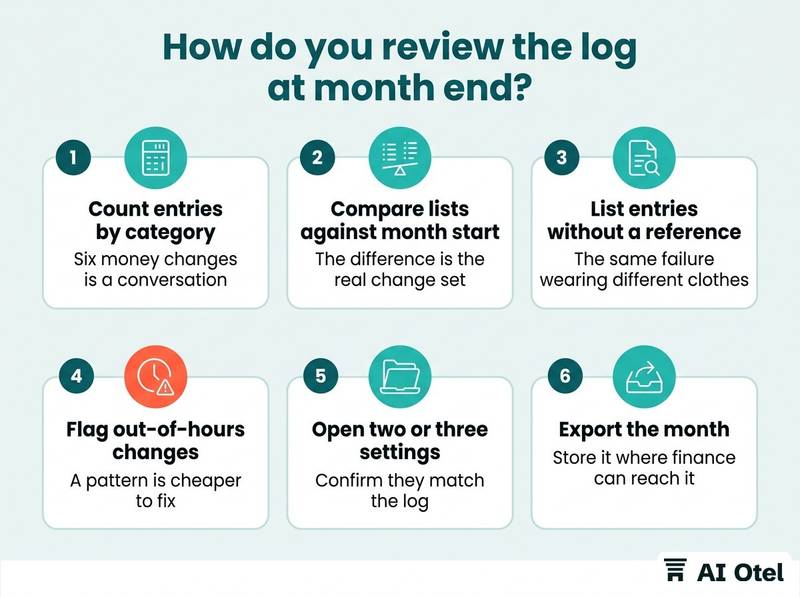
Filter by category and count. Six money changes in a month is a conversation; sixty is a permission problem. Compare the tax code list at month end with the list at month start, and do the same for document templates and the rights list. The difference between the two lists is the real change set, whatever the log says.
Look for entries with no reference and entries with a one-word reason; both are the same failure wearing different clothes. Look for clusters: the same person, the same setting, changes made outside business hours, or a setting changed twice in a week. A pattern is cheaper to fix than an incident. Sample two or three entries and open the setting in the system to confirm it matches the log; drift between the log and the system is the failure mode that makes the whole exercise pointless. Export the month and store it where finance can reach it without asking IT, and give the review itself a line in the log, with the reviewer's name.
ChecklistMonth-end review checklist
- Count entries by category
- Compare tax code, template and rights lists against month start
- List entries without a reference
- List entries with a one-word reason
- Flag out-of-hours and repeat changes
- Open two or three settings and confirm they match the log
- Export the month to the finance folder
- Record the review with the reviewer's name
In high season, the better move is to freeze changes altogether rather than review them afterwards; see a change freeze for hotel systems in high season.
What do you do after a wrong change?
Restore the previous value first, then find the cause, then close the gap that allowed it. The order matters because guests and documents are waiting while you investigate.
Revert using the before value recorded in the log, not from memory; this is the moment the before column earns its place. Record the reversal as a new entry that points at the wrong one, and the wrong entry stays exactly where it is. Work out the blast radius before you announce anything: documents issued since the change, folios still open, notifications already sent, printouts already in a guest's hand.
Correct documents that have already gone out through the proper path with your accountant. Whether a correction document is needed, and in what form, is a question for them, not for the log. Then fix the cause, not the symptom: a missing approval, a shared login, a category nobody owned, or a vendor change that arrived without a reference. Write a short note naming the cause and the new rule, and keep it with the entry; the next person to read the log will be looking for exactly that paragraph.
Watch outNever edit or delete the wrong entry
A log with a gap is worse than no log, because it looks complete and everyone stops checking.
What to do next
Pick the five settings that would hurt most if changed silently, write the entry template with its five fields and one reference field, and start logging this week. At month end, compare the lists rather than reading every line. The log, the rights list and the ticket reference are one mechanism: the log records the change, the rights decide who could make it, and the reference explains why it happened. If you want a sense of how a modern hotel operating system organizes configuration and records, or of how system records and audit trails are handled, those pages describe the approach in plain terms. Keep the same discipline you use for guest data, and confirm any question about document retention or correction with your accountant.
Frequently asked questions
Should the change log live in the PMS or in a spreadsheet?
In the system where the change happens, if the system can hold it, because the entry is then written at the moment of the change and cannot be skipped. If it cannot, use one fixed spreadsheet template with one row per change, stored in one place and exported monthly. The weakness of a spreadsheet is that it depends on someone remembering; the weakness of a system log is that it may not cover vendor-side changes, so most hotels need both and a monthly reconciliation between them.
Is a settings change log the same as an audit trail?
No. The audit trail records transactions: what was sold, charged, voided or reopened. The change log records configuration: what the system was told to do differently, and by whom. A hotel needs both, because a transaction can be correct and still be wrong for the hotel if the setting behind it changed.
What if the vendor changes a setting remotely and does not tell us?
Put the notice requirement in the contract and the reference in the ticket, then verify rather than trust. The month-end comparison of the tax code, template and rights lists against month start will show a change the log does not contain. When you find one, record it in your own log with the vendor ticket number and the date you discovered it, and raise it as a support question rather than a complaint.
How long should we keep the log?
Long enough to cover the periods whose documents or reports could still be questioned, which depends on the hotel's own document practice and on advice the hotel receives. Keep the monthly exports in the same place, and for the same period, as the financial records they explain, and confirm the period with your accountant rather than guessing.
Who should own the log?
The person who owns the settings, not the person who owns the software. Money and document categories usually sit with the accounting manager, inventory and guest text with the front office manager, and access with the general manager. IT keeps the mechanism working and runs the month-end export; ownership of each category is what makes an entry appear at all.