Data entry standards in the PMS: names, phone numbers, emails and notes that stay clean
Small entry mistakes break reports and sends. This guide gives you a half-page standard for names, phones, emails and notes, plus a weekly check to keep records clean.
AI draft · awaiting editorial review
Contents
Key takeaways
- A PMS matches and groups on exact text, so one stray space or one missing country code turns one guest into two records and one report into two rows.
- Family name and given name belong in separate fields, in normal case, with Turkish characters kept as typed.
- A phone number is stored with a plus, the country code and digits only; the leading zero is a domestic dialing prefix, not part of the number.
- If you would ever filter or count by a value it is a field; if you would only read it, it is a dated note.
- The standard holds only when a weekly exception list returns the records that break it and the desk that made the entry corrects them.
Hotel PMS data entry standards are short written rules for the fields desk staff fill most: family and given names in separate fields in normal case, phone numbers as a plus, country code and digits only, one lower-case email per field, and everything else in a dated note. A weekly exception list keeps it true.
A guest calls back about a confirmation that never arrived. The address on the profile looks right. It ends with a space. That is the whole problem, and it stays invisible at the desk, in the report and in the send until someone goes looking. After reading this guide you will have a half-page standard for names, phone numbers, emails and notes, a weekly check that finds what the standard missed, and a way to train it into new staff on their first shift.
Why do small entry mistakes become report problems?
Because a PMS compares and groups on exact text. One extra space, one missing digit or one capital letter makes the same guest or the same number into two different values, and every report that counts them counts two.
Reports group by the literal string. For example, "Ayşe Yılmaz" and "AYŞE YILMAZ" appear as two rows in a repeat-guest report, and neither looks wrong on its own. A phone number without a country code cannot be dialed or messaged by a system that does not know where the guest is. An email with a trailing space fails the send, and the failure reaches the desk as "message not delivered", never as "the address has a space".
A note typed into the surname field cannot be searched for and cannot be counted, so the information exists and is unusable. The mistake is cheap at entry and expensive at the point of use: at check-in, at the night audit, in a campaign send, or when two profiles have to be merged by hand. Vigilance does not fix this. A written rule plus a check that runs every week does, because the check finds the entries the rule did not reach. If you are preparing for any kind of automation later, the same logic applies: hotel data quality before AI: what to clean up and why.
Key pointOne value, one shape
Every field holds a single value in one agreed shape, and anything that is not that value goes in a dated note. Short enough to print on half a page and pin at the desk.
Guest names: what order, which case, which alphabet?
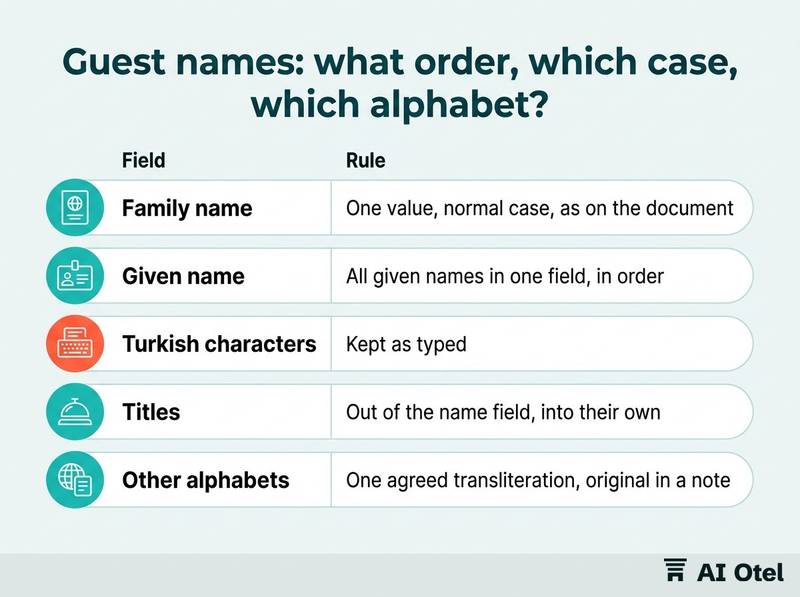
Store the name as the guest's identity document shows it, in normal case, with family name and given name in two separate fields.
Two fields, not one
A single name field forces the desk to guess where the family name ends, and every later sort, letter and report inherits the guess. Two fields remove the guess. Search before creating: check the phone number and the email first, then the name, because a name is the field most likely to be spelled two ways.
Capitals, Turkish characters and other alphabets
Normal case, not capitals. Capitals remove the letter distinctions that Turkish and some other alphabets carry, and the original spelling cannot be rebuilt from them. Keep Turkish characters: typing Ş as S, Ğ as G or İ as I creates a second profile for the same guest the next time the name is searched.
For names written in Arabic, Cyrillic or Persian script, agree one transliteration per guest and use it everywhere; keep the original spelling in a note if the desk needs it. Titles, suffixes and job titles go in their own field or a note, never inside the name, or the name stops matching the document. A fuller routine for this is in a spelling routine for guest names in Arabic, Cyrillic and Persian.
| Field | Rule | For example (wrong, then right) |
|---|---|---|
| Family name | One value, normal case, as on the document | YILMAZ → Yılmaz |
| Given name | All given names in one field, in order | MEHMET ALİ → Mehmet Ali |
| Turkish characters | Kept as typed | Sule → Şule |
| Titles | Out of the name field, into their own | Dr Mehmet Ali → Mehmet Ali, title: Dr |
| Other alphabets | One agreed transliteration, original in a note | Смirnov → Smirnov, note: original script |
Phone numbers: which format, and where does the country code go?
One pattern for every number: a plus sign, the country code, then the national number with no spaces, no punctuation and no leading zero.
The leading zero is a domestic dialing prefix, not part of the number. Keeping it makes the number unusable from outside the country and confusing inside a messaging tool. The plus makes the number unambiguous, because a number that starts with a zero only means something inside one country.
Digits only after the country code. Spaces, dots, brackets and dashes give the same number several shapes, and each shape is a different value to a search. Derive the country from the code instead of typing it twice: a separate country field filled by hand will disagree with the number eventually. Numbers that are not the guest's main number, an extension, a transfer company's line, a number that works only on one messaging app, go in a note.
Test the rule on ten recent reservations: try to send one message to each and look at what fails. The failures show which shape is getting past the desk.
ChecklistThe phone rule as a desk checklist
- Plus sign first
- Country code next
- No leading zero
- Digits only, no spaces or punctuation
- One number per field; a second number goes in a note
- The country is taken from the code, not typed again
Emails: which checks stop messages bouncing?
Trim the spaces, require one @ and a dot after it, write the whole address in lower case, and allow one address per field.
Leading and trailing spaces are the quiet failure: the address looks correct on screen and the send fails. A trim when the field is saved removes the whole category. Lower case as a house rule: the domain is not case-sensitive, and one case for the local part stops the near-duplicates that defeat matching. One address per field, because two addresses separated by a comma or a slash will be read as one broken address.
Read the address back to the guest when it is the only channel for the confirmation or the bill, and correct the profile at that moment. Treat a bounce as a data problem: log it, fix the profile at the desk, and do not send to the same address again until it is corrected. Keep the email out of the notes field and out of the name field, where nothing can check its shape.
TipPut the checks on the field itself
Trim, one @, a dot after the @, lower case: if the field enforces these, the desk cannot save a shape the system will fail on later. A check at entry costs less than a correction a week later.
Notes: what belongs in a field, and what belongs in a note?
A field holds one value in one shape that a report can count. A note holds everything else, written as dated, attributed, plain sentences.
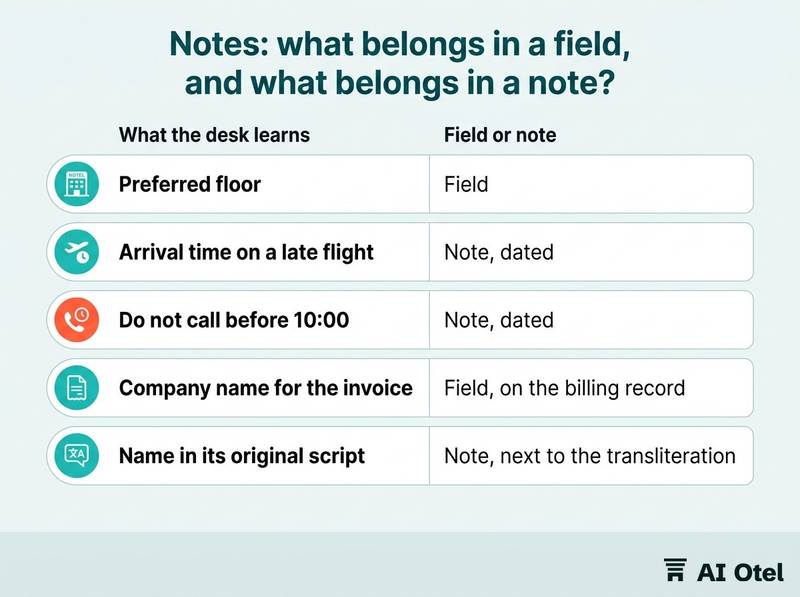
The test: if you would ever want to filter, sort or count by it, it is a field; if you would only ever read it, it is a note. Start every note with the date and the writer, for example "12.03.2026, FD: asked for a room away from the elevator". The next reader knows when it was true and who to ask.
Write what happened, not what you concluded. "Asked to move rooms twice on 12.03" can be acted on; "difficult guest" follows the guest into the next stay and cannot be checked. As a house rule, free-text notes carry no card numbers, no identity numbers and no health details: a note is the least controlled field in the system. Use a short fixed list of abbreviations for recurring notes, or search will not find them; ten agreed codes beat a hundred free spellings. When two profiles exist, merge into the older one, keep the notes, and write one line saying why the merge happened. For what to record on a profile more broadly, see what to record on a guest profile for repeat guests.
| What the desk learns | Field or note | Why |
|---|---|---|
| Preferred floor | Field | So it can be filtered at room assignment |
| Arrival time on a late flight | Note, dated | Only read, never counted |
| Do not call before 10:00 | Note, dated | Only read, never counted |
| Company name for the invoice | Field, on the billing record | The bill and reports need it |
| Name in its original script | Note, next to the transliteration | Kept for reference, not for matching |
How do you keep the standard alive after the first week?
Run one short exception list every week, fix the entries at the desk that made them, and train the rule into new staff on their first shift rather than in a manual.
The weekly exception list
One query per rule, and keep the output to one page. Fix at the source: the person who made the entry corrects it, because the correction is the training. Track which rule keeps failing, not which person; a rule that fails every week is usually one the form makes hard, and the form should change.
ChecklistThe weekly exception list
- Phone numbers without a plus
- Emails with a space, without an @ or without a dot after it
- Names in all capitals
- Name fields containing a digit or a title
- Repeat guests with an empty note field
- Profiles created in the last seven days with neither a phone nor an email
Training it into new staff
Make the form do the work: required fields, a country picker that writes the code, a trim on save, and a search step before a new profile is created. Train on the first shift: a new desk member enters three real reservations with a supervisor reading the fields back, before working alone. Review the standard once a quarter with the front office and reservations managers; a rule nobody can follow gets changed, not repeated. A fuller plan by role is in a PMS training plan by role.
One line for the data protection side: which fields you collect, how long you keep them and who may see them is a question for your data protection adviser, not for this standard. The hotel operating system page sets out how one system is put together: the hotel operating system. For the wider picture, how guest data is protected covers it.
What to do next
Write the standard on one page today: the name rule, the phone rule, the email rule and the note rule, each with one example. Pin it at the desk, run the first exception list next week, and let the list rather than memory tell you what still needs fixing. These fields are the raw material of every report and every message the hotel sends, and they cost almost nothing to keep clean at the moment of entry.
Frequently asked questions
Should guest names be typed in capitals in a hotel PMS?
No. Capitals remove letter distinctions that Turkish and some other alphabets carry, and the original cannot be rebuilt from them. Use normal case, keep family name and given name in separate fields, and follow the spelling on the document the guest presents.
How should we store a foreign guest's phone number?
As a plus sign, the country code and digits only, with no leading zero and no spaces or punctuation. One number per field; a second number, an extension or a messaging-app-only number goes in a dated note. Take the country from the code rather than typing it into a second field.
How do we stop duplicate guest profiles?
Search by phone number and email before creating a profile, then by name. When two profiles already exist, merge into the older one, keep the notes and record why the merge happened. A weekly list of new profiles with neither a phone nor an email shows where the duplicates come from.
What should never go into a PMS notes field?
Card numbers, identity numbers, health details, and any judgment about the guest rather than a fact about the stay. Anything you would ever filter or count by belongs in a field, not a note. Notes are dated, attributed and written so a colleague who has never met the guest can act on them.
Who should own the data entry standard?
The front office manager owns it, reservations and IT agree it, and one named person runs the weekly exception list. The desk that made an entry corrects it, and the standard is reviewed once a quarter so that rules the form makes hard get changed rather than repeated.