Asking AI to proofread your rate sheet: a checklist for dates, supplements and the numbers it must not change
Use AI to find date overlaps and supplement errors in your hotel rate sheet. Verify every finding against the contract before changing a single number.
AI draft · awaiting editorial review
Contents
Key takeaways
- Ask for findings, not a fixed file: a tool that returns a corrected rate sheet has already changed numbers nobody approved.
- Hunt three structural errors first: date ranges that overlap, gaps between seasons, and a supplement attached to only one of the seasons it should cover.
- Every finding is a question for the contract, not a verdict; the sheet is corrected by a person who has read the clause.
- Keep the original read-only, log each change with its finding number and reason, and have a second person compare the two files before anything is published.
A rate sheet is the table of room rates, season dates and supplements a hotel sells from. Ask an AI tool to list what looks wrong, row by row, and never to return a corrected sheet. You check each finding against the signed contract, change the sheet yourself, and keep the untouched original on file.
The file comes back tidy. The seasons line up, the table is clean, and one room rate has quietly moved to a figure nobody approved. A rate sheet is not a document to be improved; it is a set of commitments, and every number on it was agreed with someone. This article shows you how to use an AI tool to proofread a hotel rate sheet without letting it rewrite a single figure, and how to confirm each finding yourself before the sheet changes.
Which errors hide in a rate sheet?
The expensive ones are structural: dates that overlap, dates that leave a gap, and supplements that attach to the wrong season. None of them look like a mistake when you read the table.
Overlapping seasons are the first to hunt. Two rows both cover 15 June, and a booking engine will pick one; which one it picks is not your decision. Gaps are the mirror error: season A ends 31 May, season B starts 2 June, and 1 June has no rate at all, or falls back to a default nobody set deliberately.
Supplements fail quietly too. A single supplement, half board, extra bed, child policy or pet fee may be attached to one season only, when the contract applies it to all of them. Check whether each is per person per night, per room per night or per stay, because a supplement quoted in the wrong unit is a pricing error that survives every visual check.
The three that cost a season
| What to look for | How it appears in the sheet | What it costs |
|---|---|---|
| Overlapping season dates | Two rows covering the same night | The engine picks one, not you |
| Gap between seasons | A night with no row | Sold at a fallback rate |
| Supplement on one season only | A half board line that stops at the shoulder season | The supplement is not charged where it should be |
| Unit mismatch | Per room in one row, per person in the next | Systematic over- or undercharging |
| Board basis written two ways | Full name and abbreviation in different rows | Treated as two separate products |
| Minimum stay contradicting dates | A three-night rule inside a two-night season | Bookings rejected or rules ignored |
Why a tidy table hides them
These errors are invisible precisely because the sheet looks finished. A unit mismatch, a tax treatment that changes between rows, or one currency in the header and another in a footnote all read as normal when the table is clean. A published rate that does not equal its own net plus supplement, usually from rounding done by hand in several places, is the quietest of all: the arithmetic looks intentional. For more on how the pieces fit together, see seasonal prices, supplements and reductions in one table.
What should you give the AI tool, and what should you keep out?
Give it the sheet itself and the rules that govern it, and keep out anything a person would not need in order to check dates and supplements.
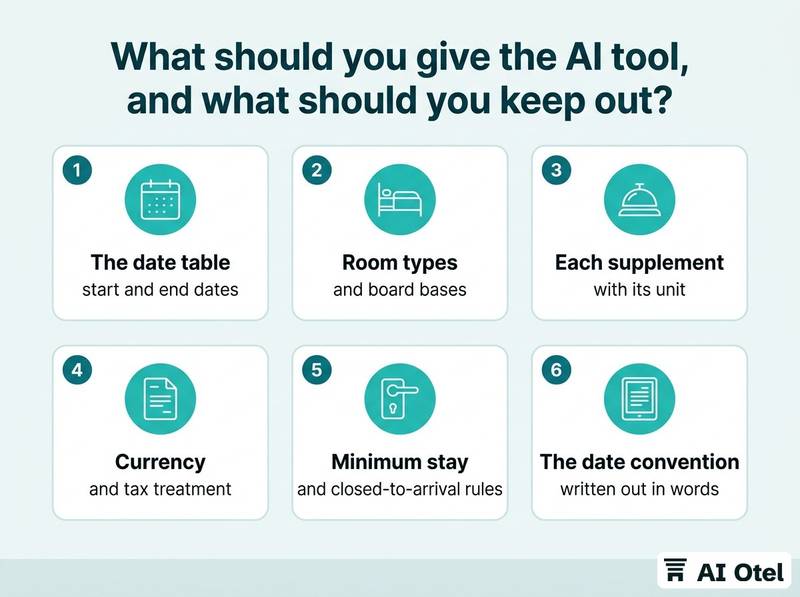
Include the full date table, room types, board bases, every supplement line with its unit, currency, tax treatment, minimum stay rules, and the season names exactly as the contract uses them. Leave out agency and corporate names, commission terms, payment terms, guest or group names, and internal notes about a client. None of them help the check, and all of them travel further than you intend.
Flatten the formatting before you paste. Merged cells, color-coded rows and footnotes that carry a real rule, such as "prices valid for stays of seven nights or more", all disappear or mislead once pasted. Write the date convention in words above the table, for example that a season starts on its first date and ends the day before its last, and use one convention throughout. Send one sheet per request: two sheets in one prompt produce findings you cannot trace back to a row.
Checklist
- The date table with start and end dates
- Room types and board bases
- Each supplement with its unit and the seasons it applies to
- Currency and tax treatment
- Minimum stay and closed-to-arrival rules
- The date convention written out in words
- Removed: agency and corporate names
- Removed: commission and payment terms
- Removed: guest and group names, and internal client notes
- Removed: merged cells, colors and footnotes carrying rules
What must the AI never change?
Every number, every date and every unit. The tool's job is to point at a line, not to produce a new one.
Rates, supplement amounts, currency, tax treatment, minimum stay nights and child age bands are read-only in this exercise. The tool may report that two date ranges overlap, but it must not propose new season boundaries: those come from the contract and from a revenue decision, and setting season dates is a decision with its own process. It may flag that one term is used two ways, but the replacement wording is chosen by the person who owns the sheet.
Require the row number or the exact cell text in every finding, so the finding can be located in seconds. Keep the original file open beside the findings; if you cannot see both at once, you are reading a new document, not checking an old one.
Watch outA returned file is a new file
Once a tool rewrites the table, you no longer have a difference you can check; you have a document with an unknown number of changes and no record of which ones. Ask for a numbered list of findings with row references, and keep the original untouched. If it returns a corrected table anyway, discard it and ask again.
What is the right question to ask an AI tool about a rate sheet?
Ask it to find and describe, in a numbered list, with the row it came from and the reason it looks wrong. Do not ask whether the sheet is correct.
State the role, the rule set and the task in that order, then the output format: finding number, row, what you see, why it may be wrong, what a person should check. Run one category per pass: overlaps first, then gaps, then supplements, then units and wording. A shorter list gets finished; a long one gets skimmed.
Tell it to report no finding for a category rather than produce one. A tool asked to find problems will always find something, and a forced finding wastes your verification time. Ask what it could not check because the sheet does not contain it; that short list is where your blind spots are. Never ask whether the sheet is correct, because correctness depends on a contract the tool has not read and a decision it was not part of. Keep the same prompt for the next sheet and the next season, so the findings stay comparable over time.
TipA prompt skeleton you can copy
1) You are checking a hotel rate sheet. 2) Here are the rules: a numbered list of season definitions, the date convention, supplement units. 3) Task: list only the date ranges that overlap. Do not rewrite, correct or reorder anything. 4) Output: finding number, row, what you see, why it may be wrong, what a person should check. If there is nothing to report, say so.
The same discipline applies when checking an AI result against the spreadsheet it came from: the output is a set of questions, not a replacement for the file.
How do you verify each finding against the contract?
Open the signed contract and the written season decision behind the sheet. A finding is confirmed only when a clause or a recorded decision says so.
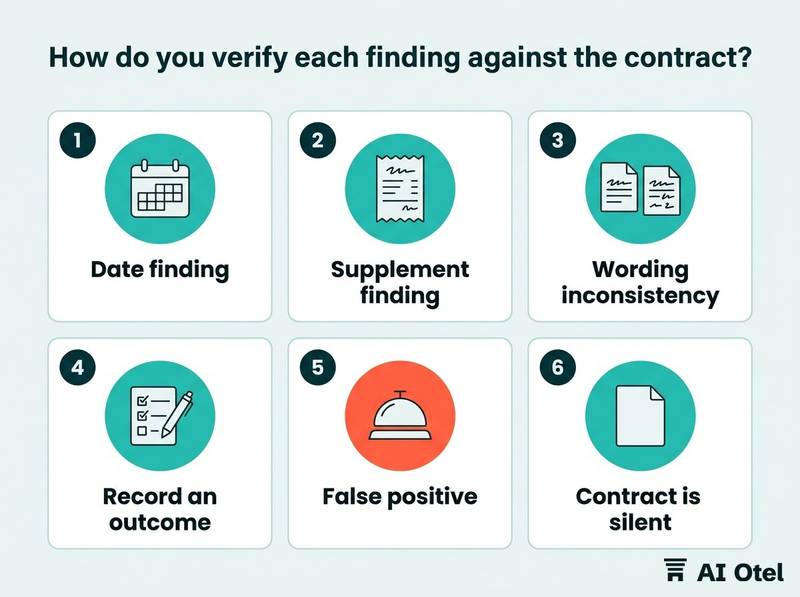
For a date finding, check the contract's season definition and whether its dates are inclusive, then check the internal decision that set them. For a supplement finding, check whether the contract lists it, what unit it is charged in, and which seasons it covers. For a wording inconsistency, decide which term is the official one and change the other; keeping both keeps the ambiguity.
Record an outcome for every finding: confirmed and changed, confirmed and left with a reason, or rejected as a false positive. Treat a false positive as information. It usually means the rule existed in someone's head and was never written down. Where the contract is silent, the answer is a decision by whoever owns the rate, written down before the sheet changes.
How do you keep an unchanged original and sign off the corrected sheet?
Save the original under a dated name and mark it read-only, change one finding at a time on a copy, and let a second person compare the two files before anything is published.
Name the original with its date and keep it read-only. Every correction is made on a copy, never on the file you were sent. Change one finding per edit and write the finding number beside the change, so the copy explains itself later; this is the same habit as keeping a rate change log that records who changed which price and why.
Compare the two files column by column: dates, rates, units, supplements. Reading them side by side by eye misses exactly the quiet changes you are guarding against. Sign-off records who checked, when, against which contract version, and which findings were rejected and why. Publish only after sign-off, then open the first channel that receives the sheet and confirm what actually loaded, not what you sent. Keep the log beside the sheet, so next season starts from a record rather than from someone's memory of what changed.
What to do next
Take the sheet you are selling from today, save a read-only copy, and run one category through the tool: overlapping date ranges only. Verify every finding against the contract before you touch a number, then log what you changed and have a second person compare the files. The tool shortens the search; the contract, the decision and the signature stay with your team. If you want the rate sheet to sit inside one system with its reservations and reports, read about a hotel operating system and the wider platform it belongs to.
Frequently asked questions
Can AI check a hotel rate sheet without changing it?
Yes, if you ask for a numbered list of findings with row references and explicitly forbid rewriting. Keep the original read-only and treat the output as a list of questions for a person, because the tool has not read the contract behind the sheet.
What is the most common mistake in a hotel rate sheet?
Problems at season boundaries: two rows covering the same night, or a night with no row at all. The next to check is a supplement that applies to one season in the sheet but to several in the contract. Both are invisible when the table looks tidy.
Should I paste the whole contract into the AI tool?
No. Paste the sheet plus the rules that govern it: season definitions, date convention, supplement units, currency and tax treatment. Keep agency names, commission terms, payment terms and internal notes out. The contract itself is read by the person verifying the findings.
How do I know an AI finding is right?
You check it against the contract clause or the written season decision. Record each finding as confirmed and changed, confirmed and left, or rejected. Rejections are useful: they usually show a rule that was applied but never written down.
Does this replace the revenue manager's review?
No. The tool shortens the search for overlaps, gaps and inconsistent wording. Deciding which rate applies, approving the correction and signing off the version that goes to channels stay with a person who owns the rate.