Matching lost property with AI: describing items, finding a likely owner and still checking by a person
AI helps describe lost items and search logs by meaning, but a person must verify ownership. This guide shows how to build a routine that keeps guest data safe while closing the gap between found items and their owners.
AI draft · awaiting editorial review
Contents
Key takeaways
- A lost-property log fails at search time because each entry is free text written by a different person, in a different language, with a different word for the same object.
- Fix the fields before adding any tool: item type, color, marks, place found, date found, who logged it, storage place, and a free field for the detail that identifies the item.
- A meaning-based search ranks candidates; it never proves ownership, so the person reads the matched entry and compares it with the item in hand.
- Ask the claimant to describe the item instead of sending your description, and keep the identifying details out of the first message.
- Identity documents, payment card data and guest contact lists stay out of any general AI chat tool; the log itself is personal data and belongs in a tool the hotel has chosen and covered by contract.
Lost property matching is the work of joining a found item to the guest who left it. AI helps in three narrow places: writing a consistent description of the item, searching the log by meaning rather than by exact word, and drafting the message in the guest's language. A person still verifies ownership and handles anything of value.
A charger, a child's soft toy and a pair of glasses sit in labeled boxes behind the front desk. Three days later a message arrives in a language nobody on shift reads, describing "a small blue thing with a cable", and the log says "adaptor, blue, room 412". The item exists, the claim is genuine, and the two texts share almost nothing. This article shows how an AI lost and found hotel routine can close that gap: a fixed description template, a search by meaning, a drafted message, and a person who still makes the return decision. For the wider routine of logging, storing and returning guests' items, see our guide to hotel lost and found.
Why do lost-property logs become hard to search?
Because the log is free text written under time pressure by different people, so the same object appears under different words, in different languages, with the fields that would make matching possible left empty.
The entry is written at the moment of finding, usually by whoever is cleaning the room, and it records what that person noticed, not what a future search will need. Synonyms then split the log: a charger, an adaptor, a cable and a power brick can be the same object, and an exact-word search finds only the one the searcher happened to type. The guest's description arrives in another language and in the guest's own vocabulary, so the two texts rarely share a word even when they describe the same item.
Missing fields are the deeper problem. Without the place found, the date found and the room, a candidate cannot be narrowed, and every search returns the whole list. Entries are also rarely closed: an item that was returned, collected by a courier or written off stays in the log and keeps appearing in results.
The cost is symmetrical. A search that returns nothing leads to an item being kept for months or discarded. A search that returns everything leads to staff ignoring the log altogether.
What a searchable entry contains
ChecklistEvery entry must carry these fields, in this order
- Item type from a short closed list (electronics, clothing, jewelry, documents, medicines, toys, other)
- Colors
- Material
- Size
- Distinguishing marks (scratches, stickers, initials, a broken clasp)
- Brand if visible
- Contents if it is a bag or case
- Condition
- Place found (room number, outlet, vehicle, area)
- Date and time found
- Who found it
- Storage place and date stored
- Photo reference in the hotel's own storage
- Status (held, returned, shipped, written off)
How do you write a consistent description from a short template?
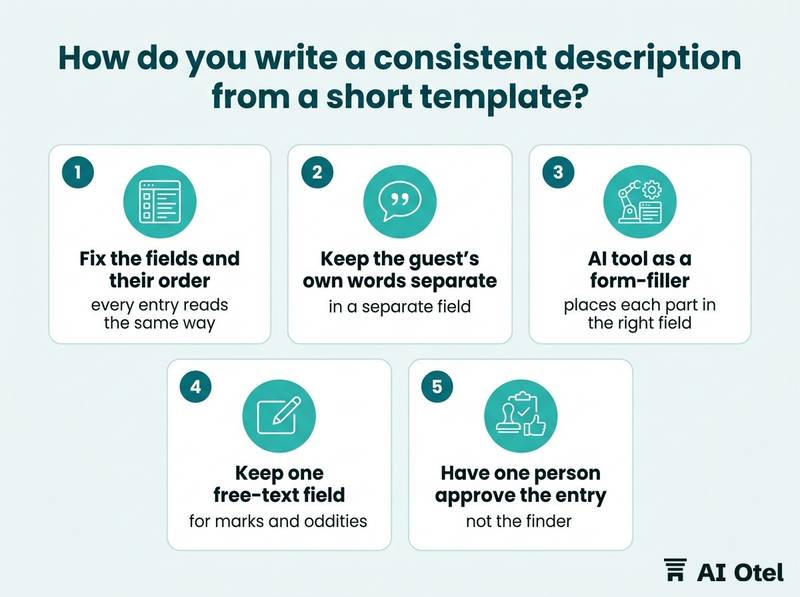
By fixing the fields and their order so that every entry reads the same way, and by keeping the guest's own words in a separate field instead of mixing them into the description.
Write the description in the hotel's working language and store the finder's original note, and later the guest's wording, beside it. Mixing the two is what makes later comparison impossible.
An AI tool is useful here as a form-filler. It takes a hurried note such as "blue adaptor, room 412, found by Ayşe on Tuesday" and places each part in the right field, then asks for the fields that are still empty. Give it the closed list of item types and let it map synonyms onto that list, so "power brick" and "adaptor" become one type and the search stops splitting.
The rule that keeps this safe: if the note does not say the color, the color field stays empty. A tool that fills gaps with plausible detail has produced a description of an item that may not exist. This failure has a name and a known pattern; see why assistants invent facts and how to catch them.
Keep one free-text field for marks and oddities. Over-templating loses exactly the detail that later proves ownership, such as a name written inside a case. Finally, have one person, not the finder, approve the finished entry. The finder describes what they saw; the approver checks that the fields are complete and consistent.
TipThe field that does the most work
The marks field is the one that later separates a real owner from a hopeful claimant. Write it in specifics (a scratch across the back left corner, a sticker of a football club, initials in marker inside the lid) rather than in adjectives (old, worn, damaged).
Can you search a lost-property log in plain words?
Yes. A meaning-based search can find entries that share no exact word with the query, but it ranks candidates rather than proving anything, so every hit is read and checked against the item in hand.
Explain the mechanism plainly to staff. A meaning-based search turns each description into a long list of numbers so that descriptions with similar meanings land near each other, and a query is placed in the same space. What it does well: synonyms, a query written in another language, and partial descriptions such as "something for charging a phone, dark blue". What it does badly: exact values. Dates, room numbers, tag numbers and amounts should be filters applied before the meaning search, not words handed to it.
It always returns something. A top-ranked entry is a suggestion to read, never a conclusion, and a low score does not mean the item is not in the log. The working order is: filter by date window, then by place found, then by item type, then run the meaning search inside that shortlist and read the entries it returns.
Show the matched entry next to the query on screen. If the tool cannot show why it matched, staff cannot check it, and an unchecked match is worse than no search.
Where meaning search helps and where it misleads
| Good use | Bad use |
|---|---|
| Another language for the same object | Deciding ownership |
| A vague description with no exact noun | Matching a room number or a date |
| A synonym the log never used | Matching a serial or tag number |
| A shortlist to read in order | Returning an item without a person reading the entry |
| Ranking candidates for a person to check | Treating a high score as evidence |
How do you draft the message to the guest in their language?
Draft a short message in the guest's language that says an item may have been found and asks the guest to describe it, then have a person read the draft before it is sent.
Do not send the description. The first message names the category only ("a small electronic item") and asks the guest for the details that were never published. A useful draft contains four things: what the guest should do next, how long the hotel holds items, how a return would work, and one contact point inside the hotel.
Check the translated draft for the things a machine gets wrong: names, room numbers, dates, opening hours, currency and the shipping terms. These are the parts a guest will act on. Keep the guest's original message in the record next to the translation; if a claim is disputed later, the original wording is the evidence. For the wider question of machine translation quality, see AI translation for guest messages: when it is good enough.
Set the tone in the hotel's own voice and keep it to a few lines. A long, formal message about a phone charger reads as a procedure, and guests stop reading. Log what was sent, to which address, and on what date, so the next shift knows the conversation is open.
How do you verify ownership before returning an item?
By asking the claimant for details that were never published and comparing them with the physical item and the log, with a person making the decision and signing for it.
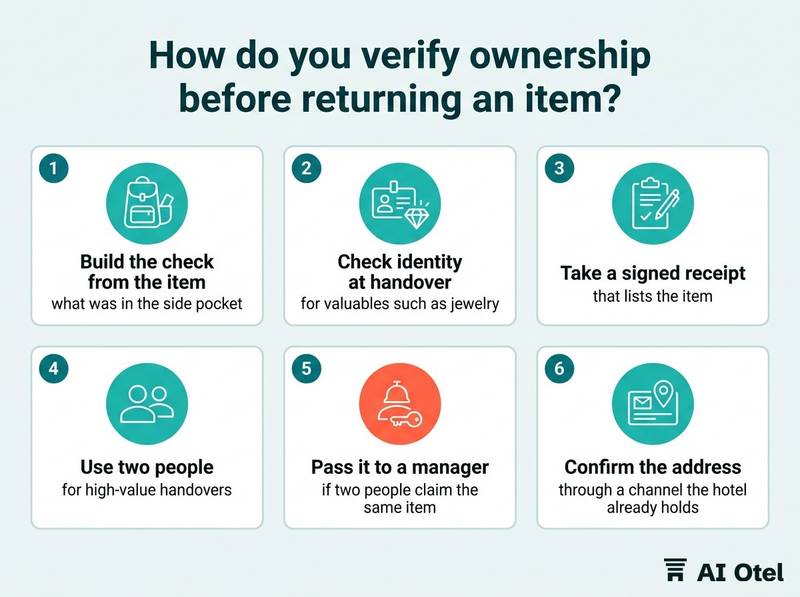
Build the check from the item itself: what was in the side pocket, which corner is scratched, what is written inside the case, what the lock code was. For valuables such as jewelry, cash, payment cards, identity documents and electronics, check identity at handover and take a signed receipt that lists the item. Use two people for high-value handovers, and record who released the item, to whom, and when.
If two people claim the same item, stop and pass it to a manager. Do not decide between them at the desk. For shipping, confirm the address through a channel the hotel already holds from the booking, not through an address supplied in the claim message.
The match score plays no part in this step. It ordered the reading; the decision comes from details only the owner would know.
Watch outThe tool never decides
A high match score is not evidence of ownership. Publishing the description or a photo in the first message hands a claimant the answers, and releasing an item on the strength of a match alone is the failure mode this whole routine exists to prevent.
What must never go into the AI tool?
Identity documents, payment card data and anything that would let a reader of the log claim an item, because the log is personal data and the tool is a second place where it is stored.
No photographs or scans of passports, identity cards or driving licenses, and no card numbers, however convenient it seems to attach them to the entry. Do not paste guest contact lists or booking exports into a general chat assistant. Describe the item, not the person, and keep the guest's name in the hotel's own system.
The log is personal data under KVKK (kişisel verilerin korunması kanunu, Türkiye's personal data protection law), so use a tool the hotel has chosen, with a contract that covers where the data is processed and for how long. Set a retention period for the log and for anything typed into the tool, and delete on schedule rather than keeping entries indefinitely. Write the staff rule in one page and have every shift read it: what may be typed, what may not, and who to ask when unsure. Treat a general chat assistant as leaving the building; anything typed into it should be something the hotel would be comfortable reading out at the front desk. The broader rule is set out in what staff may share with AI chat tools.
What may and may not be entered
ChecklistMay be entered
- Item type, colors, material, marks
- Place found, date found, storage place
- The finder's shift
- A description written without names
ChecklistMust not be entered
- Passport or ID images or numbers
- Payment card numbers
- Guest phone numbers or email addresses
- Home addresses
- Health information
- Photographs of people
- Any detail the hotel intends to use as an ownership question
What to do next
Write the template and the one-page rule this week, before any tool is chosen: fix the fields, keep the guest's words separate from the description, filter before you search by meaning, and name the person who approves every return. The tool then sits inside a routine the hotel already controls, which is the only arrangement in which a match score helps rather than decides. When the routine is solid, a hotel operating system (built and working, ahead of launch) can carry the log as structured data instead of free text, and the wider platform can serve it to the people and assistants that need it.
If you are reading this as a traveler rather than a hotelier, and you think you left something behind, write to the hotel directly and describe the item in your own words: that is exactly what the routine above is built to receive. To plan your next stay, you can find a hotel in Türkiye (opens in a new tab).
Frequently asked questions
Can AI tell me who owns a lost item?
No. It can narrow a long log to a short list of candidates and put them in a sensible order. Ownership is decided by a person comparing details only the real owner would know with the item in hand.
Should we photograph found items?
Yes, for the hotel's own record, stored in the hotel's own system and referenced from the entry. The photo is not sent to a claimant before ownership is confirmed, because it hands over the answers, and it does not go into a general chat tool.
What should we do with an item nobody claims?
Follow a written rule the hotel has set in advance: how long items are held, where, who may dispose of them, and how disposal is recorded. Items that are documents or cards need their own handling, and the hotel confirms that handling with its legal adviser.
Does a high match score mean the item is theirs?
No. The score ranks descriptions by similarity of meaning and always returns something. It is used to order what a person reads, never to release an item.
How long should we keep the log?
The hotel sets the period in writing, keeps the minimum needed to return items and answer a claim, and applies the same period to anything typed into a tool. The exact period is a decision for the hotel with its adviser, not a default.