Loading a new season's rates: a same-day check across PMS, channel manager and website
Loading a new season's rates is a controlled release, not a series of edits. This guide walks through the fixed order, sample checks, and record needed to ensure prices and restrictions match across all systems.
AI draft · awaiting editorial review

Contents
Key takeaways
- A season load is a release, not a series of edits: one approved sheet goes in, and every system is checked against that sheet, not against another screen.
- Load at the source and let the other systems receive; a price typed directly into a channel is a price with no owner.
- Sample three dates in every month of the season and every room type, and read the total a guest would pay, not the base rate on the screen.
- Closed dates, minimum stays and child rules sit in different fields from the price, so they need their own check and their own line on the record.
- The load is finished when a named person signs a one-page record of what went live, who checked it and when.
Loading a new season's rates means releasing one approved price sheet into three systems in order: the PMS, the channel manager, then the hotel's own booking engine. The channel manager sends prices and availability to the OTAs. Verify a sample of dates and room types in each, check restrictions, and record what went live and who checked it.
The sheet is approved, the season starts on Monday, and by Tuesday a date that should have been closed is selling on a channel nobody at the hotel opened that morning. Season loads fail quietly: the price is right in one place and wrong in another, and the first person to notice is usually a guest. This article walks through a load day step by step, so that by the end you can run yours with a frozen sheet, a fixed order, a sample check and a signed record.
What does loading a new season's rates actually involve?
It is a controlled release: one approved price sheet enters the systems in a fixed order, and each system is then checked against that sheet. It is not a set of edits made wherever a price happens to be visible.
A rate plan is one named combination of room type, board basis, occupancy and cancellation terms. The price is only one of its fields, and the plan has to exist under the same name in all three systems. The PMS holds the room inventory, the rate plans and the price the hotel treats as authoritative. The channel manager sends prices and availability to the OTAs. The hotel's own booking engine sells direct.
Three systems mean three failure modes: a plan that exists in one and not another, a price that differs, and a restriction that did not travel with the price. Decide before the day who approves the sheet, who loads it and who checks the result. One person can hold two roles in a small hotel, but the checker should not be the loader where staffing allows.
Everything on the day is compared to the frozen sheet, never to another system's screen. Two systems agreeing with each other can both be wrong. The load ends with sale open in every channel and the sample signed off, not with the last price typed. The sheet itself is described in detail in the seasonal rate sheet: prices, supplements and reductions in one table.
| System | What it holds | What you check on load day |
|---|---|---|
| PMS | Room inventory, rate plans, restrictions, the authoritative price | Every plan exists, dates and prices match the sheet, restrictions are set |
| Channel manager | The mapping from PMS room types and rate plans to each channel's own codes, and the push to the OTAs | No room type or rate plan left unmapped, sample prices match, restrictions arrived |
| Own website and booking engine | The direct sales funnel | The same plans are visible, the total a guest sees matches, the terms shown are the ones on the sheet |
Why freeze the approved rate sheet before anyone opens a system?
Because the sheet is the only reference the check can be measured against. If it changes during the day, nothing on the screens can be called wrong.
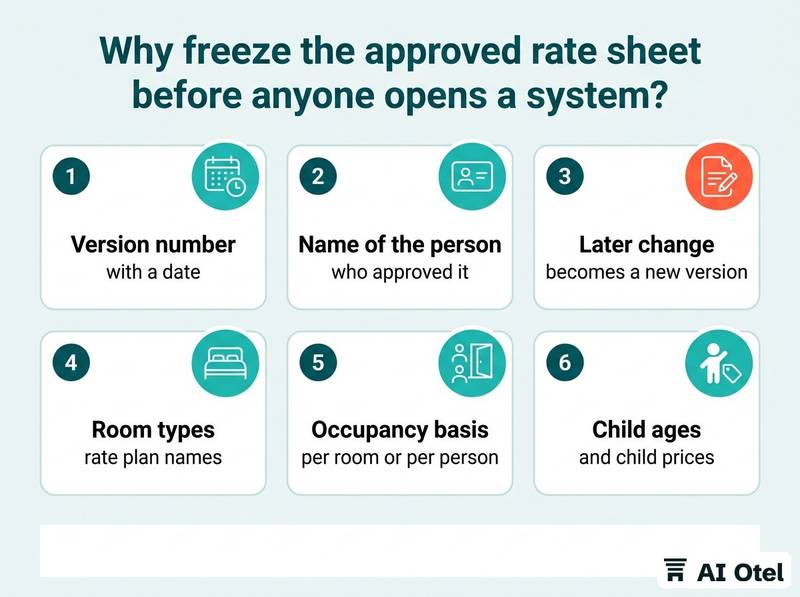
Frozen means a version number, a date, the name of the person who approved it, and a rule that any later change becomes a new version rather than an edit to the old one. The sheet has to carry everything the systems need: room types, rate plan names, date bands, occupancy basis (per room or per person), board, supplements, child ages and child prices, closed dates and minimum stays.
Use one naming convention across the three systems, so a plan can be recognized without translating codes in your head on the day. One naming convention for rate plans across the PMS, channel manager and website is worth settling long before load day. Keep the sheet where the checker can reach it during the check, not buried in an email thread.
If a price on the sheet is wrong, stop. The load day is not the day to re-price; re-pricing needs its own approval and its own version. A sheet that is right but incomplete is the most common cause of a clean load that still sells the wrong thing, because the missing field is the one nobody checked.
Watch outIf the sheet changes after loading starts
Do not patch the systems by hand. Issue a new version, note what changed, and re-run the sample on the dates the change touches. A quiet edit during a load is how a hotel ends up with three systems holding three different seasons.
In what order should you load: PMS, channel manager or website?
PMS first, channel manager second, the hotel's own booking engine last. Each system should receive the season rather than originate it.
Loading at the source means a correction later is made once, in one place, and flows outward. The channel manager's job is mapping, not pricing: room types and rate plans are tied to each channel's own codes, and an unmapped plan either disappears from that channel or sells at a default. The booking engine reads from the same inventory; where it does not, it is a manual mirror, and a mirror needs its own entry and its own check.
Do not open sale in any channel before all three hold the season. A channel that goes live early is a channel selling last season's price. The channel manager sends the change; how quickly each channel displays it is outside the hotel's control, which is why the verification comes after the push rather than instead of it. Where a channel cannot read a restriction from the source, write that limitation on the sheet so the checker knows to look at it by hand. The mapping itself is covered in channel manager mapping for room types, rate plans and testing.
ChecklistLoad order
- Hold or close sale on the affected date bands in every channel
- Create or update the rate plans in the PMS
- Set prices and restrictions by date band
- Map every room type and rate plan in the channel manager
- Confirm the booking engine shows the same plans
- Open sale
- Run the sample check and sign the record
Which dates and room types should you sample-check?
Three dates in every month of the season, every room type, plus the edges: the first and last day of each date band, and any date where a restriction applies.
A systematic error, such as a whole band wrong or a plan missing, shows up in any sample. A single typing error does not, which is why the sample is fixed in advance rather than chosen by eye on the day. Check the edges: the day before a band starts, its first day, its last day and the day after. Off-by-one errors live there.
Take one weekday and one weekend date in each month, because weekend pricing is often a separate rule from the weekday price. Read the total the guest would pay, not the base rate: supplements, taxes and fees, and the occupancy the price assumes. Check the same date in all three systems side by side and mark each line pass or fail on the sheet as you go, not from memory afterwards. A pass means a match to the frozen sheet. A match between two screens is not a pass.
| What to sample | Why | Pass means |
|---|---|---|
| First and last day of each date band | Off-by-one errors at the seams | The price on both sides of the seam matches the sheet |
| One weekday and one weekend date per month | Weekend rules are often separate | Both totals match |
| Every room type on one date | A missing or duplicated plan | Each plan exists once and at the right price |
| A date carrying a supplement or a child price | Supplements travel separately from the base rate | The total includes it once |
| A date that is closed or has a minimum stay | Restrictions are the most commonly lost field | The rule is visible and enforced |
| A shoulder date outside the season | Overlapping bands | Only one band applies |
How do you check closed dates, minimum stays and child rules?
Separately from the price, because restrictions sit in different fields and are the part most often lost between systems.
Pick a date you closed and confirm it cannot be sold in any channel. A closed date that still sells is worse than a wrong price, because the hotel has promised a room it does not have. Check minimum stay and closed-to-arrival the way a guest would meet them, by running a one-night search on a date with a longer minimum.
Child rules need their own pass: the age bands, whether the child stays free, and whether the child price is a supplement on the adult price or a separate rate plan. Confirm what each plan charges when occupancy changes: single occupancy, an extra bed, a third adult in a double. When two rules meet on one date, decide in advance which one wins and write it on the sheet, so the checker knows what to expect instead of guessing. Tour operator and agency offers carry their own rules and combinations, and are checked as a separate exercise, as described in special offers for tour operators: rules, combinations and loading.
TipTest restrictions by searching, not by reading the back office
A one-night search on a date with a longer minimum stay, and a two-adult-plus-one-child search on a family date, tell you what a guest would actually get. If a test booking is unavoidable, use a rate plan that is not sellable and cancel it the same day.
How do you cross-check what a guest actually sees?
Open the booking funnel as a guest would, in a private browser window, on the hotel's own site and on at least one OTA, and read the total and the terms.
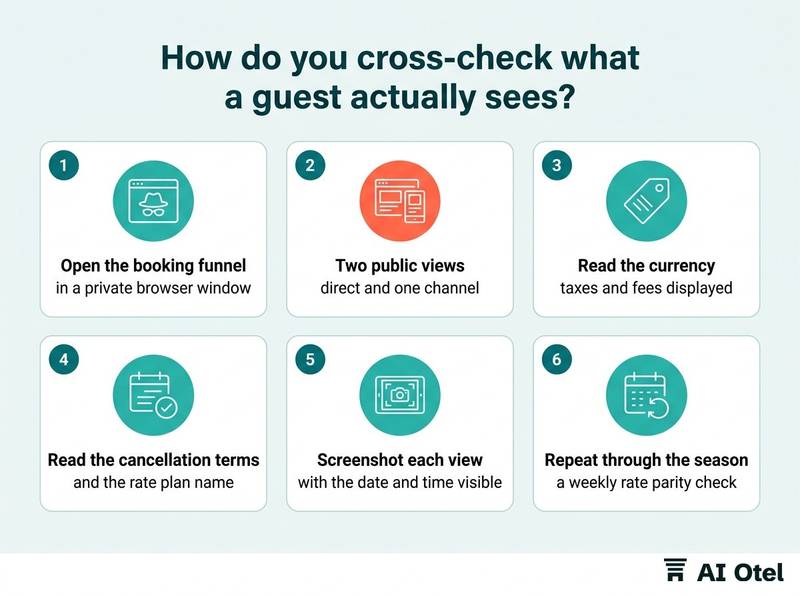
Two public views are the minimum: direct and one channel. A price can be right in the back office and wrong on the page that sells it. Use a private window with no account signed in, so no member rate or stored cookie changes what you see.
Read the currency, how taxes and fees are displayed, and whether the price is per room or per person. Read the cancellation terms and the rate plan name as displayed. A right price with the wrong terms is still a wrong sale. Screenshot each view with the date and time visible, and attach it to the record: the screenshot is the evidence if the price is disputed later. Repeat the same comparison through the season as a routine, not only on load day, because prices and mappings drift after the load; a weekly rate parity check for direct and OTA prices is the natural companion to this one.
NoteA number alone is not a pass
A price that matches the sheet but shows different cancellation terms, a different board basis or a different occupancy is not a pass. The guest buys the whole plan, not the number.
What should the load record contain, and what do you do if you find an error?
One page: what went live, who checked it, when, and what failed. If an error is found after sale opens, close the affected dates first, repair at the source second, and re-run the same sample third.
Record the sheet version, the date and time of the load, the systems loaded, the sample dates checked, pass or fail per line, the checker's name, the approver's name and the screenshots. Keep it where the next person can find it, in a season folder rather than a personal inbox, because the person who needs it is often not the person who wrote it.
On finding an error, stop the sale on the affected dates in the channel where the wrong price is visible before doing anything else. Repair at the source and let the change flow outward. Fixing a channel by hand while the PMS stays wrong guarantees the error returns at the next push. Re-run the same sample after the repair: a fix is not verified until the same lines pass again.
Hand what already sold at the wrong price to the person who owns the booking decision. Whether to honor, cancel or rebook is a commercial call, not a system one. Add a line to the record rather than editing it, so the history of the day stays readable to whoever picks it up.
ChecklistRecord fields
- Sheet version and date
- Approver's name
- Loader's name
- Date and time sale opened
- Systems loaded
- Sample dates and room types checked
- Pass or fail per line
- Restrictions checked
- Screenshots attached
- Errors found and the repair made
- Checker's signature
What to do next
Write the one-page record template and name the approver, the loader and the checker in advance. The parts fit together as one loop. A frozen sheet gives the check something to measure against, the load order keeps one owner for each price, the sample and the restriction checks catch what the screens hide, and the record turns a stressful day into a routine the hotel can repeat. If you are also weighing whether your systems should share one inventory from the start, reading about a hotel operating system and about OtelCiro's revenue review will give you the background on how distribution decisions are supported.
Frequently asked questions
Can I load new season rates while this season is still selling?
Yes, and it is usually better to. Keep the date bands from overlapping or leaving a gap, so every night has exactly one price. Name the new plans so they cannot be confused with the current ones, and check the seam date on both sides: the last night of the old band and the first night of the new one. Keep the current plans sellable until their end date.
What if the booking engine does not read from the PMS?
Then it is a manual mirror, and it needs its own entry and its own check on the sample. Write the mapping between the two down, because every future price or restriction change has to be made twice, and the second entry is the one that gets forgotten. Treat the mirror as a known risk on the sheet rather than an assumption.
How do I verify a closed date without opening it?
Read the restriction field in each system first, and compare it to the sheet. If you must test by searching, use a rate plan that is not sellable and close it again the same day. Never leave a date open to test it, and never test on a date the hotel actually wants to sell.
Who should sign off a season load?
Three roles: the person who approves the sheet, the person who loads it and the person who checks the result. Naming them in advance is what makes the record mean anything. In a small hotel one person may hold two roles, but the check should sit with someone other than the loader wherever staffing allows.
Does a mid-season price change need the same check?
Yes, at a smaller scale. Freeze the change as a new version of the sheet, load it at the source, and check the sample dates around the change rather than the whole season. Add a line to the record with the date and the reason, so the season's history stays in one place.