Retiring hotel computers, tablets and phones: wiping data, removing accounts and keeping a record
Retiring hotel devices requires more than a factory reset. This guide explains how to remove accounts, wipe storage securely, and maintain a clear record for every retired computer, tablet or phone.
AI draft · awaiting editorial review
Contents
Key takeaways
- A device leaves the building with three things attached: accounts that still work, data still on the storage, and a licence someone is still paying for.
- Wiping starts with accounts, not with the reset: remove the account that locks the device to a person, and change the password of every account it was signed into.
- A device that will not boot is not a device that cannot be wiped: the storage comes out and is destroyed, and the destruction is recorded.
- A freed software seat is only saved money if the contract allows the seat to go, so write the removal date down before the renewal.
- The record is the point: serial number, wipe or destruction evidence, route, recipient and two signatures on one page.
Retiring a hotel device means four steps in order: list the accounts and data it holds, copy or transfer what the hotel must keep, wipe or physically destroy the storage, then record who took the device and when. A factory reset alone is not a wipe if the storage still holds recoverable files.
A three-year-old front desk computer is unplugged and carried to the back office. It still has the extranet open in a browser tab, a folder of scanned guest identity documents on the desktop, and a saved password for the door-lock software. Nobody treats it as a data device until someone asks where it went. This article gives you the full routine to retire old hotel computers, tablets and phones: what to check before touching the reset, how to wipe, what to keep, and the one-page record that closes the job.
Why do old hotel devices hold more than you think?
Because a work device collects the hotel's access rights quietly, one saved login and one downloaded file at a time, and almost none of it is visible from the outside.
Saved browser passwords and autofill entries are working credentials. The extranet, the OTA inbox, the webmail account and sometimes the bank open with one click for anyone who sits down. Sessions also stay alive after the person leaves the desk: webmail, messaging on the web, the door-lock back office, the camera viewer and the point-of-sale back end can all still be signed in.
Then there are the files downloaded for a minute and never deleted: scanned identity documents, a guest list exported for a group, room charge spreadsheets, night audit reports, supplier invoices. Around them sit traces nobody clears: the print queue, the scanner's last-job folder, the downloads folder, a desktop shortcut to a folder on the server that still opens. Installed helper software adds more, from remote-support tools a vendor left behind to an old property management client with a local cache and browser extensions nobody remembers adding. Physical items count too: a USB stick still in a port, a password on a note under the keyboard, a printed login taped to the monitor stand. Tablets and phones add the photo library, a messaging backup, cached app sessions, the SIM card and any personal account the employee added.
ChecklistWhere to look before anyone touches the reset
- Browser saved passwords and autofill
- Open sessions in webmail, messaging and back-office tools
- Downloads, desktop and documents folders
- Print queue and scanner last-job folder
- Installed remote-support and vendor tools
- USB ports, notes and printed logins
- On tablets and phones: photo library, backups, app sessions and SIM card
The same quiet collection happens with shared logins across the whole property, which is why a routine for shared passwords in hotels pairs with device retirement: the wipe closes the device, the password change closes the account.
Before wiping: which accounts, licenses and files must you keep?
Sort everything on the device into three piles before anything is deleted: what the hotel keeps, what must be transferred to another person or machine, and what is simply removed.
List every account the device was signed into and write the owner next to it. A shared extranet login belongs to the hotel, a personal mailbox belongs to the employee, and the two are handled differently. Transfer before removal: shared mailboxes, calendar entries, files that exist only on that machine, the door-lock encoder database, label templates, and the local copy of a report the accountant still asks for.
Separate licences that die with the device from licences that follow a person. A preinstalled operating system or office suite stays behind; a named subscription seat does not. A licence key or certificate stored only on that machine is a record to copy out, not a file to delete with the rest. Vendor access is an account too: remote-support tools installed by a supplier must be removed and the supplier told the device is gone, so the access is not left pointing at a machine in a store room. This sits inside the broader question of who can reach your hotel systems, which deserves its own review of remote access and API keys.
For a shared or employee-owned device, agree in writing what will be copied before the wipe, and do not open a personal account's files without a rule that allows it. The replacement device gets a fresh install and a fresh sign-in, never a copy of the old machine's profile with its saved passwords carried across.
| Item | Keep (copy off) | Transfer | Remove |
|---|---|---|---|
| Shared extranet login | Password record | To successor | Saved session |
| Personal employee mailbox | Nothing, by rule | Calendar, if agreed | Account |
| Scanned guest identity documents | Only if retention requires | To the system of record | Local copies |
| Door-lock encoder database | Backup copy | To replacement machine | Local cache |
| Preinstalled operating system licence | Key record | Stays with device | Nothing |
| Named software subscription seat | Nothing | To another person | Seat from count |
| Vendor remote-support tool | Nothing | Nothing | Tool and vendor access |
| Local report exports | To shared storage | To the accountant | Device copies |
A hotel that runs one system for reservations, billing and compliance has fewer of these local copies to hunt down, because the records live in the system rather than on desktops. That is one of the quiet arguments for a hotel operating system over scattered local files.
How do you wipe a device, and what if it cannot be wiped?
Wipe by returning the device to first-time setup on an encrypted disk, or by taking the storage out; if the device will not start, the storage still comes out.
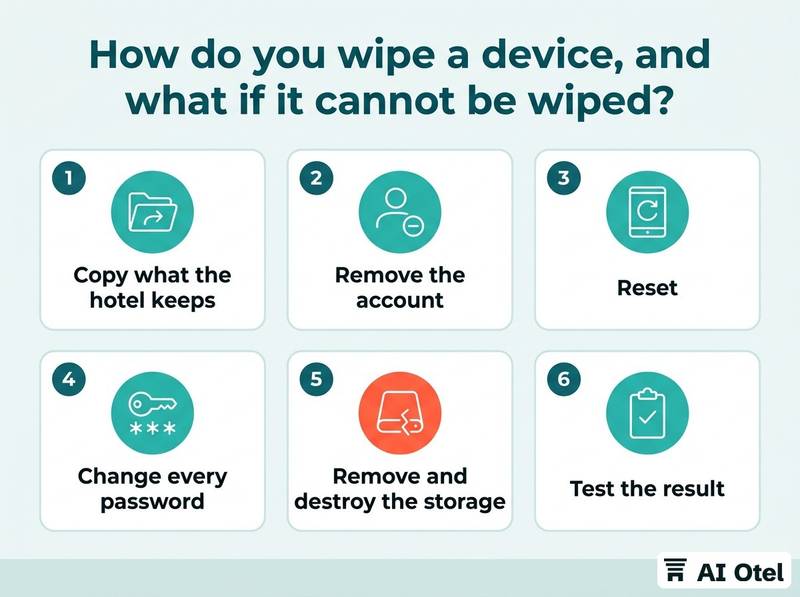
Work in order: copy what the hotel keeps, remove the account that ties the device to a person or a management account, then reset. Change every password that was saved on the device whether or not the wipe succeeds; the credential was exposed from the moment the device left controlled use.
Encryption is what makes a reset trustworthy. On an encrypted disk the reset destroys the key, and the leftover blocks cannot be read. On phones and tablets, a reset without removing the owner account leaves the device locked to that account, which blocks reuse and resale. When the device will not boot, or the storage is soldered in, remove and destroy the storage or use a destruction route that returns a certificate naming the serial numbers.
Do not forget the devices that are not computers: multifunction printers and copiers hold a disk, and so do some point-of-sale terminals and door-lock encoders. Test the result: after the wipe the device should ask for first-time setup, with no previous account, no saved network and no old user profile.
Watch outThe reset that locks the device
Resetting a phone or tablet before removing the owner account can leave it locked to an account nobody at the hotel controls, which turns a reusable device into scrap. On computers, a reset that fails halfway can leave the old profile in place; check the first-time setup screen before the device leaves the room.
Reuse, sale, donation or recycling: who decides?
The hotel decides by a written rule set before the first device moves, and that rule names who may approve each route.
Reuse inside the hotel is the cheapest route and still needs a wipe: a housekeeping tablet that once carried the front desk's mail is a data device. Sale and donation carry the same preparation as any other exit, with storage removed or destroyed with evidence before the device changes hands. For recycling, ask for a destruction certificate that names the serial numbers, and prefer a route where the hotel keeps or destroys the storage itself.
The rule should state who approves each route, what evidence is required, and which routes are closed to devices that held guest data. A device sold with software still installed is a licence question as well as a data question; check the terms before it leaves. Informal buyers and cash-for-devices routes leave the least evidence; if the hotel uses one, the wipe happens before the hand-over, never after.
Key pointWrite the rule before the first device moves
Three lines the rule must contain: who may approve reuse, sale, donation and recycling; what evidence each route requires (wipe record, photo of first-time setup, destruction certificate); which routes are closed to any device that held guest data.
How do you update the asset list and the licence count?
Close the record on the same day the device leaves: change its status, attach the wipe evidence, and take the licence out of the count before the next renewal.
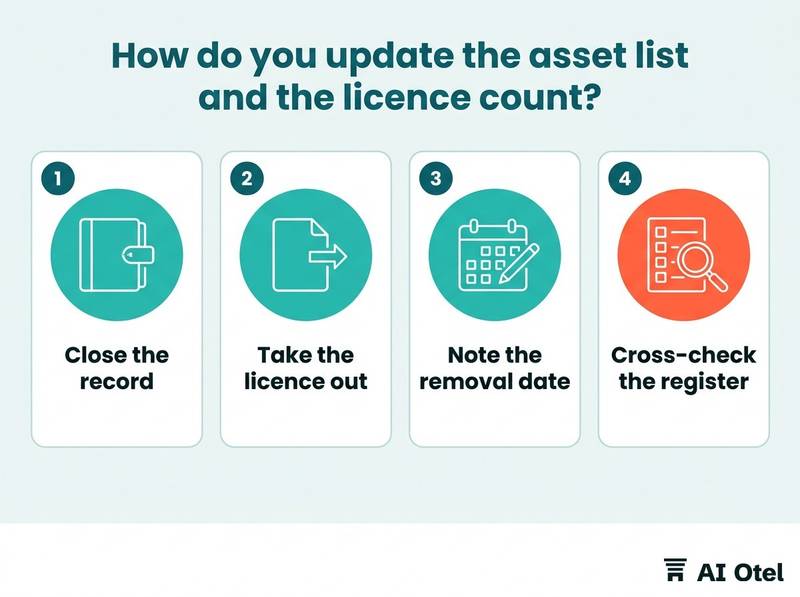
The fields that matter at retirement are asset tag, serial number, model, location, assigned person, status (in use, in store, retired), retirement date, wipe or destruction evidence, route and recipient. The status change is what stops a retired device from appearing in the next replacement plan and the next budget.
A seat removed from the count only saves money if the contract allows a reduction at renewal; note the removal date and the contract term next to it. Preinstalled licences leave with the device; do not carry them forward into the new machine's count. Cross-check the register against what is physically in the store twice a year; the devices that were never tagged are the ones that disappear. The same list feeds the IT budget, because replacement cycles and licence renewals are two readings of one register, which is how a hotel asset register with a yearly check and a hotel IT budget built from devices and licences connect.
What goes on the sign-off form?
One page per device: what it was, what was on it, how it was wiped, where it went, who took it and who checked.
The header carries the asset tag, serial number, model, the person who last used it, and the date it left service. The data section lists accounts removed, passwords changed, files copied and where to, storage wiped or destroyed, and the evidence attached. The route section records reuse, sale, donation or recycling, the recipient's name, the date and the approval.
Two signatures close the form: the person who did the work and the person who checked it. A single signature is a note, not a record. Attach a photo of the serial plate and the first-time setup screen, or the destruction certificate from the recycling route. How long the form and its attachments are kept is the hotel's own written rule; where the device held personal data, confirm the retention period with an adviser.
ChecklistSign-off form fields
- Asset tag and serial number
- Model and last user
- Date out of service
- Accounts removed and passwords changed
- Files copied and destination
- Storage wiped or destroyed, with evidence reference
- Route and recipient
- Approval name
- Signature of the person who did the work
- Signature of the person who checked
A record like this only has value if it states what was actually done, not what was intended. That principle is the same one behind how we publish what is built and what is not: a document that claims more than it can show is worse than no document.
What to do next
Start with the device already sitting in the store room: write down its serial number, list the accounts it was signed into, and change those passwords today, before anything else. Then use the one-page sign-off for every device that follows, so the asset register, the licence count and the wipe evidence all come from the same record.
Frequently asked questions
Does deleting files count as wiping a device?
No. Deleting a file removes the pointer, not the content, and the content stays recoverable until the storage is overwritten or destroyed. A factory reset on an encrypted disk destroys the key and is a real wipe; on an unencrypted disk, or on a device that will not start, removing and destroying the storage is the safer route.
Do we need to wipe a tablet that only ran the guest app?
Yes, if it was ever signed in or cached guest names and requests. Remove the account that locks the device, reset it, and record the wipe like any other device. A tablet that only ever showed a public page with no sign-in is a smaller case, but the hotel's written rule should still say which one it is.
What do we do with a laptop that will not turn on?
Take the storage out. If it can be read elsewhere, wipe it there; if not, destroy it and keep the serial number on the form. When a third party does the destruction, ask for a certificate that names the serial numbers, and keep it with the sign-off page.
Can we sell old hotel computers?
That is the hotel's decision, taken under its own written rule, not a default. The storage is removed or destroyed with evidence before the device changes hands, and the software licence terms are checked before it leaves, because a preinstalled licence usually stays with the device while a named seat does not.
Who should sign the device hand-over form?
Two people: the one who did the work and the one who checked it. The rule should name the roles rather than the individuals, so the form still works after a staff change, and the signed page is filed with the asset register entry it closes.