When the PMS, the POS and the lock system disagree on the date: business date, clocks and the night-audit window
The business date changes at night audit, not midnight. Learn why charges and key cards sometimes land on the wrong day, and how to test your systems.
AI draft · awaiting editorial review
Contents
Key takeaways
- The business date moves when night audit closes the day, not when the clock passes midnight, so a posting at 01:00 can belong to the date still open.
- A receipt stamped with today's calendar date and a revenue report showing yesterday's business date can both be correct, and that is the normal case, not the fault.
- A common cause is a device clock that has drifted or a time zone set by hand, not the PMS itself.
- Test any change with three postings: one before midnight, one after midnight before the audit, one after the audit, then reverse all three and follow them through the reports.
- Every change to a clock, a time zone, an audit start time or a lock encoder belongs in one written log that front office and accounting can both read.
The PMS business date is the date the hotel has declared open for trading. It changes when night audit closes the day, not at midnight. The calendar date comes from each device's own clock. When the two are confused, or a clock has drifted, charges, key cards and reports land on different days.
At 00:40 the minibar charge goes through the restaurant terminal. The receipt says today. The revenue report says yesterday. Both are right, and that is exactly where the trouble starts. This article separates the three dates that live inside a hotel, explains what moves each one, and gives you a repeatable test so that after any upgrade, terminal swap or clock change you can prove where a posting will land before the accountant asks.
What is the difference between the calendar date and the PMS business date?
The calendar date is what the clock says. The business date is the date the hotel has declared open, and it stays fixed until night audit closes it.
The business date is a decision, not a reading. The hotel says which trading day it is working in, and every posting made while that day is open belongs to it. The calendar date is a timestamp: it comes from the clock on the server, the terminal or the lock encoder, and it keeps moving whether or not the hotel has closed the day.
Revenue reports, the guest ledger, the trial balance and the accounting export all key off the business date, which is why they can show yesterday while the wall clock shows today. Key cards, log files, interface messages and external systems usually key off the calendar date and the device clock, which is why the two families of records can disagree.
A hotel is normally one business date behind the calendar between midnight and the audit, and that gap is healthy: it is what lets a late charge land on the night it belongs to. The failure is never the gap itself. It is a system that quietly uses the other date, or a clock that has drifted far enough to cross midnight on its own.
Three dates, three owners
| Date or clock | What it is | Who sets it, when it changes | What goes wrong |
|---|---|---|---|
| Calendar date | The date according to the device clock | The time source; moves at midnight | A device has drifted or carries the wrong time zone |
| Business date | The trading day the hotel has declared open | Night audit, once, by a person | The audit is run twice, skipped, or run at an odd hour without a record |
| Device clock | The hour and minute on a server, terminal, encoder or lock | A time source, or by hand | It drifts, is nudged manually, or is left on another time zone |
What moves the business date, and when?
Night audit moves it, once, and only after the day's postings are complete. It is a deliberate act by a person, not a timer that fires at midnight.
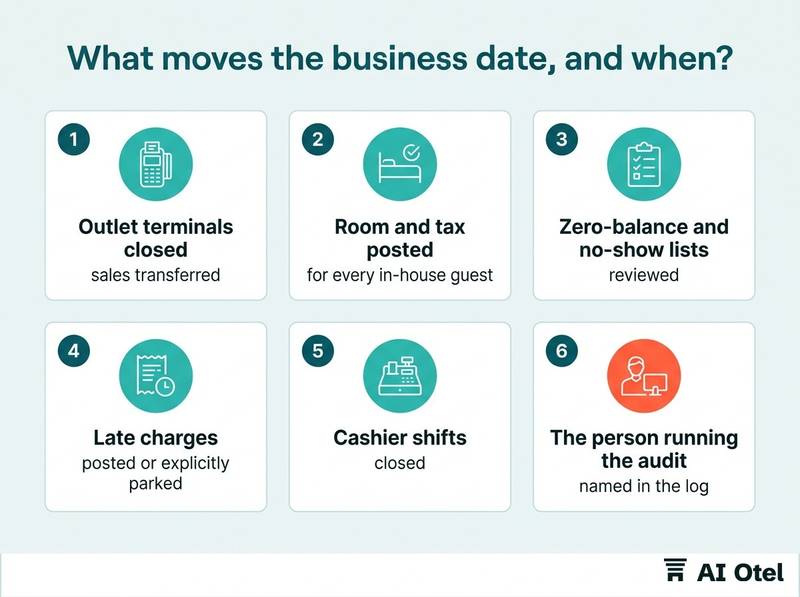
The order matters: room and tax posted, outlet sales closed and transferred, exception and zero-balance lists cleared, then the rollover. The audit start time is a policy choice. An early audit shrinks the window for late postings; a late one stretches it and pushes the rollover into the morning shift.
If the audit is skipped, two calendar days sit inside one business date and every report for that period is misleading until it is corrected. If the audit is run twice, the second rollover creates an empty business day, and postings made in between can end up on a date nobody expected. The rollover is also the moment the guest ledger, the in-house list and the day's revenue are frozen, so anything posted afterwards is a correction, not a sale.
Decide who is authorized to run the audit, who may run it a second time, and what that person must write down before doing it. A fuller sequence for the whole close is in our night audit checklist: closing the hotel business day in order (night audit checklist).
Before the rollover
Checklist
- All outlet terminals closed and their sales transferred
- Room and tax posted for every in-house guest
- Zero-balance and no-show lists reviewed
- Late charges from the previous window posted or explicitly parked
- Cashier shifts closed
- The person running the audit named in the log
- The audit start time compared with the documented policy
- A note made if the audit is running outside its usual hour
Where does the mismatch show up first?
In three places: a charge that lands a day late, a key card that stops working at the wrong hour, and two reports that will not reconcile.
A minibar or restaurant charge posted after the folio closed has nowhere to go on the closed day, so it becomes a correction, an allowance or a city-ledger entry on the next business date. A POS terminal that stamps its own calendar date can hand the PMS a sale dated today while the PMS is still working yesterday, and the outlet report and the revenue report then differ by exactly that sale.
Key cards are usually programmed to expire at a fixed checkout hour on the departure date, so a clock that is wrong makes the card die early or late. The accounting export is the last place the error appears and the most expensive to fix, because it has already left the building. The first symptom is often a guest at the desk with a receipt that does not match the bill, not a report at all. For the wider picture of how these systems hand data to each other, see the hotel technology stack: how the core systems fit together (technology stack).
Symptom, likely cause, first check
| Symptom | Likely cause | First check |
|---|---|---|
| A charge appears on the next day's revenue | Posted after the folio closed, or the terminal stamped a different date | The posting time and the business date at that moment |
| The outlet report and the revenue report differ by a small amount | A terminal is posting to its own calendar date | The terminal's clock and date against the server |
| A key card stops working before departure | The encoder or lock clock has drifted, or the expiry hour is fixed and early | The encoder clock and the card's programmed expiry |
| Two days of revenue look doubled, or one day looks empty | The audit ran twice or was skipped | The audit log for the rollover entries |
When two reports disagree, the reports themselves are usually the fastest diagnostic, as covered in night audit reports explained: trial balance, manager's flash and the exception lists (night audit reports).
How do you test it with three postings across midnight and the audit?
Put one posting before midnight, one after midnight but before the audit, and one after the audit, then follow each one to the folio, the report and the export.
Use a test room and a nominal, clearly labelled amount, for example a small charge marked as a test in the description, so nobody mistakes it for a real sale. Posting A at 23:50 should land on the business date that is open, and it should appear in that day's revenue. Posting B at 00:30, before the audit, should also land on the same business date, even though its calendar timestamp is the next day. Posting C after the rollover should land on the new business date, and it should not appear in the closed day's report at all.
Reverse all three and confirm the reversals land where you expect, because a reversal that crosses the audit is the case that most often goes wrong. Record the result with the date, the audit start time and the person who ran it, then repeat the test after any upgrade, terminal replacement, time zone change or new outlet.
What a pass looks like
Checklist
- Business date open at the start, recorded
- Posting A: time, amount, business date it landed on
- Posting B: time, amount, business date
- Audit start and end time
- Posting C: time, amount, business date
- The day's revenue report checked against all three
- The outlet report checked against the same
- The accounting export checked for the same dates
- All three reversed and the reversal dates confirmed
- Name of the person who ran the test and the date
Which clock does each system trust, and what breaks when it changes?
Each device keeps its own clock. Unless they all take the time from one source, they will drift apart, and a few minutes is enough to move a posting across midnight.
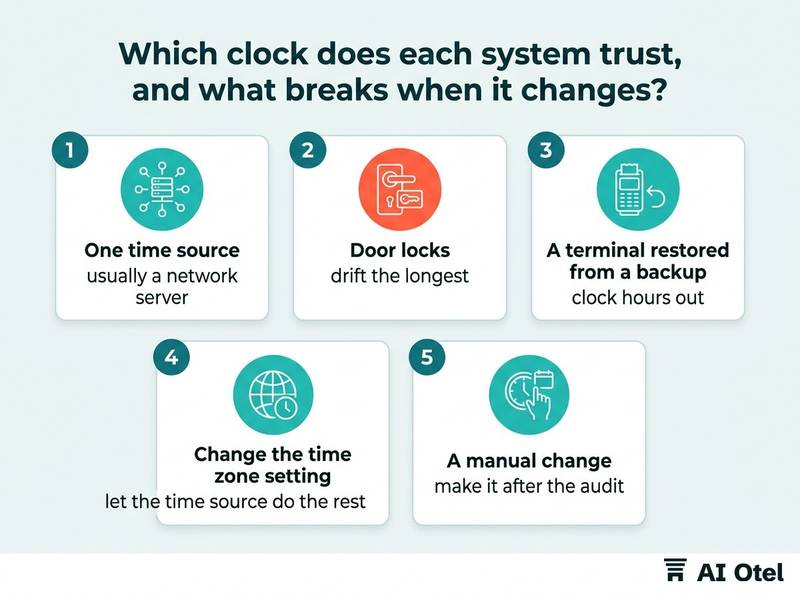
Name one time source inside the hotel, usually a network server, and point the PMS server, the POS terminals, the key encoder, the network equipment and any interface machine at it. Door locks often keep their own clock and are only corrected when someone visits them, so they drift the longest and are checked the least. A terminal that was set up by hand, or restored from a backup, can come back with a clock that is hours out and nobody notices until a charge lands on the wrong day.
Where an hour is skipped or repeated, two different moments can carry the same timestamp, and the order of postings becomes impossible to reconstruct from the log alone. The rule is to change the time zone setting and let the time source do the rest, never to nudge the hour by hand on individual devices. If a manual change cannot be avoided, make it after the audit, in a quiet hour, and write it in the log before anyone touches a clock.
Watch outNever correct a clock by hand during the trading day
A hand correction moves every posting made after it, can create a timestamp that never existed or repeat one that already did, and leaves the audit trail unable to explain the order of events. Change the time zone setting, restart the device so it takes the time from the source, and if the hour must move, do it after the rollover and record it.
What should go in the change log?
Every change to a clock, a time zone, an audit start time or a device, with who did it, when, why, and which test was rerun afterwards.
Record the system or device, the old value, the new value, the date and time of the change, the person and a ticket or reference number. Record changes to the audit start time and every manual or repeated rollover, because these move the business date without touching any clock. Record which test was rerun and what it showed, so the next person knows the change was verified and not just made.
Keep the log where front office and accounting can both read it, not in one team's inbox. The log is what lets you explain a discrepancy to the accountant weeks later, when the memory of the change is gone but the export still carries it.
Fields worth keeping
Checklist
- Date and time of the change
- System or device affected
- Old value
- New value
- Reason
- Person who made the change
- Ticket or reference
- Whether the audit was running at the time
- The three-posting test result after the change
- The date the next review is due
What to do next
Run the three-posting test once, on a quiet night, and write down what happened. That single record turns every later argument about a charge on the wrong day into a comparison against a known result, and it gives you the baseline you need before the next upgrade, terminal swap or clock change.
Frequently asked questions
Why did a minibar charge land on the next day's revenue?
The charge was posted after the guest folio closed or after the business day rolled, so it had no open day to land on. It becomes a correction or a city-ledger entry on the next business date. Check the posting time against the audit start time before assuming the system is wrong.
Can the PMS business date be ahead of the calendar date?
Yes. If the hotel runs the audit before midnight, for example to close an early function or to give the morning shift a clean start, the business date moves forward while the calendar date has not yet changed. It is legitimate as long as it is a documented policy and the same every night.
What time should night audit run?
There is no single correct hour. The trade-off is between giving late outlets time to close and getting the reports ready for the morning. Pick an hour, write it down, keep it stable, and record any night it runs outside that hour. A stable audit time is easier to test and easier to explain than an early one.
When two reports disagree, how do we find which system is wrong?
Compare the timestamps first, then the dates. If the amounts differ by exactly one posting, look at the terminal clock and the business date at the moment of posting. If a whole day looks doubled or empty, read the audit log for the rollover entries before touching any configuration.