When the property system is down: a front desk kit for check-in, billing and keys on paper
This guide details the hotel front desk downtime procedure, covering the printed kit, outage triggers, and paper-based check-in and billing. Learn how to record charges, manage keys, and reconcile data when the system fails.
Contents
Key takeaways
- An outage is declared by the duty manager, not the vendor: if the desk cannot see live availability, post a charge or complete a check-in, the hotel is on paper.
- The kit is only as good as its print time, because a stale arrivals list causes double assignments.
- Every paper line is signed by the person who took it, and every sheet is initialled again when it is typed back in.
- Charges go onto the paper sheet at the moment of sale, not at the end of the shift.
- Enter back in a fixed order: business date, stays, charges, payments, identity notifications, documents; never delete a wrong posting, void and reverse it.
A hotel front desk downtime procedure starts with a printed pack, refreshed every shift: arrivals, in-house and departure lists, room status, blank registration cards, a manual charge sheet and a key log. The duty manager declares the outage, the desk works on paper, and everything is typed back in a fixed order.
The screen freezes at 23:40 with a line at the desk and a guest holding a passport. The room list is on that screen, the rate is on that screen, and the key encoder is waiting for it. What happens in the next ten minutes depends entirely on preparation done weeks earlier. After reading this you will have the folder contents, the trigger for declaring an outage, and the order for entering everything back.
When is a system problem an outage, and who declares it?
An outage begins when the front desk can no longer trust the system's answer to three questions: which rooms are free, what the guest owes, and whether the check-in produced the records the hotel must keep. The duty manager on shift declares it, not the software vendor.
Apply the three tests in order. Can you see live availability? Can you post a charge to a room? Can you complete a check-in that produces the guest identity notification and the billing record? If any one fails, the desk moves to paper. Before declaring, separate a single workstation fault from a system fault: try a second terminal, then a second network path. One dead screen is a hardware problem; a dead desk is an outage.
Name the declarer and a deputy in the written procedure, usually the duty manager with the night manager as backup, and record the declaration as a time in the shift log, not a conversation in the corridor. The same person declares recovery, with a time, and the paper pack stays open until the reconciliation at the end is signed. This is one of the things the manager on duty rounds and the shift log exist to capture. Use two levels: degraded, where one function is missing and a workaround exists, and full paper mode, where the desk stops relying on the system at all.
Tell housekeeping, the restaurant and security at the same moment, because they are looking at the same dead screens and will otherwise keep sending charges to a system that cannot receive them. Write the trigger as a measurable test the hotel sets for itself, for example a check-in that cannot be completed within the time the front office manager considers acceptable at the desk.
Key pointThe three tests
1) Live availability visible. 2) A charge can be posted to a room. 3) A check-in produces the identity notification and the billing record. One failure means paper mode, and the duty manager records the time.
What goes in the downtime folder, and when do you print it?
The folder holds the lists and blank forms the desk needs when no screen works, and it is reprinted from the live system at the start of every shift, with the print time written on every page.
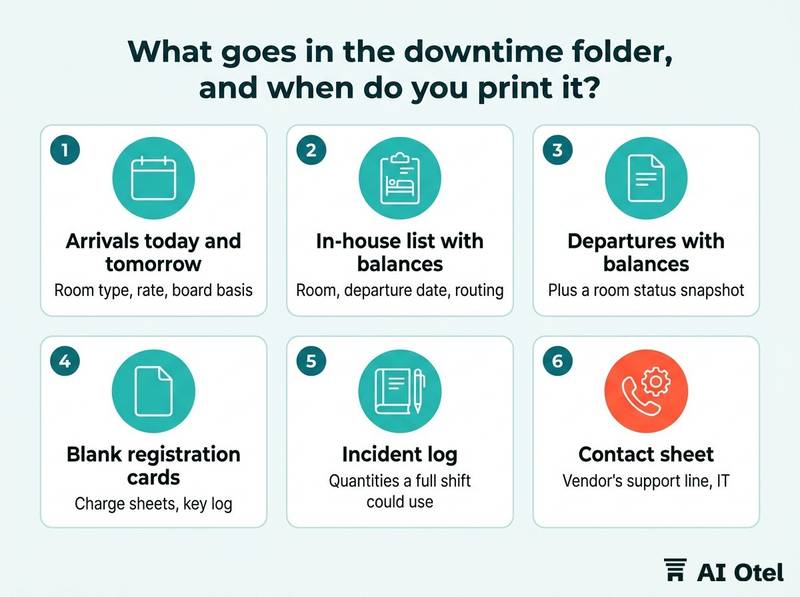
The arrivals lists cover today and tomorrow, with room type, rate, board basis, agency or company, payment status, and notes such as accessible room, late arrival or VIP. The in-house list shows room, departure date, balance and routing, so the desk knows who pays for what before it posts anything by hand. Departures come with balances, plus a room status snapshot showing occupied, vacant clean, vacant dirty and out of order.
Blank forms matter as much as the lists: registration cards, charge sheets, a key log and an incident log, in the quantities a full shift could use, not two copies. Add a contact sheet with the vendor's support line, IT, the general manager, housekeeping, security, the accountant, and the person authorized to approve a manual refund. Keep two physical copies in two places: the desk folder and a sealed envelope in the manager's office. A shared drive is not a copy, because it sits on the same network as the system that just failed. The folder contents pair naturally with the hotel IT inventory and network map.
The folder holds personal data, so it is kept locked, signed out when it leaves the desk, and shredded when it is replaced.
ChecklistFolder contents to tick off at each reprint
- Arrivals today and tomorrow
- In-house list with balances
- Departures with balances
- Room status snapshot
- Blank registration cards
- Blank charge sheets
- Key log
- Incident log
- Contact sheet
- The hotel's own room status word list
- Print time written on every page
How do you check a guest in on paper?
The paper registration card must capture the same facts the system would have captured, because it becomes the only source for everything typed in later.
Fill in the identity fields exactly as printed on the document: full name, nationality, document type and number, date of birth where the document shows it, and address. Add the stay fields and the money fields, and have the guest sign, the clerk print a name and sign, and a second person check the card against the document before the key is handed over. One card per guest where the hotel's procedure requires each guest's identity, not one card per room.
In Türkiye every stay involves a guest identity notification (KBS, the misafir kimlik bildirimi), so the card records the document details precisely, and the notification is prepared from the check-in flow for the person the hotel's written procedure names to send through the hotel's own KBS connection. Room assignment is done by one person holding the room status sheet, who writes the room number on the card and marks the sheet, so two clerks cannot give away the same room.
| Field group | What to write | Why it matters later |
|---|---|---|
| Identity | Name, nationality, document type and number, date of birth, address | Feeds the identity notification on return |
| Stay | Dates, room, rate, board, adults and children, agency, confirmation number | Rebuilds the stay exactly as sold |
| Money | Method, amount, currency, taken now or on departure, slip number | Matches the payment to the terminal report |
| Data protection notice | That the guest received it, as the procedure requires | Shows the guest received the notice |
| Signatures | Guest, clerk, second checker | Proves who recorded and checked what |
How do you record charges and payments while the system is down?
Money is recorded on a manual charge sheet in time order, one sheet per room, and every line is signed by the person who took it at the moment of sale.
Charge sheet columns: date and time, room, guest name, description, quantity, unit price, amount, currency, staff initials, and the guest's signature for the charge. Post at the moment of sale, not at the end of the shift, because memory is the weakest record in the building. Outlets keep their own numbered guest checks, write the room number on each one, and send the copies back to the desk with the shift handover.
Card payments often still work, because the terminal usually runs on a different line from the hotel system; print the terminal's end-of-day report and keep it with the charge sheet. Cash is counted by two people at every handover, and the count is written on the sheet and initialled by both. Record the currency as charged; conversion happens once, at posting, by the rule the hotel's accountant sets.
No invoice or e-document can be issued from a dead system: record the guest's request, tell the guest when the document will be sent within the legal period, and let the accountant decide how it is issued. If neither the sheet nor the terminal can record a payment, stop taking money and call the duty manager.
ChecklistRules for the manual charge sheet
- One sheet per room, lines in time order
- Posted at the moment of sale
- Guest signature on charge lines
- Outlet guest checks attached
- Terminal end-of-day report attached
- Cash counted by two people at handover
- Currency recorded as charged
- Every sheet initialled by the clerk and by the person who types it back in
How do you handle keys and room status without the system?
Room status moves to a printed board that housekeeping marks as rooms are cleaned and inspected, and keys are issued against the paper registration card with every handover written into a key log.
The desk assigns a room only when the board shows it clean and inspected, and marks the assignment on the same sheet, so the board and the cards always agree. Use the hotel's own status words and print that list into the folder, because status codes are common practice and differ between hotels and systems. Mark departures on the board at check-out so housekeeping can start cleaning without waiting for the system. Out-of-order rooms stay out of order; an outage is not the moment to sell a room with a fault.
Ask the door lock vendor in advance what the locks do when the network is down: existing cards usually keep working, but new cards cannot be encoded, and that answer decides the fallback. Keep a mechanical master key set with the duty manager, sealed and signed out, for the rooms that cannot be opened otherwise. The key log records room, key or card number, time out, time in, guest name and staff initials. Never issue a key to someone who cannot show the registration card or a document matching the name on it, however convincing the story.
TipAsk the lock vendor one question before you need it
With the network down, do existing cards still open their rooms, and can the encoder make new cards offline? Write the answer into the procedure next to the location of the sealed master key set.
How do you enter everything back when the system returns?
Enter in a fixed order, business date first and documents last, with one person typing and a second ticking the paper, and reconcile the totals before the pack is closed.
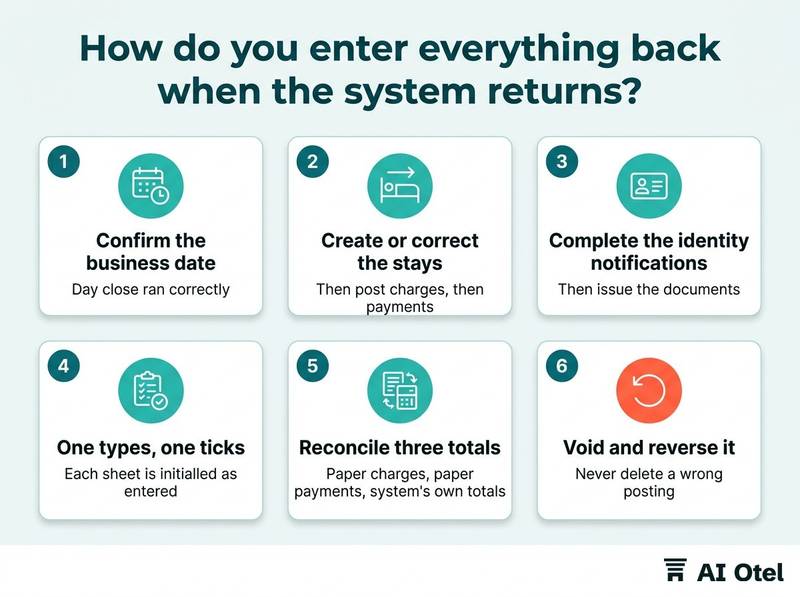
The order is fixed: confirm the business date and that the day close ran correctly, then create or correct the stays, then post charges, then payments, then complete the identity notifications, then issue the documents. Two people work as a pair: one types, one ticks the paper line by line, and each sheet is initialled as entered so a missed line can be found later.
Reconcile three totals before the pack is closed: paper charges, paper payments and the system's own totals. A difference is investigated, not written off. Never delete a wrong posting: void and reverse it, so the record shows what happened and who corrected it. Match the card terminal report against the system's payments, because the terminal is the authority on what was actually collected. Log the outage with start and end times, attach the paper pack, and keep it for the retention period the hotel's procedure sets. Tell guests with open balances what their bill now shows before they leave the desk.
This is also where what a hotel backup should contain and how to test it pays off, and where a single record helps: the hotel operating system (AI Otel PMS) keeps reservations, front desk, housekeeping, billing, restaurant sales, reports and compliance in one place, and is built and working, ahead of launch, designed so that reconciliation runs against one record instead of several. You can read more about the hotel operating system on our platform pages.
Watch outThe first hour back is where the errors are made
Do not type fast to clear the queue, do not overwrite a stay to make it match the paper, and do not delete a posting that looks wrong: void it, reverse it, and write on the paper sheet who corrected what and when.
How do you test the kit before you need it?
Run the kit once a season on a quiet shift, working only from paper for a small set of arrivals, and fix what breaks while the cost of breaking is still zero.
Choose a low-occupancy window and a fixed length; two hours is enough, with a handful of arrivals and one departure. Print the pack from the live system first, then stop using the screens for the drill, so the paper is genuinely the only source. Test the three weak points: assigning a room without availability, posting a charge from the restaurant, and making one key.
Time a paper check-in against a normal one; that ratio tells the front office manager how many staff a real outage needs at the desk. Afterwards list what failed: a missing field, an illegible form, an old phone number on the contact sheet, a form nobody could find in the folder. Give every fix an owner and a date, and record the drill in the shift log with what changed, alongside what the manager on duty records in the log. Repeat after staff changes and after any change to the system or the forms, because a kit that was right last year may describe a hotel that no longer exists.
What to do next
Print the pack today, write the print time on every page, and put the first drill in the calendar with a named owner. The kit, the trigger and the order of entry are three parts of one habit: the desk decides early, records on paper at the moment it happens, and types back in a sequence it can prove. If you want to see how a single-record system changes the recovery hour, you can request a briefing.
Frequently asked questions
How long can the printed arrivals list be used?
It ages from the moment it prints. Refresh it at the start of every shift and check the print time before use, because a list from yesterday invites a double assignment and a wrong rate. If the system has been down for hours, reprint nothing and instead mark every change on the sheet with initials and time.
Do we still have to send the guest identity notification during an outage?
Yes. In Türkiye every stay involves a guest identity notification (KBS), and it is a duty of the lodging facility, not of the software. On paper the desk records the document details exactly as printed, and the notification is completed through the system when it returns, by the person the hotel's written procedure names and with a second person checking the list.
Can the front desk issue an invoice while the system is down?
Not from a system that is not working. Record the guest's request with contact details, tell the guest when the document will be sent within the legal period, and let the accountant decide how it is issued. Keep the request on the same paper pack as the charge sheet so nothing is lost between the desk and the back office.
What should the desk do about card payments during an outage?
Try the terminal first, because it usually runs on a separate line and may still work. If it does, print the end-of-day report and attach it to the paper charge sheet, and match the two when the system returns. If the terminal is also down, stop taking card payments and call the duty manager rather than writing an amount on trust.